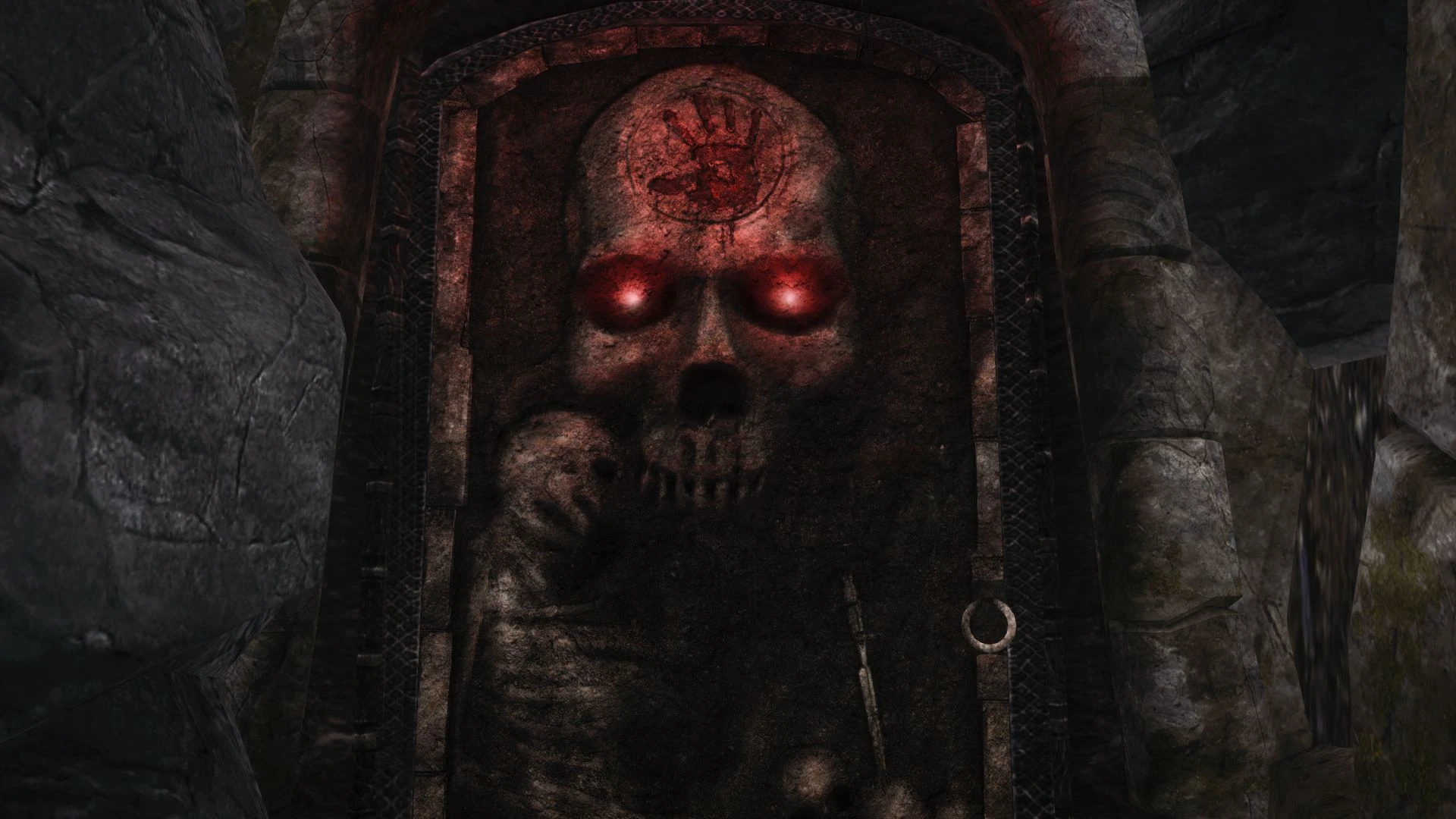
HD Dark brotherhood door
⚪ Last updated 2014⚠️ Install Order · 3 steps
Install in this order, then this mod last — most mods fail to load without their framework and dependencies in place.
Preview
🔍 Analysis
- 👍 1.8% endorsement rate — high engagement, a strong quality signal
- 🏆 #123 of 453 Models and Textures mods in this game by downloads
📋 About This Mod
Hello, first of all i'm french so sorry if my english sucks !
Description :
In my opinion the texture of the darkbrotherhood door look so ugly, unfortunately i didn't find any retexture of it and for me it was a real problem to think every time i go in the sanctuary "Oh my god, this look sooo ugly !" So i did a "small" 2048x2048 retexture of the door with glowing eyes !
Here is a before and after :
Installation :
Just put the ".dds" file into your textures -> clutter folder. If you don't have these folders just create them ;)
Compatibility :
Everything !
Check my imperial sword retexture : http://www.nexusmods.com/skyrim/mods/52914/?
A compact HD retexture for the Dark Brotherhood door in Skyrim, replacing the default texture with a higher-resolution version. With over 6,600 endorsements and 361k downloads, it's a popular, lightweight visual upgrade for players who want a sharper door without changing other aspects. Last updated in 2014, it remains a simple drop-in texture mod.
✨ Key Features
📊 Pros & Cons
✅ Pros
- Massive community trust (6,639 endorsements) — this is one of those texture mods everyone seems to have.
- Zero hassle install: just drop the texture files into your Data folder, no plugin needed.
- Lightweight and performance-friendly — it's just a door texture, so no FPS hit.
⚠️ Cons
- Only affects the door — if you're looking for a full Dark Brotherhood overhaul, this won't touch the sanctuary or armor.
- Last updated in 2014 — might not be optimized for the latest Skyrim versions, though texture mods usually age fine.
- No preview images or detailed description — you're trusting the endorsements over seeing the result first.
For Skyrim players who want a sharper Dark Brotherhood door without any gameplay changes. If you're a texture enthusiast who appreciates small, focused improvements, this is a quick win. Skip if you want a comprehensive visual overhaul of the faction.
💡 Beginner Tips
- Since it's a texture-only mod, you can install it manually by extracting the files into your Skyrim Data folder — no mod manager needed.
- If you use a mod manager like Vortex or MO2, just drag and drop the archive; it will handle the file placement automatically.
- This mod doesn't require a new game — it works on existing saves, so you can add it anytime.
📊 Mod Details
- Game
- Skyrim LE Mods
- Author
- KinderBueno
- Version
- 1.0
- Downloads
- 361,202
- Endorsements
- 6,639
- Category
- Models and Textures
- Created
- 4/16/2014
- Updated
- 4/16/2014
🔧 How to Install Skyrim LE Mods
Download from Nexus.
📖 Full step-by-step install guide for Skyrim LE →
Visit the official mod page for specific installation instructions for this mod.
🎮 Need cheat codes or console commands? Check ur gaming wiki for Skyrim LE commands, item IDs, and more.
Keep browsing — more Skyrim LE mods await