FXAA Post Process Injector
⚪ Last updated 2011⚠️ Install Order · 3 steps
Install in this order, then this mod last — most mods fail to load without their framework and dependencies in place.
Preview
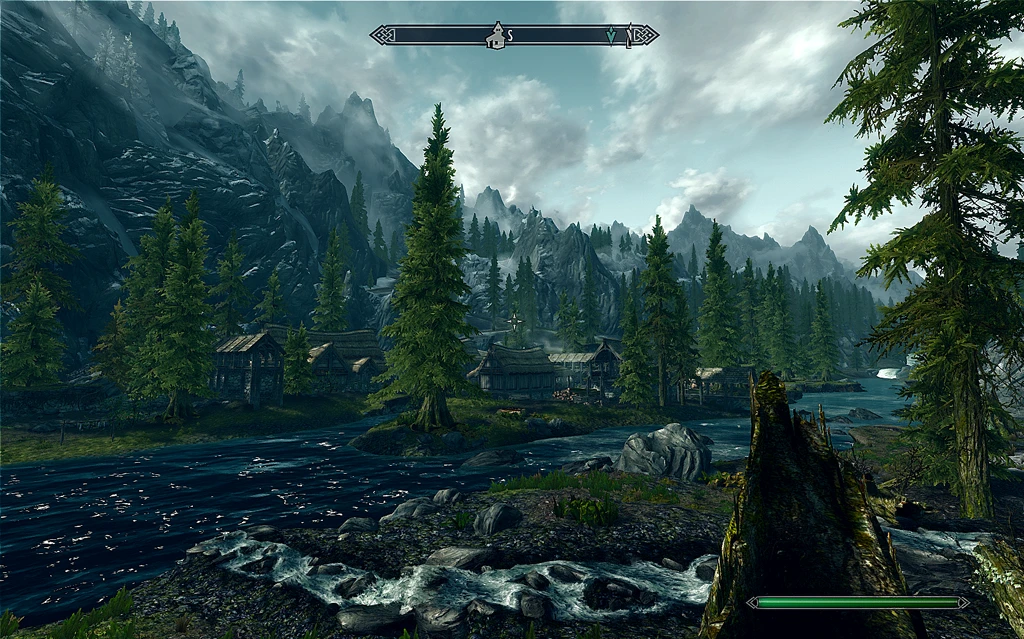
🔍 Analysis
- 👍 2.3% endorsement rate — high engagement, a strong quality signal
- 🏆 #16 of 94 Visuals and Graphics mods in this game by downloads
📋 About This Mod
Enhance your graphics with FXAA and a variety of post processing effects, including bloom, sharpen, technicolor, sepia, tonemap, vignette, and more.
------------------------------------------------------------------------------------------------------------------------------------------------------------------------------------
Important: Make sure you have the latest DirectX runtime installed. Otherwise you may crash on launch.
NdTclXw6Br4
To change mod settings, open FXAA Tool from your desktop or start menu and adjust sliders.
Automatic: Run the installer. Make sure you double check which directory it is extracting to. It should extract to Skyrim's main directory with the game executable (TESV.exe). Run FXAA_Tool.exe to change settings.
Manual:
Extract the contents from one of the folders into your main Skyrim directory w/ the game executable. Usually:
C:Program FilesSteamsteamappscommonskyrim
OR
C:Program Files (x86)Steamsteamappscommonskyrim
------------------------------------------------------------------------------------------------------------------------------------------------------------------------------------
1. 3 & 1. 2 Open injFX_Settings.h and adjust the values.
You do not need to restart your game every time you want to change a setting. Results can be seen by alt tabbing or minimizing/maximizing the game. (Full screen only)
PAUSE Key : Enable/Disable Effects In-Game
- -----------------------------------------------------------------------------------------------------------------------------------------------------------------------------------
- UNINSTALLATION------------------------------------------------------------------------------------------------------------------------------------------------------------------
FXAA Post Process Injector is a lightweight graphics enhancement mod that adds FXAA anti-aliasing and post-processing effects. It offers high customizability with minimal performance impact, making it a popular choice for improving visuals without heavy system requirements.
✨ Key Features
📊 Pros & Cons
✅ Pros
- Huge community trust with 23,512 endorsements and over a million downloads.
- Lightweight on performance, so you can keep your FPS while looking better.
- Customization options let you tweak the look to your exact taste.
⚠️ Cons
- Last updated in 2011, so it may not work with modern game versions or newer graphics APIs.
- No detailed documentation or install guide provided, so you might have to figure things out yourself.
- The mod is old and may lack support for newer post-processing techniques.
For gamers who want a simple, performance-friendly way to improve visuals without upgrading hardware. Also for modders who enjoy tweaking settings to get the perfect look. Skip if you need modern features or compatibility with recent games.
💡 Beginner Tips
- Since it's an injector, make sure to run it as administrator if you encounter issues.
- Start with default settings and adjust one slider at a time to see what each does.
- Check if your game uses DirectX 9, 10, or 11, as the injector may need specific versions.
📊 Mod Details
- Game
- Skyrim LE Mods
- Author
- Retspadez
- Version
- 2.1
- Downloads
- 1,002,445
- Endorsements
- 23,512
- Category
- Visuals and Graphics
- Created
- 11/13/2011
- Updated
- 12/19/2011
🔗 Required By 5 Mods
These mods list this mod as a dependency.
🔧 How to Install Skyrim LE Mods
Download from Nexus.
📖 Full step-by-step install guide for Skyrim LE →
Visit the official mod page for specific installation instructions for this mod.
🎮 Need cheat codes or console commands? Check ur gaming wiki for Skyrim LE commands, item IDs, and more.
Keep browsing — more Skyrim LE mods await