FileAccess Interface for Skyrim Script - FISS
⚪ Last updated 2014⚠️ Install Order · 3 steps
Install in this order, then this mod last — most mods fail to load without their framework and dependencies in place.
Preview
🔍 Analysis
- 👍 3.8% endorsement rate — high engagement, a strong quality signal
- 🏆 #5 of 26 Modders Resources and Tutorials mods in this game by downloads
📋 About This Mod
~~~ FileAccess Interface for Skyrim Scripts ~~~ -- FISS --
OVERVIEW FISS is an easy to use interface for modders to save&reload in-game variables to/from file.
This could be useful in various scenarios. For example, more and more mods offer extensive MCM settings which have to be reset from scratch whenever you start a new game. FISS allows modders to provide the possibility to create user defined presets which can be saved, reloaded or shared.
Here's a list of mods currently using FISS Take Notes - Journal of the Dragonborn MinimalHUD Spellmaking in Skyrim - The last altar Dynamic Potions - Poisons - Ingredients - Food(Source Code included) Dynamic Magicka and Stamina Growth A Matter of Time - A HUD clock widget Enchanted Arsenal Widget Mod Living takes time Timing is everything (source included) Awakened Magicka
HOW TO USE(Players) 1. Download and install FISS (Extract to folder “Skyrim/Data/” 2. Activate FISS.esp in your load order 3. Place any FISS supporting mod after that
HOW TO USE(Modders)
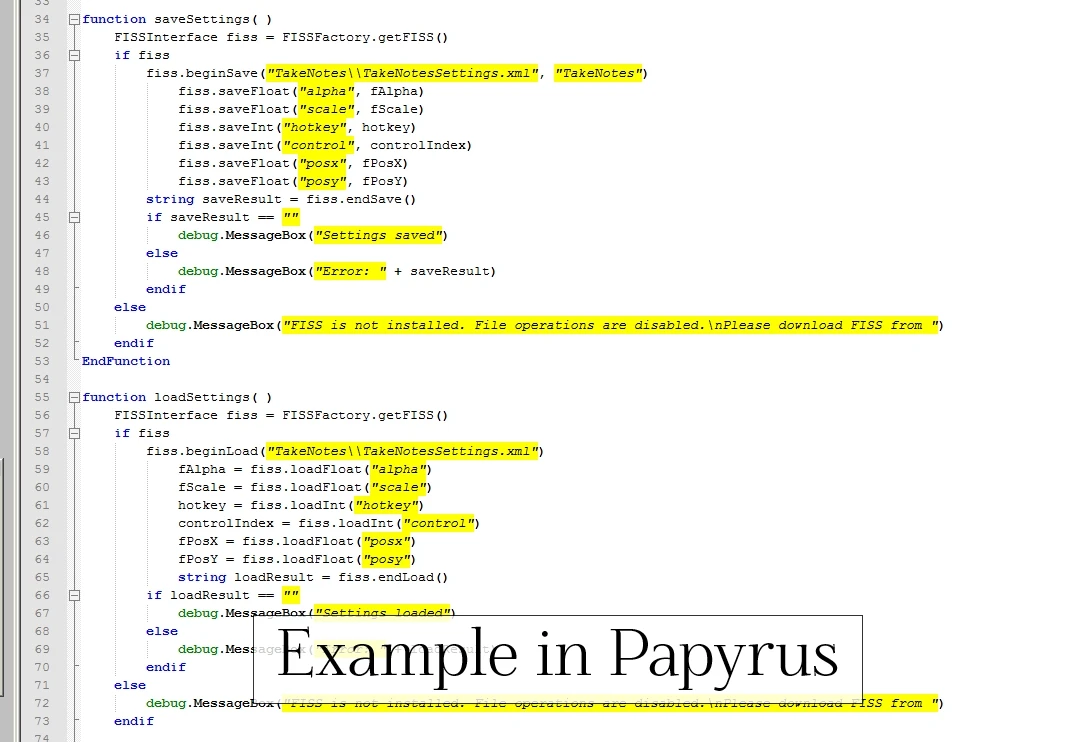
1. Download and install FISS (Extract to folder “Skyrim/Data/” 2. Activate FISS.esp in your load order 3. Use FISS in your scripts (see API and example below) 4. When releasing your mod, include the following files in your bsa(or as loose files) - FISSFactory.pex - FISSInterface.pex Do not include any other fiss files.
REQUIREMENTS FISS requires SKSE 1. 6. 16 or higher.
- -- Where are the created files located? --
- All files are stored in “/Sykrim/Data/SKSE/Plugins/FISS/” (or if you use ModOrganizer in “ModOrganizer/overwrite/SKSE/Plugins/FISS”)
- You can create your own subfolders though: e.g. fiss.beginSave(“MySubfolderMyFile.xml”)
- Global filenames (e.g. “c:myfoldermyfile.xml”) will NOT work.
- If you create your own subfolder, make sure to ship that folder-structure with your mod, cause - depending on the specific game setup - FISS might not have the rights to create that folder by itself.
- -- Do I have to release different versions of my mod for people that do/do not have FISS? --
- No. Just do a simple check to see i
FISS is a modder's resource that provides an easy-to-use interface for saving and reloading in-game variables, such as MCM settings, to and from files. It has 36,124 endorsements and nearly a million downloads, indicating strong community adoption. Last updated in 2014, it remains a staple for Skyrim modding.
✨ Key Features
📊 Pros & Cons
✅ Pros
- Massive community trust: 36,124 endorsements and nearly a million downloads show this is a go-to resource.
- Solves a real problem: lets modders persist MCM settings without hassle.
- Lightweight and focused—does one thing and does it well.
⚠️ Cons
- Last updated in 2014—may have compatibility issues with newer Skyrim versions or modding tools.
- Requires modder integration; not a plug-and-play mod for regular players.
- No detailed documentation or examples provided in the description, so modders may need to dig for usage info.
For Skyrim modders who want to add save/load functionality for their mod's settings. Perfect for MCM-heavy mods. Skip if you're a player looking for gameplay changes—this is a backend tool.
💡 Beginner Tips
- If you're a modder, check the FISS page on the Nexus forums for community-made examples and tutorials.
- Make sure your mod properly references FISS as a master file in the Creation Kit.
- For players, you don't need to install this unless a mod explicitly requires it—most mods bundle it or list it as a dependency.
📊 Mod Details
- Game
- Skyrim LE Mods
- Author
- Lord Conti
- Version
- 1.21
- Downloads
- 949,017
- Endorsements
- 36,124
- Category
- Modders Resources and Tutorials
- Created
- 11/28/2013
- Updated
- 2/12/2014
🔧 How to Install Skyrim LE Mods
Download from Nexus.
📖 Full step-by-step install guide for Skyrim LE →
Visit the official mod page for specific installation instructions for this mod.
🎮 Need cheat codes or console commands? Check ur gaming wiki for Skyrim LE commands, item IDs, and more.
Keep browsing — more Skyrim LE mods await