FavBar - Categorized Favorites Menu custom config
⚪ Last updated 2012⚠️ Install Order · 4 steps
Install in this order, then this mod last — most mods fail to load without their framework and dependencies in place.
Preview
🔍 Analysis
- 👍 4.0% endorsement rate — high engagement, a strong quality signal
- 🏆 #53 of 65 User Interface mods in this game by downloads
📋 About This Mod
- -----------------------------------------------------------------------------------------------------------------------
- NOT A STANDALONE MOD. This is an edited config file of Categorized Favorites Menu
- by Favmenumodder. Please install v1. 6 before installing this mod.
- http://skyrimnexus.com/downloads/file.php?id=4862
- -----------------------------------------------------------------------------------------------------------------------
- ####################################################################
- Update 0. 3 - Tytanis Compatibility
- Added all spells/shouts, most items (the ones that will end up being favorited)
- If there\'s anything else useful that\'s being mis-sorted, please comment.
- Coming Soon: JaySuS alternate sword names being added
- 1/8 Found several mis-sorted items such as Frostbite Venom. Will update with a fix soon
- ####################################################################
- --------------------------------------------------------------------------------------------------------------------
- Works WITH or WITHOUT Headbomb\'s Better Sorting (comment if there is a problem)
- --------------------------------------------------------------------------------------------------------------------
- Categorized Favorites Menu takes the small vanilla menu and expands it into multiple
- configurable lists, and since it\'s so easy to configure it\'s definitely worth messing around with to
- find out how you like it positioned, how the lists work, etc.
- This is just my version that I am uploading by request from the Custom Configurations thread.
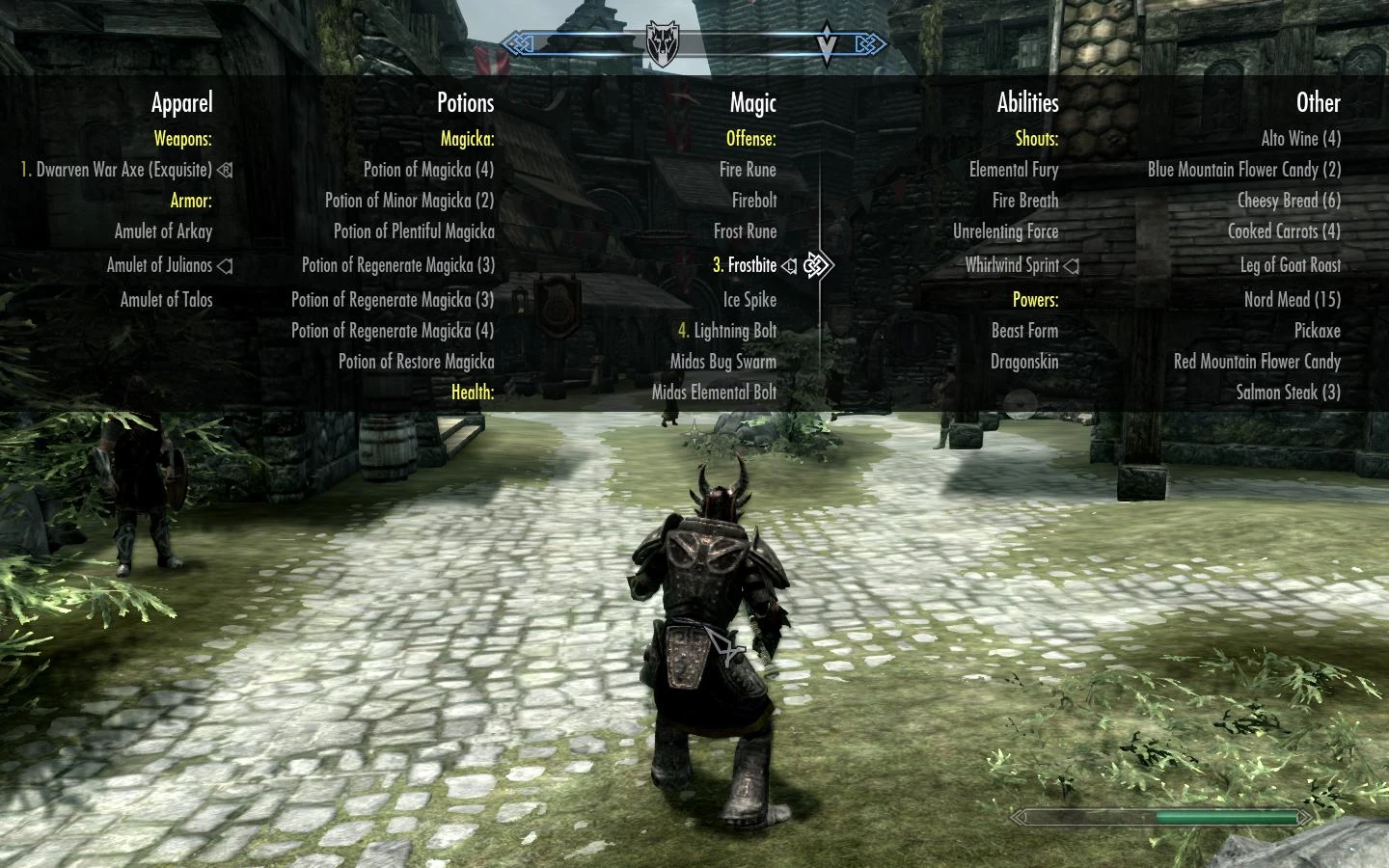
- FavBar changes the standard position, categories, and columns of the default CFM so it takes up
- less screenspace while still having room to quickly find everything you need. The addition of
- sublists in version 1. 6 of CFM made this even better. It\'s been moved to the top so you can still
- see your hands/what you have currently equipped.
- One cosmetic difference I\'m going to try and figure out is how to fade out the lists at the top
- and bottom similar to the vanilla list, it might blend better. This will be optional if I do figure it out.
- The current version SHOULD be fully compatible with Headbomb\'s Better Sorting, and Tytanis.
- I\'m currently in the works of updating this to be compatible with 3E Weapons, Midas Magic,
- Deadly Dragons, etc.
- PLEASE READ THE README!
- Update for Better Sorting also included many other unique items such as masks that are now
- sorted properly. Only comment if things are rediculously awry and I will try to fix it.
- Please Endorse and/or Comment with your thoughts! :]
- ------------------------------
- INSTALL
- Make sure you have version 1. 6 of Categorized Favorites Menu installed.
- Copy and replace \"favoritesmenu.cfg\" file from the RAR into your
- Skyrim/Data/Interface folder.
- It should ask you to overwrite a file, click yes.
- Comment if there are problems with this
- CHANGELOG
- VER 0. 3 - Tytanis compatibility added
FavBar is a UI mod for Skyrim that splits the Favorites menu into 5 categories and displays them as a bar across the screen, below the compass and above the crosshair. It requires Categorized Favorites Menu and is updated for Better Sorting and Tytanis. With 84 endorsements and last updated in 2012, it's a niche but functional enhancement for players who want quicker access to items.
✨ Key Features
📊 Pros & Cons
✅ Pros
- Streamlines inventory access with a visible bar, cutting down menu navigation.
- Community-tested with 84 endorsements and over 2,000 downloads.
- Compatibility updates for popular mods like Better Sorting and Tytanis show active maintenance.
⚠️ Cons
- Last updated in 2012 — likely outdated for current Skyrim versions and may conflict with newer UI mods.
- Requires Categorized Favorites Menu as a dependency, adding setup complexity.
For Skyrim players who frequently use the Favorites menu and want a more visual, categorized layout. Ideal for those already using Categorized Favorites Menu and looking to enhance it. Skip if you prefer minimal UI changes or play with a controller, as the bar may not suit all playstyles.
💡 Beginner Tips
- Ensure you have Categorized Favorites Menu installed first, as FavBar won't work without it.
- Use a mod manager like Nexus Mod Manager to handle file placement and avoid overwriting other UI mods.
- Check your load order to place FavBar after Categorized Favorites Menu and any sorting mods like Better Sorting.
📊 Mod Details
- Game
- Skyrim LE Mods
- Author
- Pickel5857
- Version
- v0.3
- Downloads
- 2,082
- Endorsements
- 84
- Category
- User Interface
- Created
- 1/6/2012
- Updated
- 1/7/2012
🔧 How to Install Skyrim LE Mods
Download from Nexus.
📖 Full step-by-step install guide for Skyrim LE →
Visit the official mod page for specific installation instructions for this mod.
🎮 Need cheat codes or console commands? Check ur gaming wiki for Skyrim LE commands, item IDs, and more.
Keep browsing — more Skyrim LE mods await