EzEs -Colored Map Markers-
⚪ Last updated 2013⚠️ Install Order · 3 steps
Install in this order, then this mod last — most mods fail to load without their framework and dependencies in place.
Preview
🔍 Analysis
- 👍 4.7% endorsement rate — high engagement, a strong quality signal
- 🏆 #47 of 76 User Interface mods in this game by downloads
📋 About This Mod
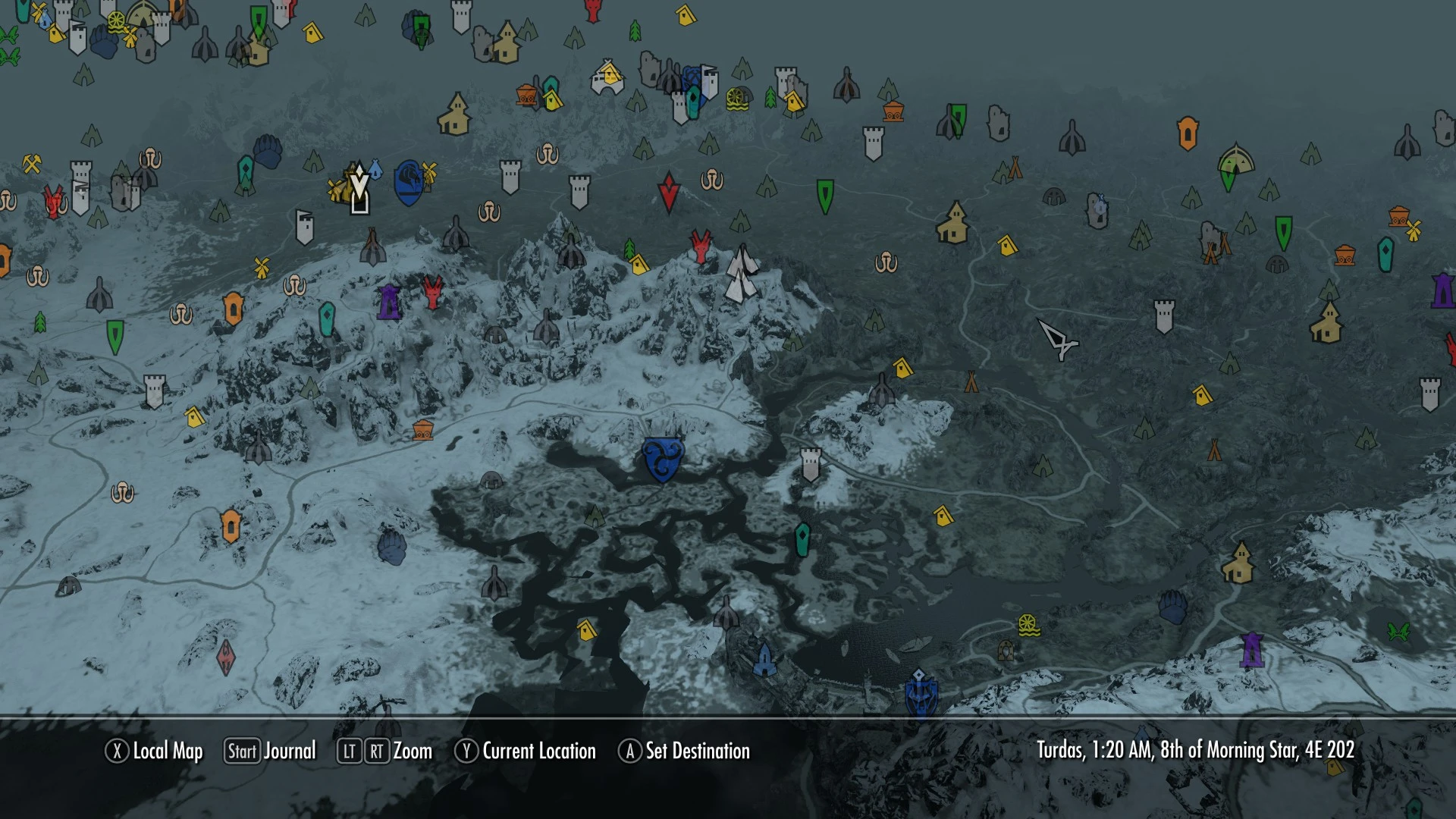
Colors your map markers!
Please read BEFORE asking a question about an issue or problem.
- Compatible with Skyrim 1. 8 and up -
- Skyrim v1. 7 will have the new markers replace your quest waypoints and your player marker -
TarKBvrCD6M
Updates: 7. 1 - New installer. Now contains all variations for this mod. - all old versions have been uploaded as a zip file for manual extraction. 7. 0 - fixed the compass - updated all files - Only a few will be updated from now on. 12 was a little much.
Regarding alternate color schemes: I've made variations for everyone to pick from, from the installation menu, you can somewhat pick and choose which colors you want to have. Pictures are available for each one there.
If you have a compatibility issue with SkyUI: A compatibility file is available through the installer. Pick the SkyUI version you want instead of the default ones. - For SkyUI (3. 3) tick the "map menu" under file checking. (this removes error)
Optional Files: - The 'Minecart file' changes the normal mine markers to a minecart. This does not affect the color of the markers. That is changed by each individual color scheme
Notes This file shouldn't interfere with most map mods. Only mods that edit "map.swf" in the [...\skyrim\data\interface] folder, and "hudmenu.gfx" in the [...\skyrim\data\interface\exported] folder will be affected. If that's the case, just install those mods first - then install this mod second and overwrite any files.
===================================================================== Install notes: Click Here
Install notes (if other than NMM): - Download the file and extract to the files to your data folder. - "map.swf" goes in the [...\skyrim\data\interface] folder. - "hudmenu.gfx" goes in the [...\skyrim\data\interface\exported] folder. =====================================================================
Troubleshooting: If your compass disappears, or you are having trouble with the heads-up display, delete 'hudmenu.gfx' from your exported folder in the data folder. located in - [...\skyrim\data\interface\exported]
If your markers disappear, delete 'map.swf' from your interface folder in the data folder. located in - [...&
EzEs -Colored Map Markers- is a lightweight UI mod for Skyrim that recolors map markers for better visibility. It's compatible with Skyrim 1.8+ and SkyUI, ensuring waypoint markers remain visible. With nearly 7,000 endorsements and 148k downloads, it's a popular quality-of-life enhancement for players who want clearer map navigation.
✨ Key Features
📊 Pros & Cons
✅ Pros
- Community favorite with 6,933 endorsements and 148,680 downloads.
- Works with SkyUI, so it fits right into your existing mod setup.
- Lightweight and focused—does exactly what it says without bloat.
⚠️ Cons
- Last updated in 2013—might not be tested with the latest Skyrim Special Edition or Anniversary Edition.
- Only recolors markers; if you want custom icons or more map overhauls, this won't cover that.
For Skyrim players who want a quick, no-fuss way to make map markers stand out, especially if you use SkyUI. If you're a completionist who spends hours staring at the map, this is a nice quality-of-life touch. Skip if you're looking for a full map overhaul or custom icons—this is purely a color tweak.
💡 Beginner Tips
- Since this mod is just a texture/UI file, you can install it manually by dropping the contents into your Skyrim Data folder—no mod manager needed.
- If you're using SkyUI, make sure to load this mod after SkyUI in your load order to ensure compatibility.
- For Skyrim Special Edition, you may need to convert the mod or use a mod manager that handles oldrim files—check the mod page for any updates.
📊 Mod Details
- Game
- Skyrim LE Mods
- Author
- xEightballx
- Version
- 7.1
- Downloads
- 148,680
- Endorsements
- 6,933
- Category
- User Interface
- Created
- 11/7/2012
- Updated
- 3/14/2013
🔧 How to Install Skyrim LE Mods
Download from Nexus.
📖 Full step-by-step install guide for Skyrim LE →
Visit the official mod page for specific installation instructions for this mod.
🎮 Need cheat codes or console commands? Check ur gaming wiki for Skyrim LE commands, item IDs, and more.
Keep browsing — more Skyrim LE mods await