Extended UI
⚪ Last updated 2015⚠️ Install Order · 4 steps
Install in this order, then this mod last — most mods fail to load without their framework and dependencies in place.
Preview
🔍 Analysis
- 👍 1.9% endorsement rate — high engagement, a strong quality signal
- 🏆 #10 of 76 User Interface mods in this game by downloads
📋 About This Mod
- -Description--
- Extended UI is a project that attempts to fix parts of the user interface. At the moment the intent is for Extended UI to be a complementary mod to SkyUI rather than to replace parts of SkyUI.
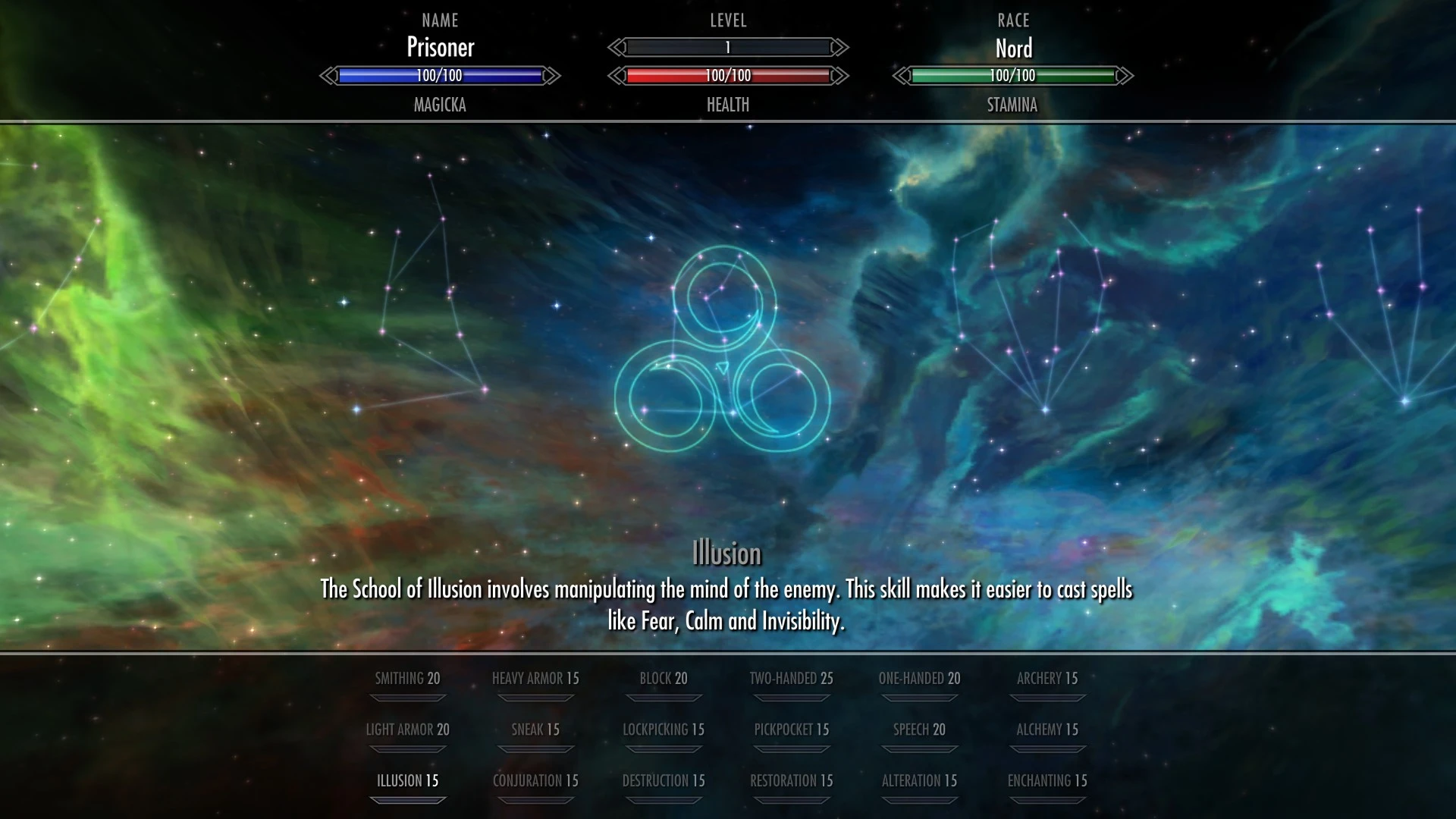
Menus that this mod currently affects: -Skills menu- - The name and progress of every skill can be seen when browsing skills. The selected skill is highlighted. - Superfluous UI elements slide out of the way when switching to browsing perks. - More perk names are visible at the same time. - Support for longer skill and perk descriptions. - Ability to hide UI elements related to Legendary skills. - Show (de)buffs to attributes and skills as base value +/- modifier instead of the default tinted text. - Ability to adjust the placement of skill markers at the bottom of the screen according to the aspect ratio (4:5, 5:4, 16:9, 16:10).
- Sleep/wait menu-
- - Adjustable maximum sleeping/waiting value (2-999 hours).
- Console-
- - The name and FormID is shown for the cell that the player is currently in.
- - A few new commands:
- "exui_help" - Display information about the other new commands.
- "exui_fullscreen" - Makes the console fill the entire screen and show more information at once.
- "exui_log: MESSAGE" - Prints MESSAGE in the Papyrus log.
- "exui_sendmodevent: EVENTNAME, STRINGARG, NUMARG" - Send an SKSE mod event (EVENTNAME) with up to two parameters (STRINGARG, NUMARG).
- "exui_getcrosshairref" - Returns the name, ReferenceID, and FormID of the reference that is currently in the crosshairs of the player.
- "exui_loadmenu: FILENAME" - Opens up/closes the menu in FILENAME.swf in the "\Skyrim\Data\Interface" folder.
- -Requirements--
- Skyrim (>= 1. 9. 32. 0. 8)
- SKSE (>= 1. 7. 1)
- SkyUI (>= 4. 1)
- -Compatibility--
- Mods that edit the following files are, or may be, incompatible with Extended UI:
- statsmenu.swf
- console.swf
- sleepwaitmenu.swf
- -How to install--
- 1. Extract all files to "\Skyrim\Data" or install with your favorite mod manager.
- 2. Activate Extended UI.esp.
- -How to uninstall--
- Uninstalling this mod in the middle of a playthrough is not officially supported. Once the files have been removed, then you should either start a new game
- or revert to a save that has not seen this mod.
- Remove the following files:
- "\Skyrim\Data\Extended UI.esp"
- "\Skyrim\Data\Exte
Extended UI is a UI overhaul mod for Skyrim that fixes parts of the user interface, designed to complement SkyUI rather than replace it. With over 31,000 endorsements and 1.6 million downloads, it's a highly popular choice for players seeking UI improvements.
✨ Key Features
📊 Pros & Cons
✅ Pros
- Huge community trust (31,443 endorsements, 1.6M downloads)
- Works alongside SkyUI, so you get the best of both
- Focused on fixing UI issues, not just reskinning
⚠️ Cons
- Last updated in 2015 — may not be compatible with the latest Skyrim patches or SkyUI versions
- Requires SkyUI to get the full intended experience, so it's not standalone
For Skyrim players who already use SkyUI and want to polish the remaining UI rough edges. Skip if you're looking for a complete UI overhaul or if you play without SkyUI.
💡 Beginner Tips
- Install SkyUI first, then Extended UI, to ensure compatibility.
- Check the mod's forum posts for any known issues with your Skyrim version.
- Use a mod manager like Vortex or Mod Organizer 2 to keep track of overwrites.
📊 Mod Details
- Game
- Skyrim LE Mods
- Author
- MrJack
- Version
- 1.2.0d
- Downloads
- 1,614,711
- Endorsements
- 31,443
- Category
- User Interface
- Created
- 9/6/2014
- Updated
- 2/17/2015
🔗 Required By 2 Mods
These mods list this mod as a dependency.
🧩 Commonly Used Together
Users add these mods to the same collections — a real compatibility signal, not an AI guess.
🔧 How to Install Skyrim LE Mods
Download from Nexus.
📖 Full step-by-step install guide for Skyrim LE →
Visit the official mod page for specific installation instructions for this mod.
🎮 Need cheat codes or console commands? Check ur gaming wiki for Skyrim LE commands, item IDs, and more.
Keep browsing — more Skyrim LE mods await