Dynamically Disable Eye Adaptation and Bloom
⚪ Last updated 2016⚠️ Install Order · 3 steps
Install in this order, then this mod last — most mods fail to load without their framework and dependencies in place.
Preview
🔍 Analysis
- 👍 5.6% endorsement rate — high engagement, a strong quality signal
- 🏆 #11 of 58 Visuals and Graphics mods in this game by downloads
📋 About This Mod
Overview:
Like many people I find the HDR eye adaptation and object blooming a distraction rather than an enhancement to the game. But I didn't like that all the current solutions had conflicts with lighting mods (ELE, Relighting Skyrim, etc...). So I created this mod. Instead of editing ImageSpaces in the CreationKit, this mod creates ImageSpaceModifiers and applies them dynamically through script.This method means that: A) This should be compatible with every mod out there. B) You can toggle the effects on and off in-game.
For those of you using SkyUI (MCM), you can toggle the effects through the Mod Configuration Menu. Everyone else can do so by reading the books added to your inventory.
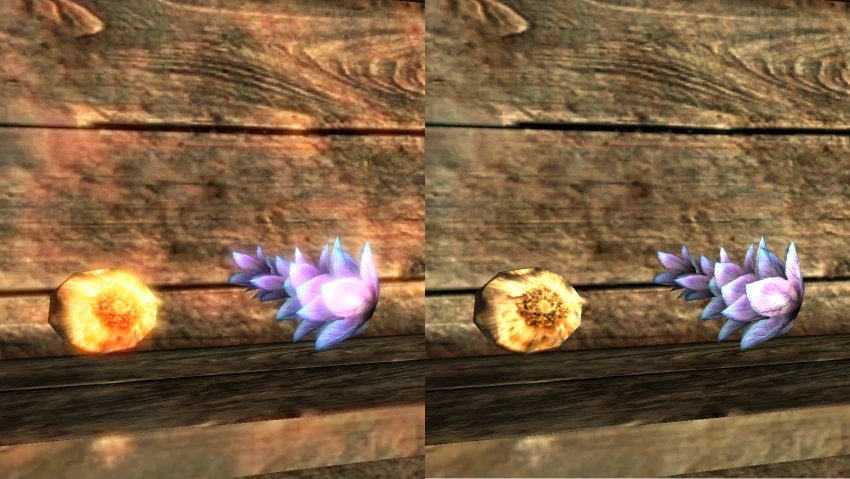
You can see a before and after example of the Bloom effect being disabled in the uploaded image, and there's a video for Eye Adaptation.
Installation:
There are 2 versions. Install one or the other, not both.The regular version has no requirements beyond the game itself. The MCM version requires SKSE, and optionally SkyUI. I've only tested it on SKSE 1. 7a, but it should work with 1. 6 as well.
Either install the package through a Mod Manager/Organizer or unzip its contents into your Skyrim Data directory.
Both effects will be disabled by default upon installation.
Uninstallation:
To uninstall simply delete DisableHDREffects.* from your Skyrim Data directory.Known Issues:
- Loading a save game or doing a wait while staring at a fire at night can cause the screen to be very dark. Opening and closing the map, or toggling eye adaption on and off will fix it.Changelog:
1. 2. 0 - Refactored the code to allow having MCM and non-MCM releases (for Skyrim SE) - Added workarounds for some of the common adaptation issues (waiting through a sunrise/sunset, loading a save game at night) - Added hotkey support for toggling the effects (MCM version only). Configurable in MCM.This mod disables eye adaptation and object blooming via scripting, eliminating the irritating visual effects that can obscure gameplay. It is compatible with all image space lighting mods, making it a versatile choice for players who want a cleaner look without sacrificing other visual enhancements. With over 1,100 endorsements and 20,000 downloads, it's a proven solution for those bothered by these effects.
✨ Key Features
📊 Pros & Cons
✅ Pros
- Community-approved with 1,161 endorsements and over 20k downloads
- Works alongside other lighting mods, so you don't have to choose
- Targets two annoying visual effects in one go
⚠️ Cons
- Last updated in 2016, so may not be tested with the latest game patches
- Script-based approach might conflict with mods that alter the same systems
For players who find eye adaptation and bloom distracting or want a more natural look without losing other lighting mods. Skip if you enjoy the cinematic bloom or rely on eye adaptation for gameplay cues.
💡 Beginner Tips
- Place the files in your Data folder or use a mod manager for easy uninstallation.
- If you use other lighting mods, load this one after them to ensure it takes effect.
- Test in a bright area to see the difference immediately.
📊 Mod Details
- Game
- Skyrim LE Mods
- Author
- jstabb
- Version
- 1.2.0
- Downloads
- 20,914
- Endorsements
- 1,161
- Category
- Visuals and Graphics
- Created
- 4/15/2014
- Updated
- 11/1/2016
🔧 How to Install Skyrim LE Mods
Download from Nexus.
📖 Full step-by-step install guide for Skyrim LE →
Visit the official mod page for specific installation instructions for this mod.
🎮 Need cheat codes or console commands? Check ur gaming wiki for Skyrim LE commands, item IDs, and more.
Keep browsing — more Skyrim LE mods await