Dynamic TimeScale now with AutoSave
⚪ Last updated 2013⚠️ Install Order · 3 steps
1🛠️ SKSE — Skyrim Script Extender Download ↗
2🔧 USLEEP — Unofficial Skyrim Legendary Edition Patch Download ↗
3🖥️ SkyUI — SkyUI (MCM framework) Download ↗
Install in this order, then this mod last — most mods fail to load without their framework and dependencies in place.
Preview
🔍 Analysis
- 👍 7.1% endorsement rate — high engagement, a strong quality signal
- 🏆 #10 of 99 Immersion mods in this game by downloads
📋 About This Mod
Dynamic TimeScale V4!
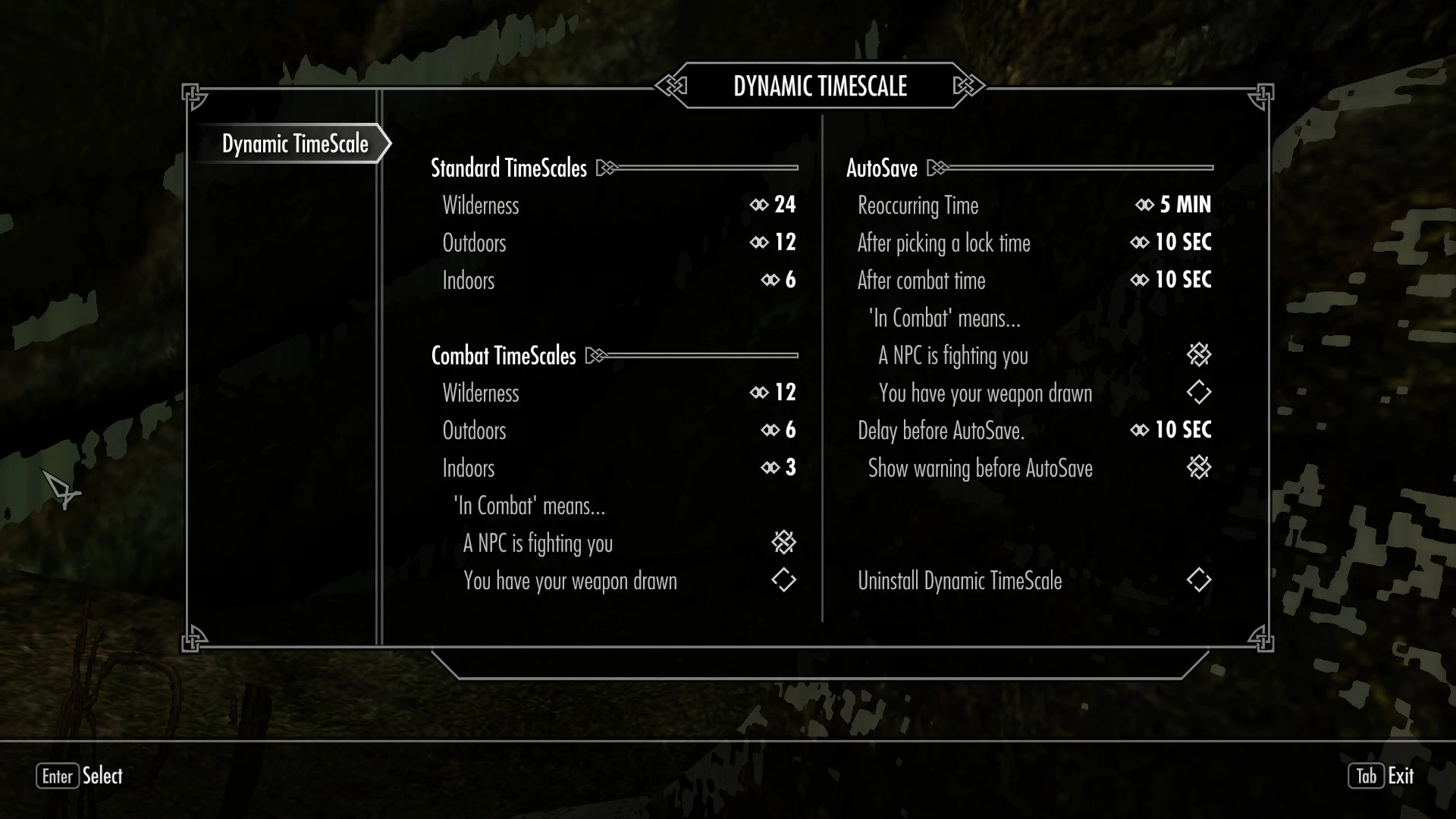
WTF does this thing do? This mod does two jobs. First, it changes the TimeScale based on whether your character is indoors, outdoors, running around in Skyrim\'s wilderness and whether you are fighting. Second, it can perform an AutoSave at regular intervals or after certain events (specfically after combat or after picking a lock.)
Requirements Skyrim SKSE 1. 6. 9 or later (found at skse.silverlock.org) SkyUI 3. 1 or later (found at Skyrim Nexus) If using the Dawnguard or Dragonborn version, their respective expansions.
Upgrading If you\'re upgrading from an older version of Dynamic TimeScale, before uninstalling the old mod, go into the configuration book and under Advanced Options, select uninstall. Save your game and then upgrade to the new version.
Dynamically adjusting TimeScales There are up to six different TimeScales to will be switched to when... The Wilderness TimeScale is used when your character is roaming around in the general wilderness of Skyrim (you\'re not inside a building/dungeon or in one of the major cities.) The Indoors TimeScale is used when your character is inside a building or in a dungeon. The Outdoors TimeScale is used when your character is either in one of the major cities or you\'re in one of the \"outdoor\" dungeons (i.e. Blackreach.) Each of these settings has a partner setting that is used when your character is in combat (which can mean either you have your weapon drawn, an agressive NPC is fighting or actively looking for you or a combination of both.)
Fast Travel, Sleeping & Waiting Thanks to some new features in SKSE, Dynamic TimeScale will now switch the TimeScale to the default 20 whenever you open up the map, sleep or wait menus and will immedeatly switch back to your desired TimeScale when you leave those menus.
Periodic AutoSaves A new feature to DynamicTimeScale. This will perform an AutoSave at regular intervals and can, optionally, perform an AutoSave at the end of a combat session or after picking a lock. The AutoSaves come with a warning message, in the top left of the screen, and a slight delay to give you time to \"get your poop in a group\" before for the AutoSave takes place. These AutoSaves are put on hold when your character is in any menu, but specifically in a dialog or crafting menu, and will resume when you leave the menu. (See the configuration description for det
🤖 AI-enhanced — based on mod data
Dynamic TimeScale now with AutoSave adjusts the game's timescale based on whether you are outdoors, indoors, or in combat, and can perform periodic auto-saves. A classic immersion mod with 3,448 endorsements, last updated in 2013.
✨ Key Features
Changes the game's timescale based on whether you are outdoors, indoors, or in combat.
Can perform periodic auto-saves.
📊 Pros & Cons
✅ Pros
- Community favorite with 3,448 endorsements and nearly 50k downloads.
- Adds a simple quality-of-life feature with auto-saves.
- Lightweight and focused on immersion without overhauling gameplay.
⚠️ Cons
- Last updated in 2013 — may be incompatible with current game versions.
- Limited to timescale and auto-save features; no other enhancements.
🎯 Is This For You?
For players who want a more realistic passage of time in Skyrim, especially those who find the default timescale too fast. Also useful for anyone who wants periodic auto-saves without relying on mods like SkyUI. Skip if you're looking for modern features or extensive customization.
For players who want a more realistic passage of time in Skyrim, especially those who find the default timescale too fast. Also useful for anyone who wants periodic auto-saves without relying on mods like SkyUI. Skip if you're looking for modern features or extensive customization.
📦 Install:Easy· Under 1 minute
💡 Beginner Tips
- Since the mod is from 2013, check if your Skyrim version is compatible or use a mod manager to handle any potential conflicts.
- If you use other mods that alter timescale, load this one after them to ensure its effects apply.
- Test the auto-save interval in-game to find a frequency that doesn't interrupt combat.
📊 Mod Details
- Game
- Skyrim LE Mods
- Author
- Kae Arby
- Version
- 4.2
- Downloads
- 48,684
- Endorsements
- 3,448
- Category
- Immersion
- Created
- 2/20/2012
- Updated
- 3/9/2013
🔧 How to Install Skyrim LE Mods
Download from Nexus.
📖 Full step-by-step install guide for Skyrim LE →
Visit the official mod page for specific installation instructions for this mod.
🎮 Need cheat codes or console commands? Check ur gaming wiki for Skyrim LE commands, item IDs, and more.
Keep browsing — more Skyrim LE mods await