Dragon Glyphs HD
⚪ Last updated 2011⚠️ Install Order · 3 steps
Install in this order, then this mod last — most mods fail to load without their framework and dependencies in place.
Preview
🔍 Analysis
- 👍 3.4% endorsement rate — high engagement, a strong quality signal
- 🏆 #14 of 299 Models and Textures mods in this game by downloads
📋 About This Mod
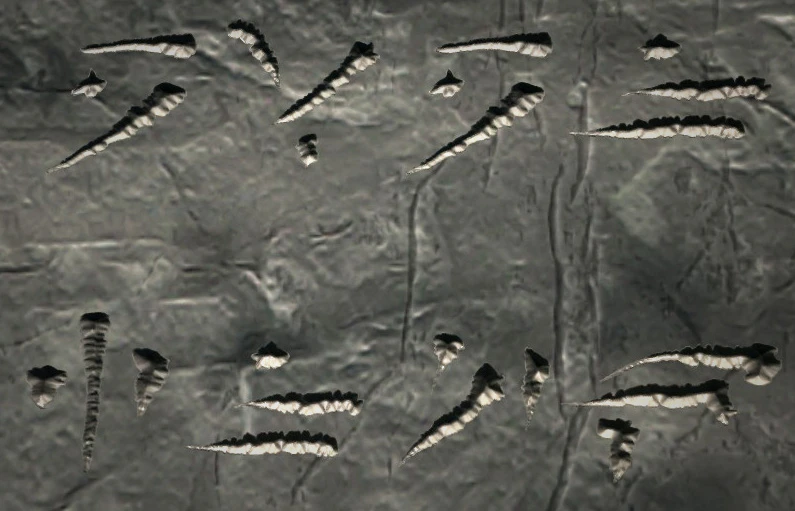
A hand-crafted retex of the standard dragon glyphs you see every time you learn a word of power. So far, there are Dragon, Daedric, Latin and Klingon versions. Also, the wall that the glyphs are normally seen on was very low res, so that had to be enhanced as well. I made these in a way that I can (relatively) quickly and easily make new glyphs, so a lot of new versions will be coming out for this as time goes on. If anyone has any ideas, please leave them in the comments sections. Note: Due to other engagements (and other games) I do not plan on updating this or any of my other mods, indefinitely. At a later date, my interest in Skyrim may come back but until then, please do not leave impatient comments about updates or fixes.
Dragon Glyphs HD is a texture mod for Skyrim that replaces the dragon glyphs seen when learning Words of Power with high-resolution, hand-crafted textures. It offers four language options: Dragon, Daedric, Latin, and Klingon. With 1,740 endorsements and over 51,000 downloads, it's a popular choice for players wanting to enhance the game's visual detail.
✨ Key Features
📊 Pros & Cons
✅ Pros
- Community favorite with 1,740 endorsements and 51k downloads
- Adds a fresh look to a frequently seen part of the game
- Multiple language choices let you customize the aesthetic
⚠️ Cons
- Last updated in 2011, so it may not be compatible with the latest Skyrim versions
- Only affects glyph textures, so it's a minor visual change
- No screenshots or detailed install instructions provided
For Skyrim players who want to refresh the look of dragon glyphs without overhauling the whole game. If you're into lore-friendly or themed playthroughs, the Daedric or Klingon options add a fun twist. Skip if you're looking for major visual overhauls or gameplay changes.
💡 Beginner Tips
- Make sure to place the textures in your Skyrim Data folder, typically under 'Textures\interface\'.
- If you use a mod manager like Nexus Mod Manager, you can install it directly for easier management.
- Since it's an old mod, check for compatibility patches if you're using Skyrim Special Edition or Anniversary Edition.
📊 Mod Details
- Game
- Skyrim LE Mods
- Author
- Valstein0
- Version
- v2
- Downloads
- 51,163
- Endorsements
- 1,740
- Category
- Models and Textures
- Created
- 12/6/2011
- Updated
- 12/7/2011
🔧 How to Install Skyrim LE Mods
Download from Nexus.
📖 Full step-by-step install guide for Skyrim LE →
Visit the official mod page for specific installation instructions for this mod.
🎮 Need cheat codes or console commands? Check ur gaming wiki for Skyrim LE commands, item IDs, and more.
Keep browsing — more Skyrim LE mods await