Customizable Camera
⚪ Last updated 2018⚠️ Install Order · 4 steps
Install in this order, then this mod last — most mods fail to load without their framework and dependencies in place.
Preview
🔍 Analysis
- 👍 4.0% endorsement rate — high engagement, a strong quality signal
- 🏆 #18 of 76 User Interface mods in this game by downloads
📋 About This Mod
··· Customizable Camera ···
by Arindel
Classic Skyrim | Special Edition
MIDpxaXeXVg
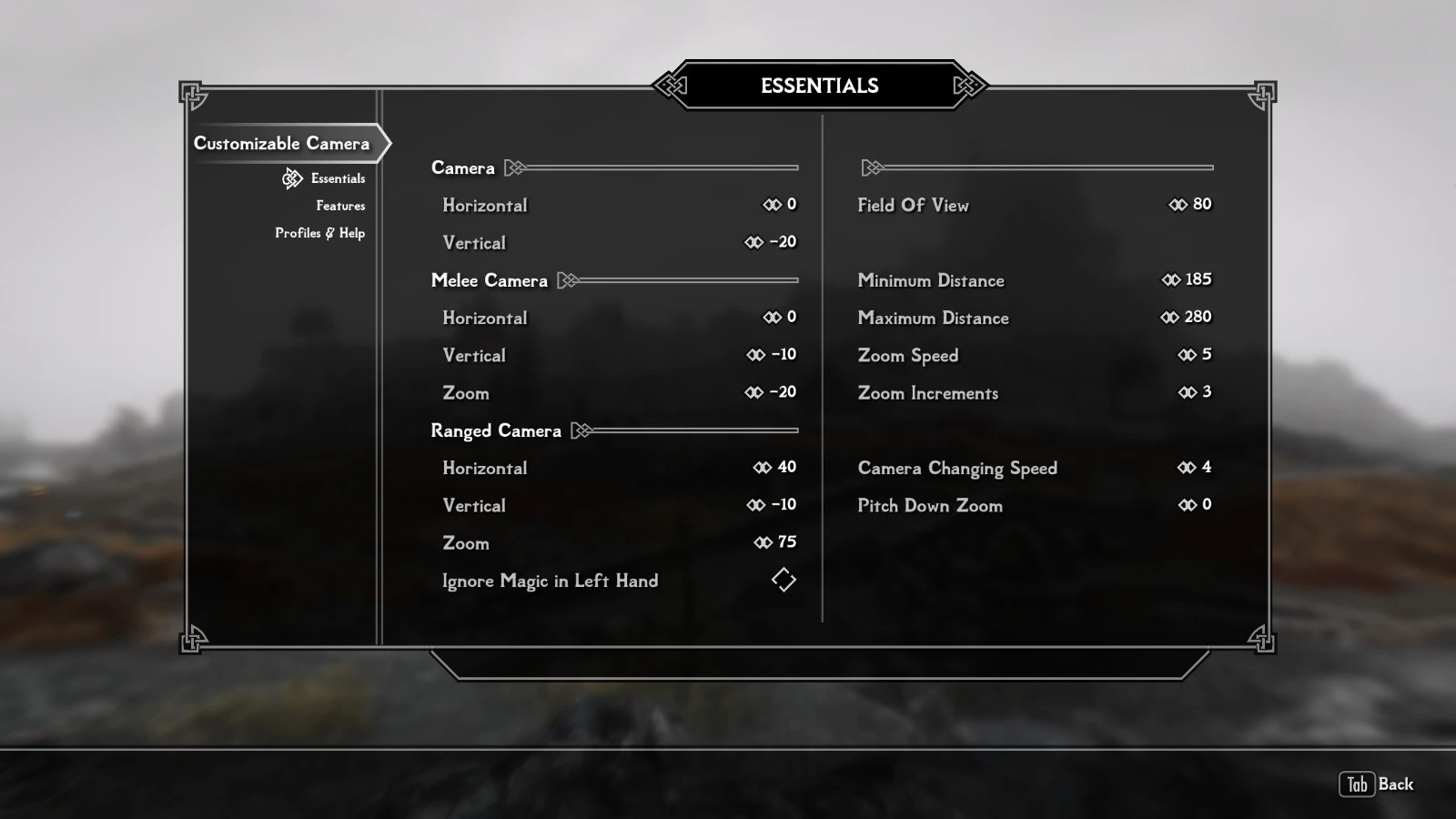
Customizable Camera lets you modify the camera in almost any way you want via MCM which is offered by SkyUI mod and comes with extra features such as following:
- Swap Side key allows you to change the camera sides quickly at the press of a button.
- TFC Mode lets you toggle between normal camera and a flying camera that you can use to explore your surroundings.
- Adaptive Sneaking allows you use a separate height slider for sneaking, useful if your character is in your way and can't aim.
- Adaptive Crosshair hides the crosshair when using melee weapons and shows up if you're using ranged weapons or spells.
- View Mode, a feature toggled by hotkey that switches to an user defined camera for various purposes such as portrait view or eagle view.
- Profiles system to save and load from external files. Needs PapyrusUtil to be installed for this feature to work.
Localization support is available beginning with version 2. 03. Translation files can be found in "Data\Interface\Translations\..." starting with "customizable camera_XXX" in their name.
There are still some messages stuck in english, that's because I've been unable to make those change-able in translation files, but they are rare so I hope it doesn't bother anyone.
Requirements:
- PapyrusUtil (soft requirement, only if you want Profiles system to work)
Compatibility:
- Any mod that alters the camera through scripted INI editing is directly incompatible.
Install & Uninstall:
1. Install via your favorite mod manager.
2. In game, wait for MCM to message: MCM registered 1 new menu(s). Only after that it will appear in MCM. If it doesn't appear, save and load and wait a little again.
To uninstall simply remove Customizable Camera from your favorite mod manager. Remember to draw your weapon out and then sheath for the game to restore the vanilla camera after uninstalling.
/!\ In case you have issues after uninstalling mod, make sure you don't have the following files in your Data\Scripts folder:
CustomizableCamera.pex
CustomizableCameraRunner.pex
Thes
Customizable Camera lets you tweak your camera settings in-game through the Mod Configuration Menu, including quick side-swapping and dedicated view modes for landscape or portrait characters. Requires SkyUI. A popular UI mod with over 26,000 endorsements, last updated in 2018.
✨ Key Features
📊 Pros & Cons
✅ Pros
- Huge community trust with 26,435 endorsements and over 668k downloads.
- In-game customization via MCM means no config file editing.
- Quick side-swapping is a godsend for players who like to change perspective on the fly.
⚠️ Cons
- Last updated in 2018 — may have compatibility issues with newer Skyrim versions or other mods.
- Requires SkyUI, so if you're not using that UI overhaul, this mod won't work.
For Skyrim players who want more control over their camera without leaving the game. If you're a screenshot enthusiast or roleplayer who likes to switch between landscape and portrait framing, this is a must-have. Skip if you're fine with the vanilla camera or don't use SkyUI.
💡 Beginner Tips
- Make sure SkyUI is installed and active before adding this mod, or the MCM menu won't appear.
- Use the hotkey to swap sides quickly during gameplay — it's faster than opening the menu.
- If you're using a mod manager, let it handle the file placement to avoid overwriting other camera mods.
📊 Mod Details
- Game
- Skyrim LE Mods
- Author
- Arindel
- Version
- 2.21
- Downloads
- 668,763
- Endorsements
- 26,435
- Category
- User Interface
- Created
- 6/18/2013
- Updated
- 8/12/2018
🔗 Required By 1 Mod
These mods list this mod as a dependency.
🧩 Commonly Used Together
Users add these mods to the same collections — a real compatibility signal, not an AI guess.
🔧 How to Install Skyrim LE Mods
Download from Nexus.
📖 Full step-by-step install guide for Skyrim LE →
Visit the official mod page for specific installation instructions for this mod.
🎮 Need cheat codes or console commands? Check ur gaming wiki for Skyrim LE commands, item IDs, and more.
Keep browsing — more Skyrim LE mods await