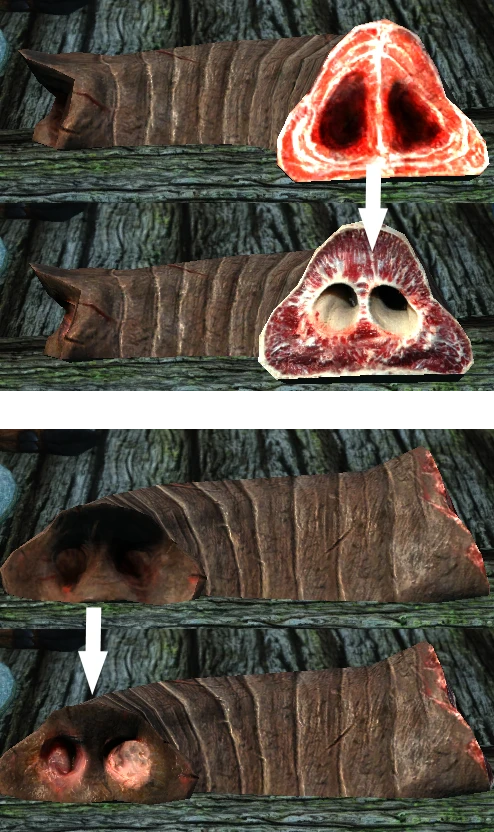
Cross section of Mammoth snout
⚪ Last updated 2016⚠️ Install Order · 3 steps
Install in this order, then this mod last — most mods fail to load without their framework and dependencies in place.
Preview
🔍 Analysis
- 👍 1.6% endorsement rate — high engagement, a strong quality signal
- 🏆 #8 of 25 Items and Objects - World mods in this game by downloads
📋 About This Mod
---I extend my heartfelt gratitude to Pfuscher---
Pfuscher was very nice to me and helped me a lot. Mesh file, mipmap and normal map from him. I do not know how to express my thanks.
(http://www.nexusmods.com/skyrim/users/212132)
Just retexture for Cross section of Mammoth snout. Skin is not amended.
----------------------------------------------------------------------------------------------------
Download my file and Use Mo or Drag and Drop my 'textures' folder into your 'data' folder and merge textures.
A simple retexture for the Cross section of Mammoth snout item in Skyrim, replacing the default texture with a new one. With 577 endorsements and over 37,000 downloads, it's a popular cosmetic tweak for players who want a fresh look for this specific item. Last updated in 2016, it remains a niche but well-received addition.
✨ Key Features
📊 Pros & Cons
✅ Pros
- Community-approved with 577 endorsements and 37k downloads—clearly a lot of people wanted this.
- Drop-in texture replacer, no plugin hassle—just install and go.
- Gives a fresh look to a commonly overlooked item, perfect for immersion freaks.
⚠️ Cons
- Only affects one item—if you're not into ultra-specific texture tweaks, this is pointless.
- No screenshots or detailed previews in the description, so you're flying blind until you test it.
- Last updated in 2016—might not be compatible with newer texture overhauls or mods that alter the same mesh.
For Skyrim players who obsess over every visual detail and want a unique look for the Mammoth snout item. Skip if you're looking for gameplay changes or broader texture overhauls—this is purely cosmetic and hyper-specific.
💡 Beginner Tips
- Since it's a texture replacer, just drop the files into your Data folder or use a mod manager—no load order worries.
- If you use other texture mods that touch the same item, install this one last to ensure it overwrites.
- Check the file structure in the mod archive to confirm it matches your game's directory—some retextures have nested folders.
📊 Mod Details
- Game
- Skyrim LE Mods
- Author
- quilb
- Version
- 0.21
- Downloads
- 37,215
- Endorsements
- 577
- Category
- Items and Objects - World
- Created
- 10/13/2016
- Updated
- 10/14/2016
🔧 How to Install Skyrim LE Mods
Download from Nexus.
📖 Full step-by-step install guide for Skyrim LE →
Visit the official mod page for specific installation instructions for this mod.
🎮 Need cheat codes or console commands? Check ur gaming wiki for Skyrim LE commands, item IDs, and more.
Keep browsing — more Skyrim LE mods await