Compass Marker Range
⚪ Last updated 2013⚠️ Install Order · 3 steps
Install in this order, then this mod last — most mods fail to load without their framework and dependencies in place.
Preview
🔍 Analysis
- 👍 7.3% endorsement rate — high engagement, a strong quality signal
- 🏆 #8 of 58 User Interface mods in this game by downloads
📋 About This Mod
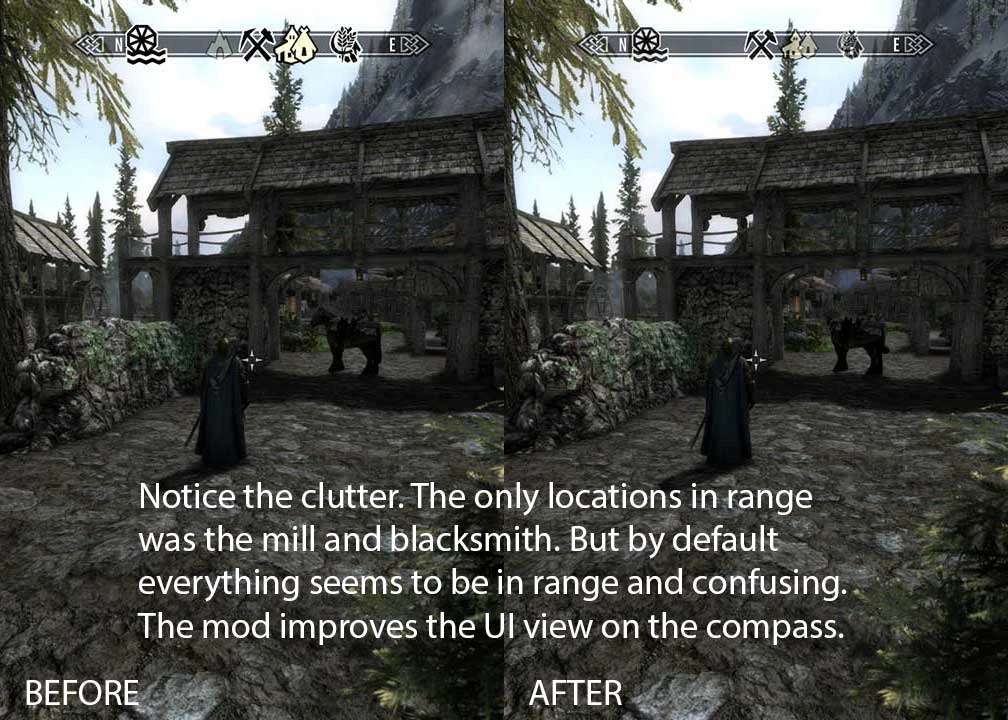
========================================================================================= Compass Marker Range v1 (Feb 6, 2013) Added 2 more optional files, now exist 40%, 50%, 60% and 70% reduction range ========================================================================================= What This Mod Does? Reduces when the compass markers detection range and also reduce the range before the marker icons blow up in your compass UI when you can barely see the location. The default download, as per my personal choice settings: - Reduced the range of initial location markers detection by around 40% (12000). - Reduced the range of when the location markers become fade to large and solid icons by 60% (4000). Optional Download: 1. Compass Marker Range 50: Range reduced 50% of the vanilla Skyrim settings (5000,10000) 2. Compass Marker Range 60: Range reduced by 60% (4000,8000) 3. Compass Marker Range 70: Range reduced by 70% (3000,6000) Detailed Description I have been so frustrated for the past weeks playing with gigantic icons in my face. I can\'t find any mods and there\'s no simple ini settings to edit. Decided to make it for myself. Skyrim Nexus has been unbelievable for me, so its time for me to give back to the community. This is a simple mod to change the UI compass markers to avoid clutter and have a better sense of the markers or locations around you. In the vanilla Skyrim settings, the range of the markers for locations around you is very far. I have Atlas Map Markers mod that introduces a whole lot more markers to the map. What I end up with is very big, cluttered and stacking markers on my compass, even those that are far away. I also cannot tell how far these location markers are because all of them are right in my face. This is especially annoying in bigger cities where there are lots of location markers around you. The eventual result is much nicer compass UI. I still see slightly further locations markers on my compass near the main roads, but at the same time I also know which ones are really closer to me. This is promotes some exploration to go off the main roads to discover more markers. Technical info: These are the 2 settings that affect the compass markers. fHUDCompassLocationMaxDist is when the marker comes into detection range and appears on your compass initially with a faded icon. iMapMarkerFadeStartDistance is when the solid marker starts to fade and become smaller -- it is easier to understand this effect as the range being reduce for the marker to go from fading to solid and large. fHUDCompassLocationMaxDist (Default value 20000) I have mine set to 12000 to ac
Compass Marker Range is a lightweight UI tweak for Skyrim that reduces the detection range of compass markers and prevents icons from expanding when locations are barely visible. The result is a cleaner compass that improves spatial awareness. With 914 endorsements and over 12,000 downloads, it's a proven quality-of-life mod for players who find the default compass cluttered.
✨ Key Features
📊 Pros & Cons
✅ Pros
- Community favorite with 914 endorsements and over 12k downloads.
- Does exactly what it says: cleans up the compass without any extra bloat.
- Tiny mod that's easy to install and forget about.
⚠️ Cons
- Last updated in 2013, so it may not be compatible with the latest Skyrim versions or mods that alter the compass.
- Only affects compass marker range—if you want more UI overhauls, this won't cover them.
- Potential conflicts with other UI mods that modify compass behavior.
For Skyrim players who find the default compass too cluttered and want a cleaner, more immersive HUD without overhauling the entire UI. If you're running a mod list that changes the compass, check compatibility first. Skip if you prefer a fully featured UI overhaul or don't mind the vanilla compass.
💡 Beginner Tips
- If you're using a mod manager like Vortex or MO2, just download and install—no extra setup needed.
- Since this mod is from 2013, test it with your current Skyrim version; if it doesn't work, look for a similar newer mod.
- Pair it with a minimalistic HUD mod for the best experience.
📊 Mod Details
- Game
- Skyrim LE Mods
- Author
- Xrande
- Version
- 1
- Downloads
- 12,525
- Endorsements
- 914
- Category
- User Interface
- Created
- 2/3/2013
- Updated
- 2/5/2013
🔧 How to Install Skyrim LE Mods
Download from Nexus.
📖 Full step-by-step install guide for Skyrim LE →
Visit the official mod page for specific installation instructions for this mod.
🎮 Need cheat codes or console commands? Check ur gaming wiki for Skyrim LE commands, item IDs, and more.
Keep browsing — more Skyrim LE mods await