Better Free Camera
⚪ Last updated 2016⚠️ Install Order · 3 steps
Install in this order, then this mod last — most mods fail to load without their framework and dependencies in place.
Preview
🔍 Analysis
- 👍 4.3% endorsement rate — high engagement, a strong quality signal
- 🏆 #13 of 65 User Interface mods in this game by downloads
📋 About This Mod
Attention: This mod is no longer being supported or updated.
This mod has been uploaded by "The Care Taker" at the request of its owner. The Care Taker account is run by Nexus Mods for the purpose of hosting mods created by authors who are no longer active in the community.
If you are a mod author and would like to learn more about this service or have questions, you can find details regarding The Care Taker HERE.
Happy modding!
Compatible with Enderal
What Is This?
I have always found it annoying that you would have to bring up the console in order to toggle free camera mode and adjust the speed. I looked for any existing mods that might allow it to be easily mapped to a single key but the couple I found didn't seem to work so well. I decided to put together my own little mod to perform this simple task.
Features
-
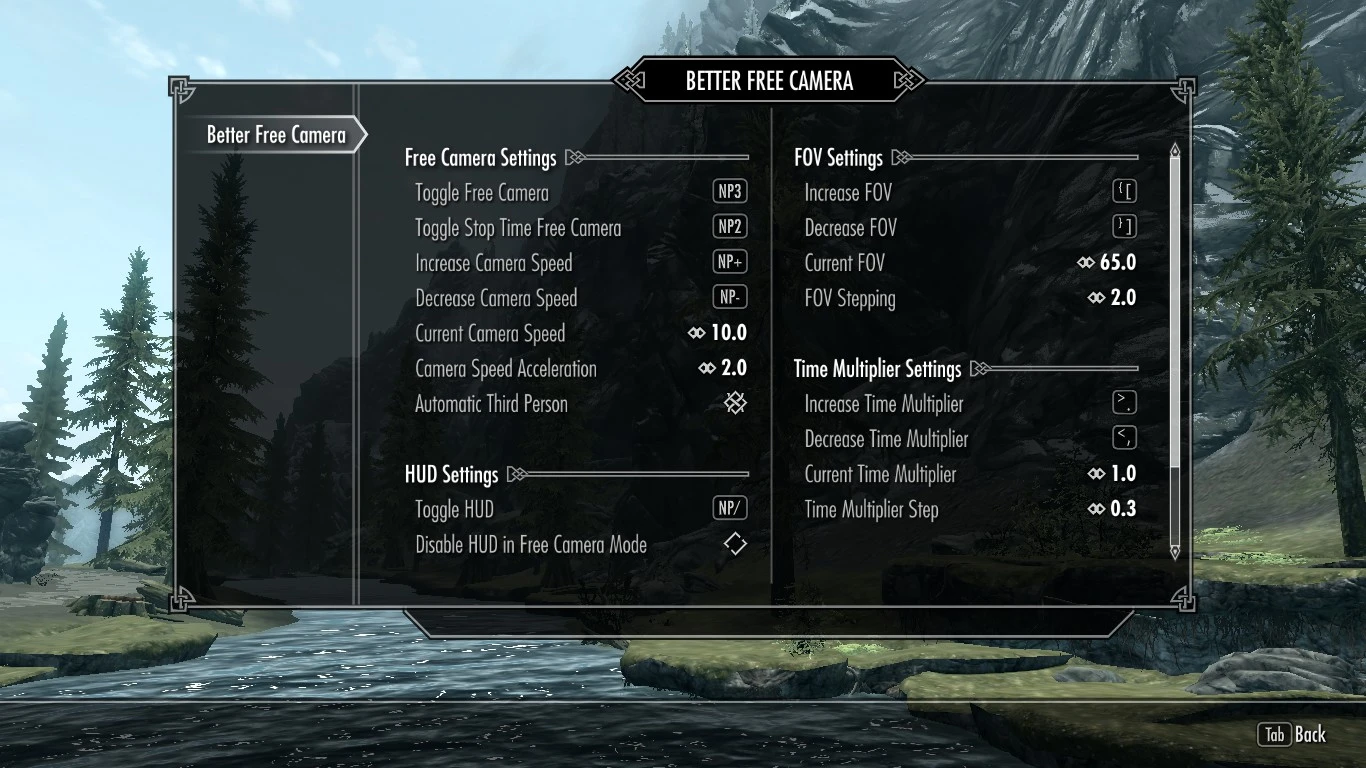
[]Toggle free camera mode and adjust the speed using a single keypress.
[
]Toggle the HUD on and off.[]Adjust the field of view.
[]Adjust the time multiplier to slow down or speed up the action.
[]Take screenshots with ability to temporarily toggle the HUD off the moment the screenshot is taken.
[]Screenshots can output to PNG, JPG, and BMP formats.
[]MCM menu to configure hotkeys and make adjustments to other settings.
[]Option to switch to third person perspective automatically when in first person mode so your character is always visible in free camera mode.
[]Option to automatically disable the HUD when entering free camera mode.
[]Toggle clipping mode to move through solid objects.
[]Toggle animcam for third person camera mode.
[]Hotkey to "Become Unstuck" when exiting free camera mode in certain situations causes problems in the game.
[]Option to clear all hotkeys so you can bind only the ones you want to use.
[]No more need for console commands!
This mod mainly deals with free camera controls. If you are interested in configuring other camera modes you should consider using Customizable Camera.
Known Issues
[]Screenshots only work in some form of windowed mode. You will need to set ForceBorderless and ForceBorderlessFullscreen to true in your enblocal.ini for a windowed full screen mode.
[]The time multiplier will be reset to 1. 0 after using a bow. Skyrim does this because it slows down time for the Steady Hand perk and then sets it back to normal. This happens even if your character does not have the Steady Hand perk.
[*]Equipping clothes/armor/weapons may not make any visible changes in free camera mode. This is a
Better Free Camera is a UI mod for Skyrim that replaces console commands with a toggleable free camera mode. It lets you adjust speed, FOV, animcam, clipping, and time manipulation via hotkeys. Compatible with Enderal, it has 2,704 endorsements and was last updated in 2016.
✨ Key Features
📊 Pros & Cons
✅ Pros
- Huge community trust with 2,704 endorsements and 62,700 downloads
- Streamlines camera controls—no more typing console commands mid-game
- Works with Enderal, so you get the same freedom in that total conversion
⚠️ Cons
- Last updated in 2016—might have issues with the latest Skyrim versions or mod setups
- Requires you to learn new hotkeys, which might take a bit to get used to
For Skyrim players who love cinematic screenshots or need precise camera angles for machinima. Also great for modders who want to inspect their work without fiddling with console commands. Skip if you're not into photography or camera tweaking—this is purely a utility, not a gameplay changer.
💡 Beginner Tips
- If you're using a mod manager, just download and activate—no special load order needed since it's a UI mod.
- Test the hotkeys in a safe area first to avoid accidentally toggling time or clipping during combat.
- For Enderal, make sure you have the correct version of the mod installed, as compatibility may vary.
📊 Mod Details
- Game
- Skyrim LE Mods
- Author
- Utopium
- Version
- 3.9
- Downloads
- 62,700
- Endorsements
- 2,704
- Category
- User Interface
- Created
- 9/1/2016
- Updated
- 10/16/2016
🔧 How to Install Skyrim LE Mods
Download from Nexus.
📖 Full step-by-step install guide for Skyrim LE →
Visit the official mod page for specific installation instructions for this mod.
🎮 Need cheat codes or console commands? Check ur gaming wiki for Skyrim LE commands, item IDs, and more.
Keep browsing — more Skyrim LE mods await