A Closer Look - Simple Smooth Hotkey Zoom
⚪ Last updated 2015⚠️ Install Order · 4 steps
Install in this order, then this mod last — most mods fail to load without their framework and dependencies in place.
Preview
🔍 Analysis
- 👍 3.7% endorsement rate — high engagement, a strong quality signal
- 🏆 #98 of 121 Gameplay mods in this game by downloads
📋 About This Mod
For a long time I've wanted a very simple, very SMOOTH, unobtrusive way to "look closer" at objects, people, etc. in the game. I have almost every object textured in hi-res and enjoy taking in the details, but despite that, I find being able to actually read the spines on books, examine shelves, and look closely at NPCs and their gear to be more "immersive." And it's just fun!
Opening the console to type a lower FOV, and then doing the same to reset it was just immersion breaking. So I decided to make this very simple, lightweight mod. It uses one very simple, event-based script (the safe kind; the 'bad' kind are the ones that register for updates or refresh constantly, which this does not do) and an SKSE DLL provided by a brilliant mod author who didn't want any credit.
This is my first functionality / gameplay mod / MCM. The source is included, and I am always open to feedback and ways to improve!
VIDEO WALKTHROUGH | Video Review by the always entertaining MMOxReview -- THANKS, BRAH (starts at 3:18)
lHPfyst2BosCHswe4r1eN8 FEATURES
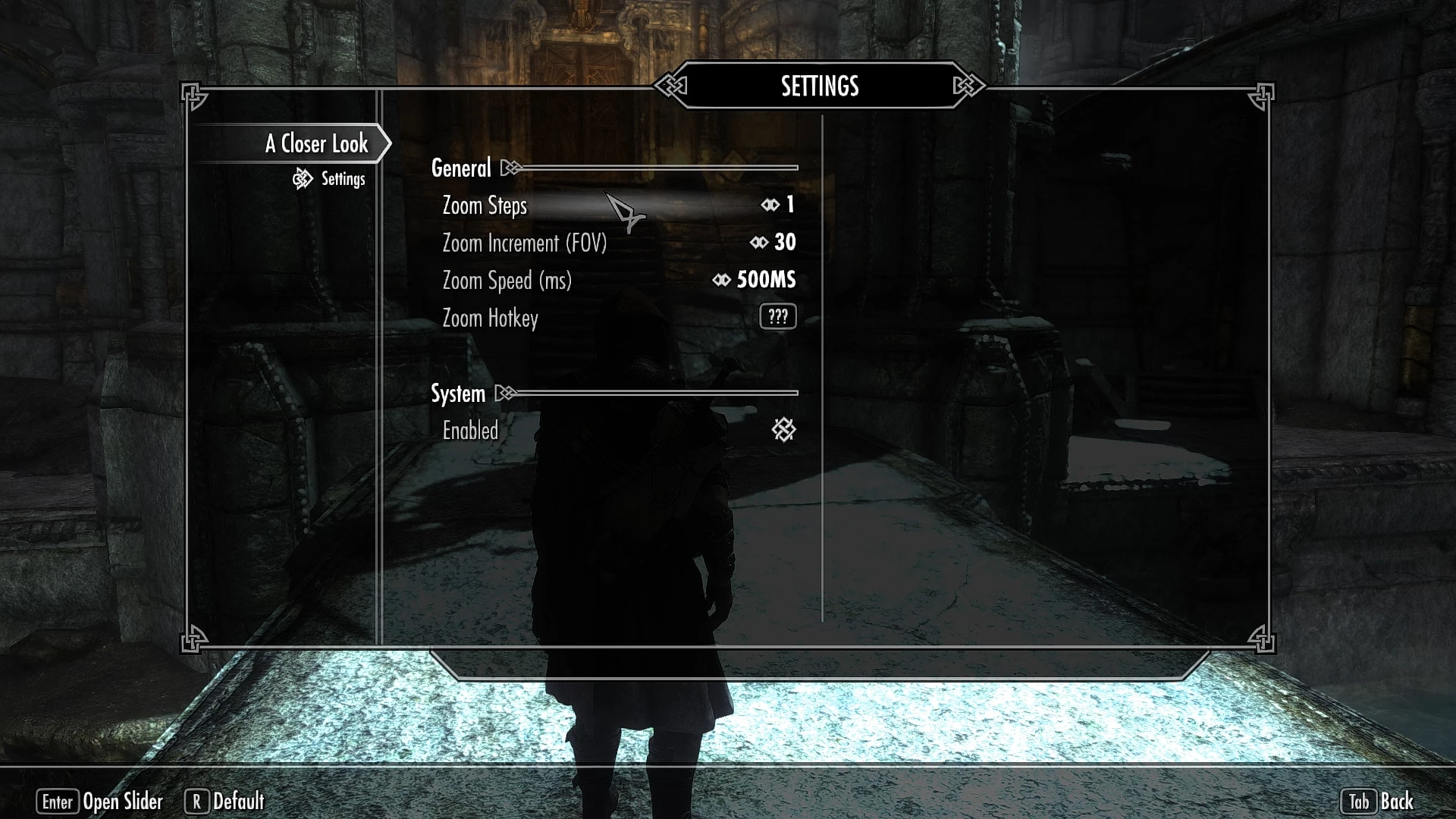
- []Smoothly zooms in when the assigned hotkey is pressed []Smoothly zooms back out when that key is pressed again []Can be used most any time (conversations, combat, etc.) []MCM to allow configuration for: []- Number of steps []- Zoom amount per-step []- Zoom speed []- Hotkey assignment []- Disable functionality for simple removal []Very lightweight, safe, event-based scripts (not the 'bad' kind), code-reviewed! []Safe to remove (though you should still never remove mods mid-game!) []Enable/disable without having to remove it []Works with gamepads / controllers! []EXTREMELY FAST AND RESPONSIVE!
COMPATIBILITY & KNOWN ISSUES
[]Confirmed to work with Enhanced Camera, but you must make sure to set bEnableFOVOverride=0 in the SKSE_EnhancedCamera.ini []Works with Customizable Camera, but you need to set your default FOV inside of CC itself, otherwise when zooming out you may return to vanilla FOV value. [*]Because it simply slides the FOV up and down, it should
A lightweight Skyrim mod that adds a smooth zoom-in hotkey for inspecting objects and NPCs, with full MCM configuration. Requires SKSE. Popular with 3,698 endorsements and over 100k downloads, though last updated in 2015.
✨ Key Features
📊 Pros & Cons
✅ Pros
- Community favorite with 3,698 endorsements and 101k downloads
- Smooth zoom is a quality-of-life upgrade for immersion lovers
- MCM gives you full control without ini fiddling
⚠️ Cons
- Last updated in 2015 — may be incompatible with newer Skyrim versions
- Requires SKSE, so console players are out
- No detailed documentation or troubleshooting in the description
For Skyrim players who love inspecting every detail of the world and want a smoother way to zoom in on objects and NPCs. Perfect for immersion-focused playthroughs and screenshot hunters. Skip if you're on console or prefer gameplay overhauls.
💡 Beginner Tips
- Make sure SKSE is installed and you launch the game through skse_loader.exe, not the default launcher.
- Use the MCM menu to rebind the hotkey to something comfortable — default might clash with other mods.
- Test the zoom on a static object first to get a feel for the smoothness before using it on NPCs.
📊 Mod Details
- Game
- Skyrim LE Mods
- Author
- fadingsignal
- Version
- 1.1
- Downloads
- 101,132
- Endorsements
- 3,698
- Category
- Gameplay
- Created
- 4/22/2015
- Updated
- 4/22/2015
🔧 How to Install Skyrim LE Mods
Download from Nexus.
📖 Full step-by-step install guide for Skyrim LE →
Visit the official mod page for specific installation instructions for this mod.
🎮 Need cheat codes or console commands? Check ur gaming wiki for Skyrim LE commands, item IDs, and more.
Keep browsing — more Skyrim LE mods await