Strangerville Photo of Bizarre Plant Inventoryable
⚪ Last updated 2022Preview
🔍 Analysis
- 👍 0.0% endorsement rate
- 🏆 #144 of 535 Overrides mods in this game by downloads
📋 About This Mod
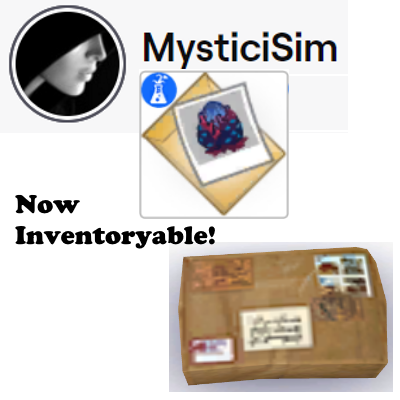
This is the reason why I made the Get To Work filing cabinets functional - so I can store in them these Strangerville items in my Sim's inventory that could not be removed. With this mod, now they can be. So now, you can live drag the Photo of Bizarre Plant out of your Sim's inventories. Place it on the ground, on shelves, on surfaces, or inside chests, boxes, and (ahem!) my modded filing cabinets. Out of inventories, it will appear simply as a package. I love playing the Strangerville mystery scenario. Problem is, I hate the files that collect in my Sim's inventory. I just think they don't need to be there when my Sim goes out on a date, goes on vacation, etc. They should be stored elsewhere, not forever carried every-freakin'-where. I know I'm not alone in this. So stay tuned for more Strangerville files overrides. Enjoy! P. S. I only make mods that I use myself. I hope they prove useful to you too.
This mod overrides the Photo of Bizarre Plant in Strangerville so it can be live-dragged into storage units like boxes and chests. It's a small UI/override tweak for players who want to organize that specific item. With no endorsements and a 2022 update, it's a niche utility.
✨ Key Features
📊 Pros & Cons
✅ Pros
- Finally lets you stash that weird plant photo in a chest instead of leaving it on a shelf.
- Tiny mod, zero bloat—just does one job.
- Works with base game storage, no extra packs needed.
⚠️ Cons
- Zero endorsements means it's untested by the community—could break with updates.
- Only affects one specific item, so if you don't care about that photo, it's useless.
- Last updated in 2022, so it might not work with the latest game patches.
This is for Sims 4 players who are tired of the Photo of Bizarre Plant cluttering their inventory and want to organize it in storage. It's also for completionists who want every item to be storable. If you never touch Strangerville's weird plant photo, skip it.
💡 Beginner Tips
- Place the mod in your Mods folder and enable script mods in game settings.
- Test in a save with the Strangerville photo to see if it works with your current game version.
- If the photo still won't drag, try removing other UI mods that might conflict.
📊 Mod Details
- Game
- Sims 4 Mods
- Author
- MysticiSim
- Version
- MysticiSim_Strangerville Photo of Bizarre Plant Inventoryable
- Downloads
- 2,145
- Endorsements
- 0
- Category
- Overrides
- Created
- 12/14/2022
- Updated
- 12/14/2022
🔧 How to Install Sims 4 Mods
Drop .package files into Mods folder.
📖 Full step-by-step install guide for Sims 4 →
Visit the official mod page for specific installation instructions for this mod.
🎮 Need cheat codes or console commands? Check ur gaming wiki for Sims 4 commands, item IDs, and more.
Keep browsing — more Sims 4 mods await