FinJingSims - Thai Style loading screens
🟡 Updated this yearPreview
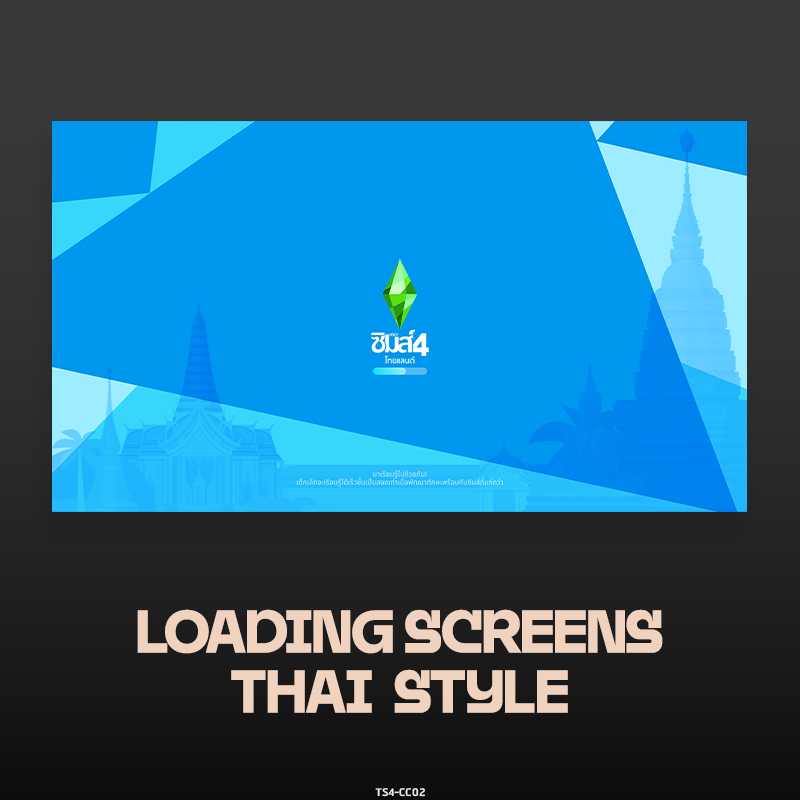
🔍 Analysis
- 👍 0.0% endorsement rate
- 🏆 #17 of 535 Overrides mods in this game by downloads
📋 About This Mod
Ever felt that you could customize everything in your Sims’ lives? But have to deal with the same loading screen during every operation? You can now load the screen to modify it
This mod replaces the default loading screens in The Sims with Thai-style artwork, offering a cultural aesthetic for players seeking visual variety. It has zero endorsements but nearly 5,700 downloads, and was last updated in February 2026. Suitable for players wanting to personalize their game's loading experience.
✨ Key Features
📊 Pros & Cons
✅ Pros
- Gives your game a fresh cultural vibe every time you load.
- Nearly 5,700 downloads show some community interest despite zero endorsements.
- It's a simple override—no complex setup, just drop it in and go.
⚠️ Cons
- Zero endorsements means it's not widely vetted—use at your own risk.
- Only affects loading screens, so don't expect any gameplay changes.
- Potential compatibility issues with other UI or loading screen mods.
This is for Sims players who want to add a personal or cultural touch to their game's loading screens. If you're tired of the same old loading art and appreciate Thai aesthetics, this is a quick cosmetic tweak. Not for those seeking gameplay or performance improvements.
💡 Beginner Tips
- Place the mod in your Mods folder and enable script mods in game settings if required.
- If you have other loading screen mods, remove them to avoid conflicts.
- Check the mod's file structure to ensure it's not nested too deep in folders.
📊 Mod Details
- Game
- Sims 4 Mods
- Author
- FinJingSims
- Version
- Thai Style loading screens Version 1.5.0
- Downloads
- 5,699
- Endorsements
- 0
- Category
- Overrides
- Created
- 11/16/2022
- Updated
- 2/26/2026
🔧 How to Install Sims 4 Mods
Drop .package files into Mods folder.
📖 Full step-by-step install guide for Sims 4 →
Visit the official mod page for specific installation instructions for this mod.
🎮 Need cheat codes or console commands? Check ur gaming wiki for Sims 4 commands, item IDs, and more.
Keep browsing — more Sims 4 mods await