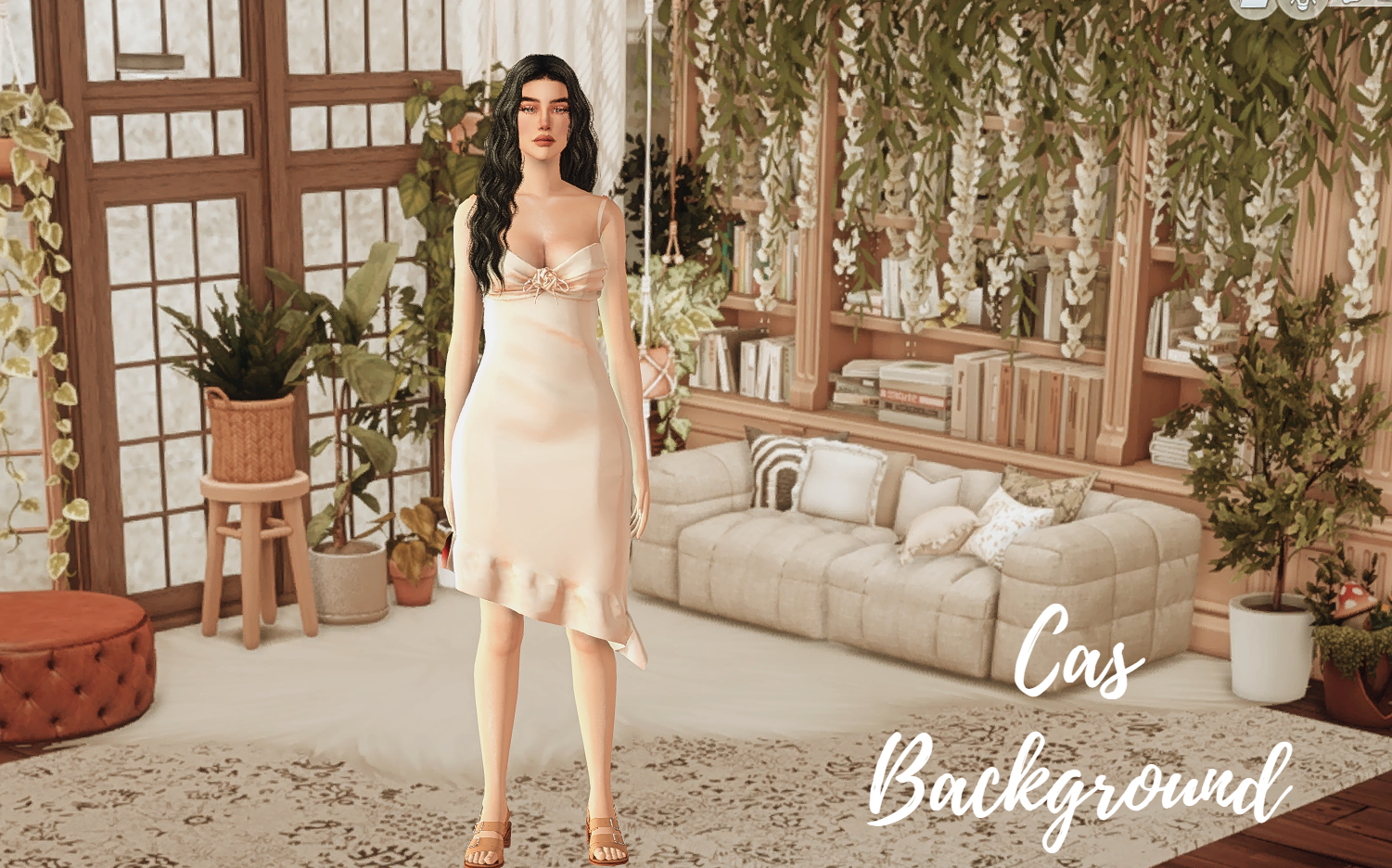
Cas Backgroun 08
⚪ Last updated 2023Preview
🔍 Analysis
- 👍 0.0% endorsement rate
- 🏆 #98 of 743 Miscellaneous mods in this game by downloads
📋 About This Mod
CAS BACKGROUNG 08 BOHO STYLE LIBRARY CHAGES THE BLUE AND GREEN DEFAULT BACKGROUN ON THE SIMS 4 FOR THIS MORE AESTHETIC BACKGROUND REMEMBER TO ONLY PUT ONE CAS BACKGROUND ON YOUR MODS FOLDER AND DOWNLOAD THE BLOP REMOVER MOD TO AVOID A SHADOW ON THE FEET OF YOUR SIMS
Cas Backgroun 08 is a simple CAS background replacement mod for The Sims 4, created by PilarLeonYT. It offers a new backdrop for the Create-A-Sim screen, with no additional features. Despite zero endorsements, it has over 3,500 downloads, indicating some interest. Suitable for players seeking a fresh look for their CAS interface.
✨ Key Features
📊 Pros & Cons
✅ Pros
- 3,573 downloads show it's been tried by many.
- Simple swap, no bloat or extra scripts.
- Refreshes the CAS screen for a new vibe.
⚠️ Cons
- Zero endorsements – nobody's vouched for it yet.
- No preview images or detailed description, so you're flying blind.
- Compatibility risk with other CAS background mods or game updates.
This is for Sims 4 players who want a quick visual change to the Create-A-Sim screen without messing with complex mods. If you're tired of the default background and want something different, this is a low-effort option. Not for those seeking major overhauls or extra features.
💡 Beginner Tips
- Place the .package file in your Mods folder (Documents > Electronic Arts > The Sims 4 > Mods).
- Make sure to enable 'Script Mods' in game settings if you have other mods, though this one may not need it.
- If you don't see the change, check that the mod isn't conflicting with another CAS background mod.
📊 Mod Details
- Game
- Sims 4 Mods
- Author
- PilarLeonYT
- Version
- CAS 08
- Downloads
- 3,573
- Endorsements
- 0
- Category
- Miscellaneous
- Created
- 10/26/2023
- Updated
- 12/2/2023
🔧 How to Install Sims 4 Mods
Drop .package files into Mods folder.
📖 Full step-by-step install guide for Sims 4 →
Visit the official mod page for specific installation instructions for this mod.
🎮 Need cheat codes or console commands? Check ur gaming wiki for Sims 4 commands, item IDs, and more.
Keep browsing — more Sims 4 mods await