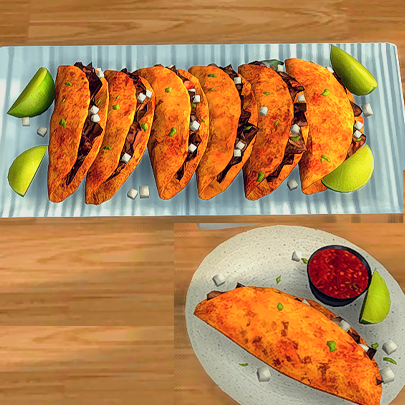
Beef Birria Tacos Custom Recipe
🟡 Updated this year⚠️ Install Order · 1 step
Install in this order, then this mod last — most mods fail to load without their framework and dependencies in place.
Preview
🔍 Analysis
- 👍 0.0% endorsement rate
- 🏆 #29 of 227 Recipes mods in this game by downloads
📋 About This Mod
If you enjoy my content and want to help me keep creating, you re welcome to subscribe to my Patreon , I d truly appreciate it! You will also get early access to my content. Thank you! REQUIRED MOD/FILES: The latest version of My Grocery Shopping List mod. Please delete the old version after updating to the latest version. OPTIONAL Custom Ingredients (Get the custom ingredients HERE ) If you don't want to use ingredients, only download the recipes below. Found in Home-Cooked Meal HOW TO USE RECIPE: 1. Make sure you have the most recent version of the Grocery List Mod installed. (linked above) ALWAYS DELETE THE PREVIOUS VERSION. 2. Download the recipe file attached to this post. 3. Click on the Grocery List, find and click the recipe and start cooking! HOW TO USE RECIPE (IF USING Insimnia's Custom INGREDIENTS) 1. Make sure you have the most recent version of the Grocery List Mod installed. (linked above) ALWAYS DELETE THE PREVIOUS VERSION. 2. Download the custom ingredients (linked above) (optional) 3. Download the recipe file attached to this post. 4. Click on the Grocery List to check what ingredients are needed. If you don't have them all, the recipe will be grayed out and your Sim will not be able to cook. 5. Make sure to click "open" on the ingredients if necessary , then put ALL of the required ingredients in your Sim's inventory or the fridge to "unlock" the recipes in the Grocery List Mod. If there is no option to "open", the ingredient can be used as is. 6. Once you have all the required ingredients, click on the Grocery List, and you are now able to click on the recipes. HOW TO INSTALL: Simply drag and drop the PACKAGE file directly to your Mods folder.
This is a custom recipe mod for The Sims 4 that adds Beef Birria Tacos to the game, requiring the My Grocery List Mod. It has 18,203 downloads but no endorsements and was last updated in October 2025. The mod is for players who want more food variety in their Sims' cooking.
✨ Key Features
📊 Pros & Cons
✅ Pros
- 18k downloads show it's popular despite zero endorsements.
- Adds a specific, real-world dish that's trendy and fun.
- Integrates with the My Grocery List Mod for a cohesive experience.
⚠️ Cons
- Requires the My Grocery List Mod, so it won't work standalone.
- No endorsements might mean it's untested or not widely loved.
- Only one recipe, so it's a niche addition for most players.
This is for Sims 4 players who love adding realistic food options to their game and already use the My Grocery List Mod. It's also for fans of Mexican cuisine who want their Sims to cook birria tacos specifically.
💡 Beginner Tips
- Make sure you have the My Grocery List Mod installed first, or the recipe won't appear.
- Look for the recipe under the cooking skill menu in-game after installation.
- Check the mod's page for any additional instructions if the recipe doesn't show up.
📊 Mod Details
- Game
- Sims 4 Mods
- Author
- insimniasims4
- Version
- InsimniaRecipesBeefBirriaTacos.zip
- Downloads
- 18,203
- Endorsements
- 0
- Category
- Recipes
- Created
- 10/1/2025
- Updated
- 10/17/2025
🔧 How to Install Sims 4 Mods
Drop .package files into Mods folder.
📖 Full step-by-step install guide for Sims 4 →
Visit the official mod page for specific installation instructions for this mod.
🎮 Need cheat codes or console commands? Check ur gaming wiki for Sims 4 commands, item IDs, and more.
Keep browsing — more Sims 4 mods await