SOTTR Modding Tools
🟡 Updated this yearPreview
🔍 Analysis
- 👍 2.9% endorsement rate — high engagement, a strong quality signal
- 🏆 #1 of 28 Miscellaneous mods in this game by downloads
📋 About This Mod
Toolset for creating and installing SOTTR mods. Supports meshes, textures, animations/physics, hair, text, and sound.
These tools also work for Tomb Raider (2013) and Rise of the Tomb Raider!
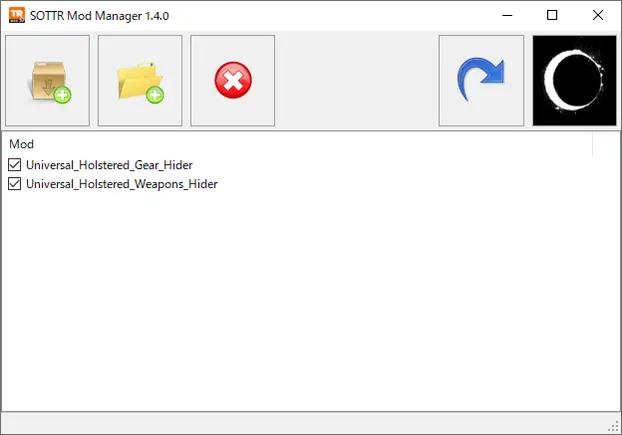
Mod Manager
Installs mods as SOTTR .tiger archives, making it possible to mod not just textures but also meshes and metadata.
Note that this tool does not support Special K texture mods. It can only install mods specifically made for it.
Installing the manager
Simply extract to any location (doesn't have to be the game folder).
Installing mods
Mods can be installed either from an extracted folder or straight from their . 7z/.zip/.rar archive. This can be done in multiple ways:
-
[]Click one of the "+" toolbar buttons and select the file or folder to install.
[
]Drag-and-drop the file or folder onto the listbox.[]Drag-and-drop the file or folder onto the .exe.
Creating a backup of the game's .tiger files is not required. The manager installs mods by creating new .tiger files rather than modifying existing ones.
Uninstalling mods
To uninstall a mod, select it and click the "×" toolbar button (or press the Del key).
Manually deleting the mod's .tiger file is also possible, but not recommended. If you install mods A and B and then delete mod A, the game might stop working until you delete B as well. This won't happen if you delete A from the mod manager instead.
Enabling/disabling mods
You can use the checkboxes to temporarily disable mods so the game will no longer load them. Later on, you can just as easily enable them again.
Reinstalling mods
If your mod setup broke for some reason and the game no longer starts, you can try clicking the arrow toolbar button to reinstall all your mods. This is a quick and fully automatic process that doesn't require the original downloaded files.
Uninstalling the manager
Simply delete the files again.
Extractor
Extracts files to serve as a base for modding. Like the manager, this tool can be run from anywhere.
Hook tool
A tool that hooks into a running game ( Steam only) and does the following:
-
[] Logs the in-archive files and (for SOTTR) animations accessed by the game in real time.
[
] Watches a mod folder for changes and automatically reinstalls it, making it possible to see those changes ingame without restarting. - Allows editing material parameters and seeing the results instantly ingame.
Blender addon
Lets you import and export meshes, skeletons, hair, and animations. Custom cloth physics are also possible.
Binary templates
Template files for inspecting and modifying some file types with ImHex or 010 Editor. Can be used to tweak shader parameters in materials, for example.
Documentation/Sources
Documentation for modders is available on GitHub. It's also included as an HTML file in the download.
The source code of all the tools is similarly available on the GitHub page.
Credits
alphaZomega for their file format descriptions and Ekey for their open source CDCE TIGER Tool. A large part of the knowledge used to create these tools comes from there.
Jostar, Raq, and swiz19 for beta testing.
Jostar for the mod manager icon.
Version history
Initial release
1. 0. 2
You can now reference any resource from any resource, even if the target
-
[] Logs the in-archive files and (for SOTTR) animations accessed by the game in real time.
📊 Mod Details
- Game
- Shadowofthetombraider Mods
- Author
- arc_
- Version
- 1.11.0
- Downloads
- 265,427
- Endorsements
- 7,587
- Category
- Miscellaneous
- Created
- 12/3/2023
- Updated
- 5/25/2026
- Tags
- Body
🔧 How to Install Shadow of the Tomb Raider Mods
Install via a mod manager (Vortex or Mod Organizer 2). Most mods drop into the game folder.
📖 Full step-by-step install guide for Shadow of the Tomb Raider →
Visit the official mod page for specific installation instructions for this mod.
🎮 Need cheat codes or console commands? Check ur gaming wiki for Shadow of the Tomb Raider commands, item IDs, and more.
Keep browsing — more Shadow of the Tomb Raider mods await