Lazy FoV And Vignette Fix
⚪ Last updated 2021Preview
🔍 Analysis
- 👍 3.1% endorsement rate — high engagement, a strong quality signal
- 🏆 #1 of 55 Visuals and Graphics mods in this game by downloads
📋 About This Mod
Lazy FoV And Vignette Fix
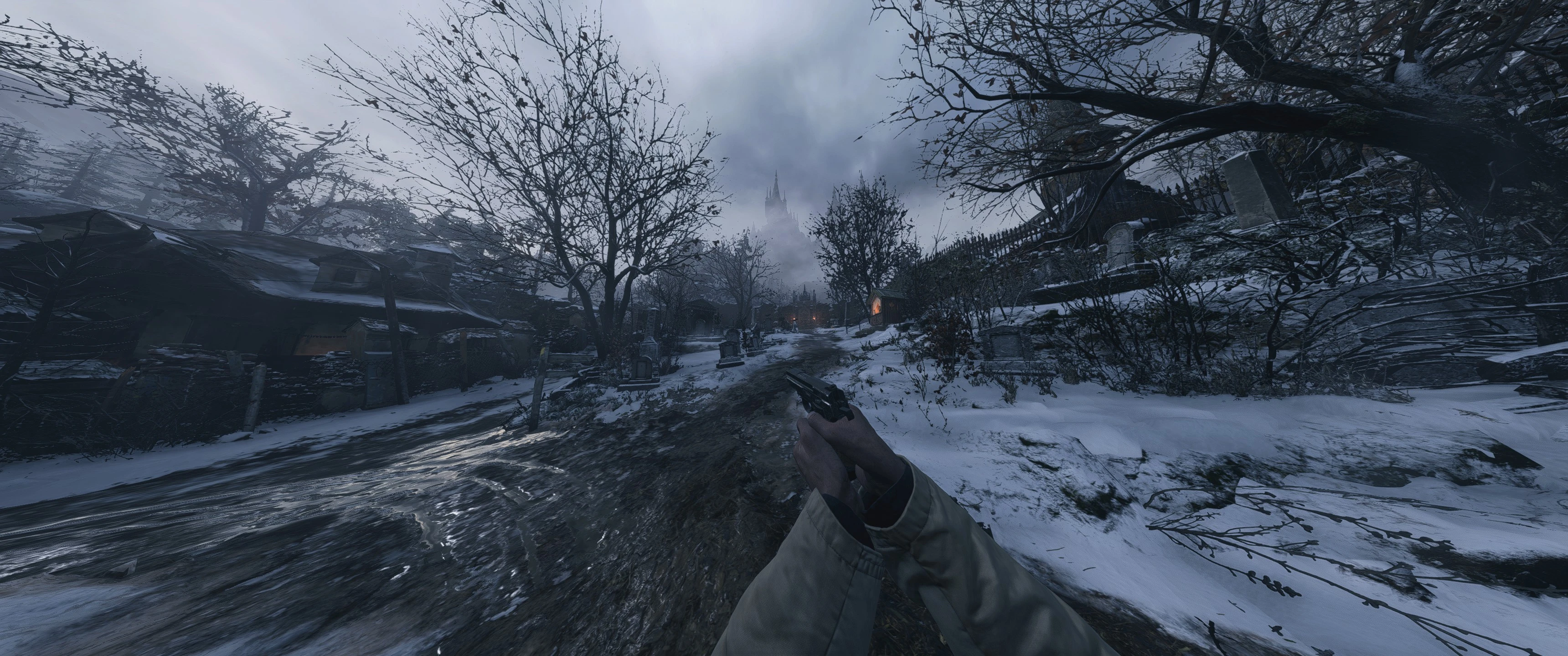
Hello all! CAPCOM has done it again. Another first person Resident Evil game with a locked FoV and vignette coverage. One imagines they'll trot out the same insane nonsense as last time about it being more spook when you're getting motion sickness. So I wrote a tool to fix it.
Trainer:
-
[]FoV sliders and vignette slider that update the in-game FoV/vignette in real time!
[
]Separate FoV sliders for base FoV, zoom FoV and vignette[]Hotkey (F1) to toggle fix off for cutscenes (if that's something you'd like)
[]Update agnostic
[]Remembers last set FoV and vignette, and auto-sets
-
[]Edits the game's exe directly, so you only ever have to open the game
[]Can fix the base FoV and zoom FoV
[]Update agnostic
Comparison:
Trainer:
Pros:
-
[]Can dynamically alter the FoV/vignette on the fly
[
]Has hotkey to turn off fix for cutscenes if you'd prefer it that way[]Update agnostic
-
[]Have to run it with the game each time you play
HardMod Edition:
- []Only need to run the game
-
[]Is update agnostic, though requires you to re-run the patch on each game update
[]Cannot change anything dynamically
[]No cutscene hotkey
Known issues/future work:
[*]It's breaking HDR! - It's not. The game oddly forces HDR in fullscreen mode, then has a bug that means it might not turn back on after returning from ALT-TAB/borderless. For now, until the HardModEdition. Or, run the game in SDR, setup your prefered FoV and vignette and clos
-
[]Can dynamically alter the FoV/vignette on the fly
Removes the tight field-of-view and vignette effect from CAPCOM's horror game, eliminating motion sickness and the oppressive dark edges. Built for players who want a clearer, wider view without the cinematic post-processing. No-nonsense fix with massive community backing (3,161 endorsements, over 100k downloads).
✨ Key Features
📊 Pros & Cons
✅ Pros
- Massively popular — 3,161 endorsements means it actually fixes the problem.
- Over 100k downloads, so you know it's the go-to fix for this annoyance.
- Blunt, no-BS description from the author: it just fixes the FoV and vignette, nothing else.
⚠️ Cons
- Last updated in 2021 — if the game has patched since, this mod might not work.
- Only touches FOV and vignette; no options to adjust strength or toggle separately.
- Author provides zero install instructions — you're on your own for file placement.
For players who got motion sick from the default tight FOV and hated the dark vignette corners. If you want a clearer view without the cinematic clutter, this is a quick quality-of-life tweak. Skip if you're fine with the original look or want a full visual overhaul.
💡 Beginner Tips
- Extract the mod files into the game's root directory, overwriting when prompted — no mod manager needed.
- If you use any other FoV or vignette mod, disable them first; multiple fixes will conflict.
📊 Mod Details
- Game
- Residentevilvillage Mods
- Author
- Mace ya face
- Version
- 1.2.1
- Downloads
- 100,589
- Endorsements
- 3,161
- Category
- Visuals and Graphics
- Created
- 5/4/2021
- Updated
- 7/21/2021
🔧 How to Install Residentevilvillage Mods
Download from Nexus Mods.
📖 Full step-by-step install guide for Residentevilvillage →
Visit the official mod page for specific installation instructions for this mod.
🎮 Need cheat codes or console commands? Check ur gaming wiki for Residentevilvillage commands, item IDs, and more.
Keep browsing — more Residentevilvillage mods await