Simple Realistic 3D V1.0 for RE2 2019
⚪ Last updated 2019Preview
🔍 Analysis
- 👍 6.6% endorsement rate — high engagement, a strong quality signal
- 🏆 #31 of 78 Miscellaneous mods in this game by downloads
📋 About This Mod
CREDITS:
Capcom (for created this creepy but beautiful game)
Timothy Lottes (NVIDIA)
Reshade Team (Crosire, CeeJay, Marty McFly, Ganossa/Hawk, Bacondither, Ioxa, Otis, Jose Negrete, et al. ~ https://reshade.me)
What is this?
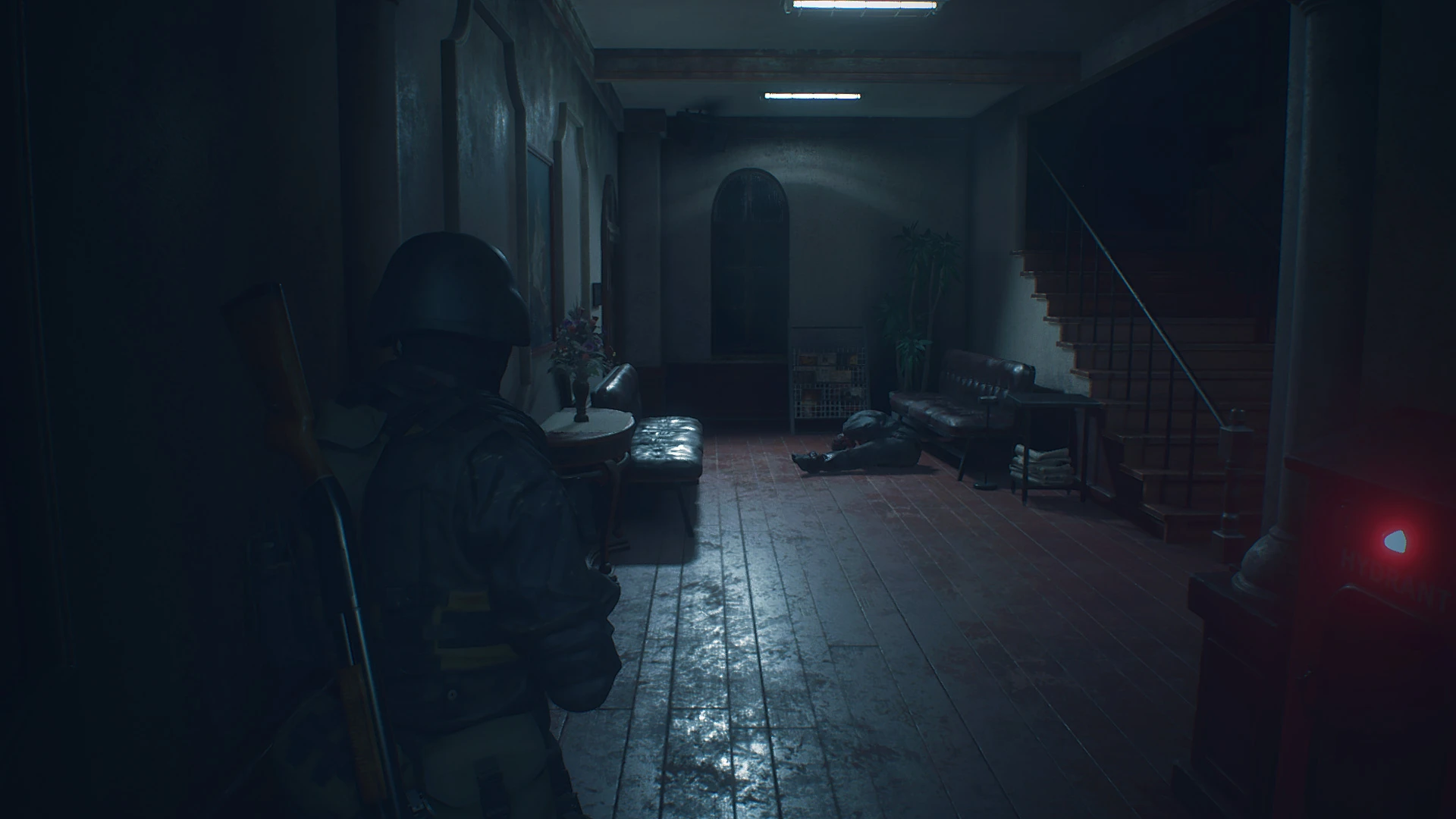
A simple Reshade preset and shaders pack for Resident Evil 2 2019
This preset would give you simple realistic mimic with smaller performance hit.
It's NOT using heavy or complex shaders (e.g AO, HDR, Ambient Light, etc); just simple shaders.
3D stereoscopic mode (Top-Bottom) also included with this simple preset.
It's based on Reshade 2.x.x (customized version). ~ NOT compatible with Reshade 3.x or Reshade 4.x
Colder colors tone, reduced that green tints from vanilla version
Note:
- This mod only can run properly in DirectX 11 mode (won't run in DirectX 12 mode)
- This mod is NOT compatible with Reshade 3.x and Reshade 4.x (please clean-up Reshade 3.x/4/x before apply this mod)
- To eliminate jaggies, please set FXAA + TAA as your default Anti-aliasing
Update:
The newer version V4. 0 based on Reshade 4. 4.x now available through my Patreon page. It's lite version and faster than older version. Dark level, light intensity, color saturation and sharpness adjustment also added into Reshade UI (Press END button to show it up). Support both API version mode (DX12 and DX11). Make sure you already update your RE2 (because RE2 DX12 have some serious issue with lighting/brightness on some certain system).
UI adjustment in version 4. 0
How to Install:
- Clean-up/Move/Backup your previous SweetFX or Reshade files (dxgi.dll/d3d11.dll and their related files and folders) if you already installed it to your game.
- Extract this file into the same folder with your game executable (re2.exe)
How to Un-install:
- Delete or move these files: d3d11.dll, ReShade.fx, and also /Reshade/ folder
Command Keys:
INSERT: Toggle Effects ON/OFF (default is ON)
F11: Activate 3D Stereoscopic Mode - Top and Bottom Format ~ Optimized for LG 3D Cinema Screen (Thanks to: Jose Negrete for this awesome shader!)
PRINT-SCREEN: Take in-game Screenshot (in PNG format and it would be save to your game root folder)
PAUSE : Toggle realtime side by side comparison (left = vanilla, right = with mod ON)
DEL : Toggle The Dark-booster ON/OFF (default is OFF)
Please turn it OFF if you feel the scene is too dark
I hope you like this!
Chris Rubino
A Reshade preset and shaders pack for Resident Evil 2 (2019) that aims for a realistic look with minimal performance impact. It also includes a 3D stereoscopic mode (Top-Bottom). With 369 endorsements and 5,592 downloads, it's a moderately popular visual enhancement for the game.
✨ Key Features
📊 Pros & Cons
✅ Pros
- Community-tested with 369 endorsements and over 5,500 downloads
- Adds a 3D stereoscopic mode, which is rare and cool for VR or 3D setups
- Performance-friendly approach, so you don't tank your FPS for visuals
⚠️ Cons
- Last updated in 2019, so it might not be compatible with the latest RE2 patches or Reshade versions
- Only offers a single preset, so you might need to tweak it to your taste
- Potential conflicts with other Reshade presets or mods that alter graphics settings
For RE2 players who want a quick visual upgrade without heavy performance loss, especially if you're into 3D or VR. Skip if you're looking for gameplay changes or if you prefer a more customizable reshade setup.
💡 Beginner Tips
- Make sure you have Reshade installed correctly before adding this preset, and place the files in the game's root folder.
- If you're using the 3D mode, check your display supports top-bottom 3D or use a VR headset that can handle it.
- Test the preset in different lighting areas of the game to see if you need to adjust the shader settings for your monitor.
📊 Mod Details
- Game
- Residentevil22019 Mods
- Author
- Chris Rubino
- Version
- 1.0
- Downloads
- 5,592
- Endorsements
- 369
- Category
- Miscellaneous
- Created
- 2/18/2019
- Updated
- 2/18/2019
🔧 How to Install Resident Evil 2 (2019) Mods
Download from Nexus Mods.
📖 Full step-by-step install guide for Resident Evil 2 (2019) →
Visit the official mod page for specific installation instructions for this mod.
🎮 Need cheat codes or console commands? Check ur gaming wiki for Resident Evil 2 (2019) commands, item IDs, and more.
Keep browsing — more Resident Evil 2 (2019) mods await