Cel-ReShade
⚪ Last updated 2019Preview
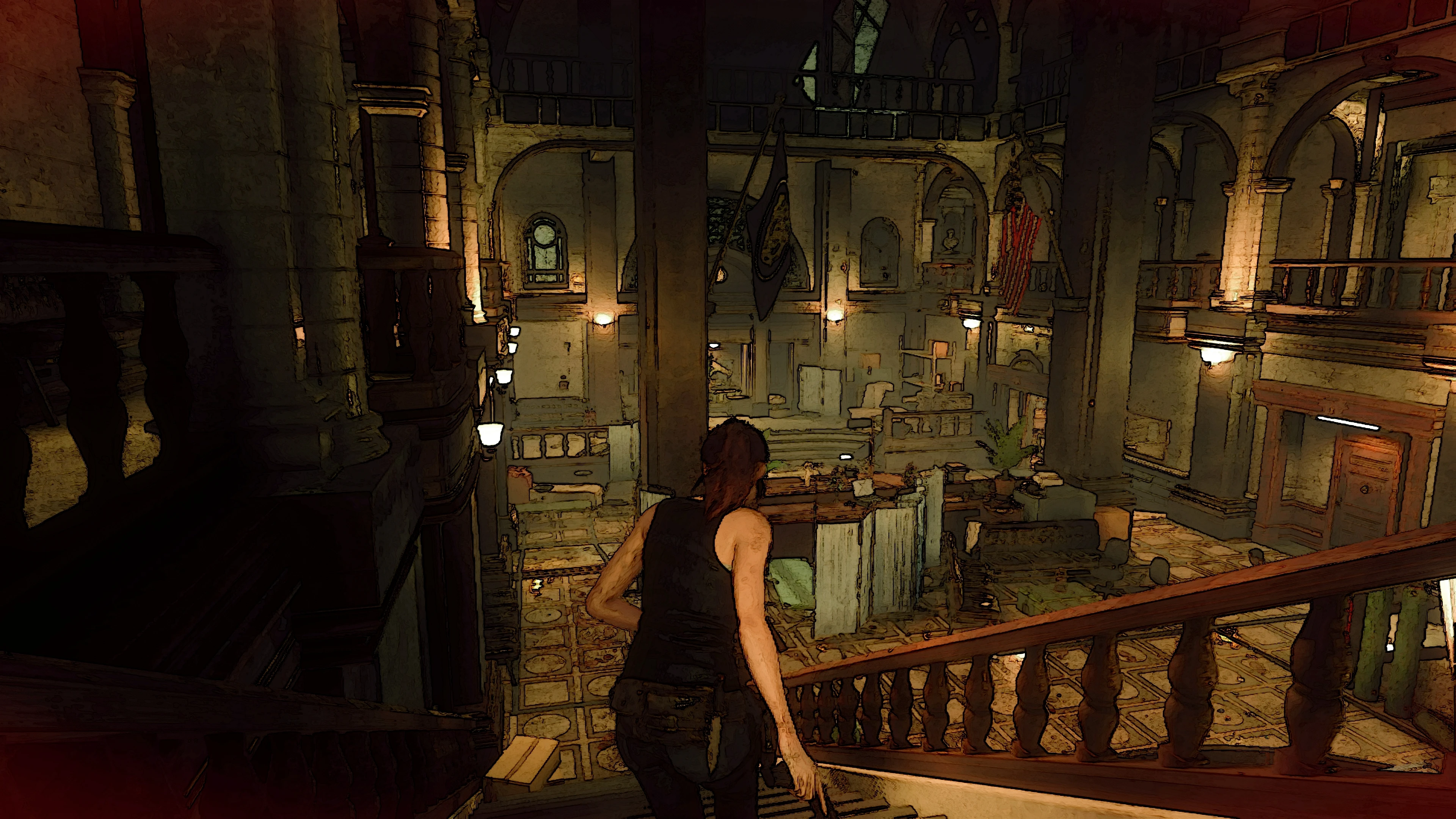
🔍 Analysis
- 👍 8.0% endorsement rate — high engagement, a strong quality signal
- 🏆 #60 of 105 Visuals mods in this game by downloads
📋 About This Mod
A ReShade preset that simulates a cel-shading effect. Can also double as a solid non-celshade preset that brings out the color and clarity of the image if you disable the main effect but still use the other effects.
z0TPwGZCg-A
INSTALLATION:
1. Install ReShade onto your re2.exe. (with the Direct3D 10+ API option)
(default location is C:\Program Files (x86)\Steam\steamapps\common\RESIDENT EVIL 2 BIOHAZARD RE2\re2.exe)
2. Make sure to choose the following effect files during installation:
Cartoon.fx
Colourfulness.fx
FineSharp.fx
MagicBloom.fx
Technicolor2.fx
You can choose others, (and I encourage anyone using ReShade to download and experiment with all of the effect files) but for the purposes of this preset, those are the only effects you need.
3. Copy "Cla's Cel-Shade.ini" into the game folder and choose it as the preset when ReShade asks. The other settings in that window can be left alone.
USAGE & TIPS:
This ReShade preset was designed on and is intended for 4K. The Cartoon effect may cause text to become unreadable at lower resolutions. The Clarity, FineSharp, and MagicBloom effects are turned off by default because they can be intensive, but you should try turning them on at least once and see if you get acceptable FPS because they really do help the screen look clearer, especially text. (my preview vid has those 3 effects turned off because I am unable to run the game at 60FPS with them on and at 4K resolution) You may also want to change your in-game Image Quality setting to 50% as the extra detail from a higher setting may cause the Cartoon effect to draw a lot of artifacts on screen. (at 4K anyway. Maybe it's safe to stay at 100% for lower resolutions because otherwise you may lose so much detail that it becomes blurry) You will also probably want to disable Motion Blur for a similar reason. (the background blurring as you move the camera may result in Cartoon.fx spitting out a messier image) If you want extra FPS, you can also change Rendering Mode to Interlaced as it actually looks fine with this ReShade preset. If your crosshair is set to white and it is hard to see, switch it to a different color. (red or green seem best)
If you don't know how to use ReShade in game, you just press Home to bring up the ReShade menu. From there, the only thing you need to worry about is the Home tab for toggling specific effects. (make sure the Performance Mode checkbox at the bottom is checked unless you plan on messing with the individual settings of each effect) Though you shouldn't need to do this as installing it as mentioned above will have these effects already turned on. The
📊 Mod Details
- Game
- Residentevil22019 Mods
- Author
- Cla
- Version
- 1.0
- Downloads
- 1,483
- Endorsements
- 118
- Category
- Visuals
- Created
- 3/27/2019
- Updated
- 3/27/2019
🔧 How to Install Resident Evil 2 (2019) Mods
Download from Nexus Mods.
📖 Full step-by-step install guide for Resident Evil 2 (2019) →
Visit the official mod page for specific installation instructions for this mod.
🎮 Need cheat codes or console commands? Check ur gaming wiki for Resident Evil 2 (2019) commands, item IDs, and more.
Keep browsing — more Resident Evil 2 (2019) mods await