PlayStation Icons Replacement
⚪ Last updated 2022⚠️ Install Order · 3 steps
Install in this order, then this mod last — most mods fail to load without their framework and dependencies in place.
Preview
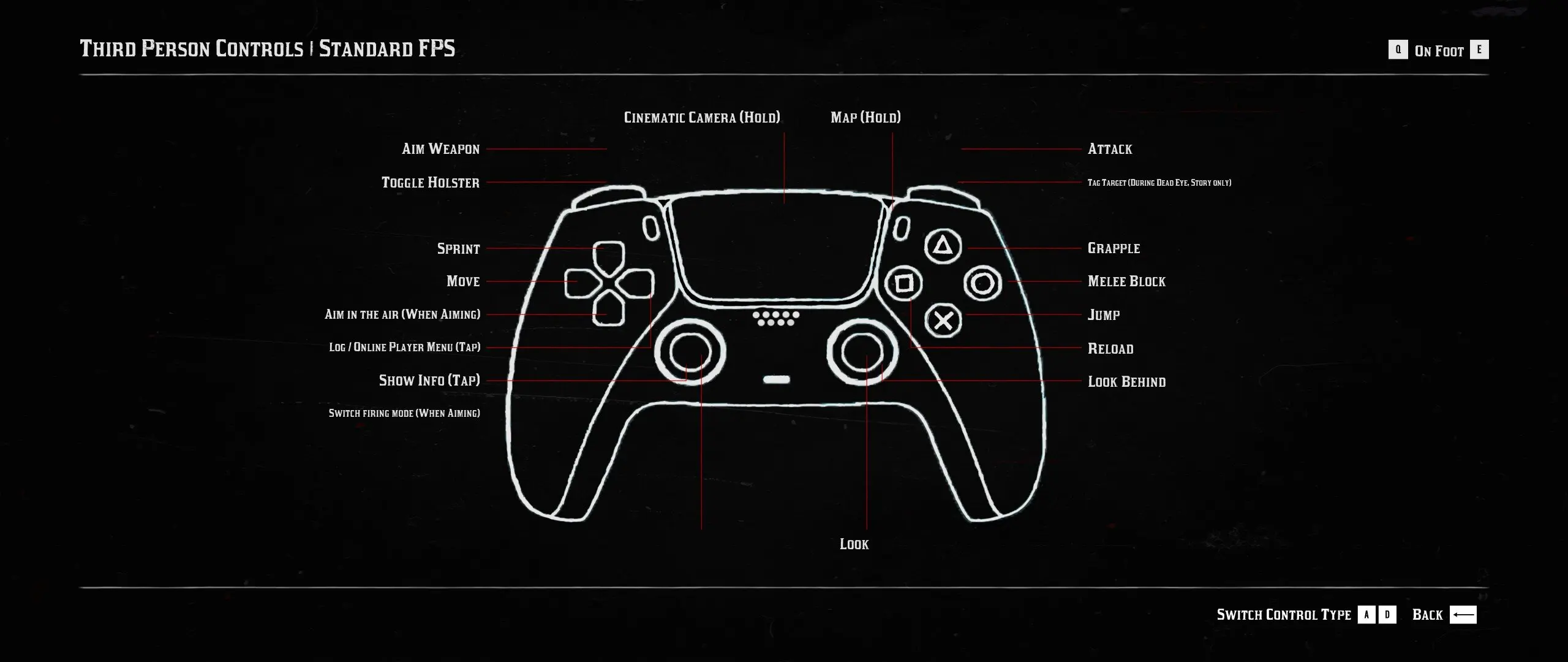
🔍 Analysis
- 👍 2.1% endorsement rate — high engagement, a strong quality signal
- 🏆 #2 of 37 User Interface mods in this game by downloads
📋 About This Mod
Red Dead Redemption 2 is supposed to have native support for PlayStation controllers and while it does, it's not perfect. Vibration doesn't work and if you use a different controller configuration on steam, you are back to Xbox button prompts. This mod simply replaces the Xbox icons in the game files with PlayStation icons, basically forcing the game to show the correct prompts.
Installation
Mod Manager
Download PlayStation Icons Replacement (LML-Ready) and install using mod manager.
Manual
Simply copy the folder "lml" into your root directory. As long as you have Lenny's Mod Loader installed, it will already been set up and you just need to drag & drop it in. That's it.
*Either option both require Lenny's Mod Loader and Scipthook!!
Link to Lenny's Mod Loader
Link to Scripthook
This mod replaces Xbox button prompts with PlayStation icons in Red Dead Redemption 2, fixing the issue where PS4/PS5 controllers show wrong prompts. It requires Lenny's Mod Loader and ScriptHook, and works with both mod manager and manual installation. With over 2,200 endorsements, it's a popular fix for PlayStation controller users.
✨ Key Features
📊 Pros & Cons
✅ Pros
- Community-approved with 2,206 endorsements and over 100k downloads
- Solves a real annoyance for PS controller users – no more Xbox prompts
- Works with both mod manager and manual install, so you can pick your style
⚠️ Cons
- Requires two separate mods (Lenny's Mod Loader and ScriptHook) to function
- Last updated in January 2022 – might not be compatible with the latest RDR2 patches
- Only affects button icons; doesn't fix vibration or other controller issues
For RDR2 players who use a PlayStation controller and are tired of seeing Xbox button prompts on screen. Also great for anyone using custom Steam controller configs that break the native PS support. Skip if you're on Xbox or keyboard/mouse – this mod won't do anything for you.
💡 Beginner Tips
- Make sure you install Lenny's Mod Loader and ScriptHook first – the mod won't work without them.
- If you're using a mod manager, grab the LML-Ready version; for manual install, just drop the 'lml' folder into your root directory.
- After installing, launch the game and check the pause menu – if you still see Xbox icons, verify that the mod files are in the right place.
📊 Mod Details
- Game
- RDR2 Mods
- Author
- vStar925
- Version
- 2.0
- Downloads
- 103,941
- Endorsements
- 2,206
- Category
- User Interface
- Created
- 5/23/2021
- Updated
- 1/11/2022
🔧 How to Install RDR2 Mods
Install Script Hook RDR2 first. Most mods go in game directory.
📖 Full step-by-step install guide for RDR2 →
Visit the official mod page for specific installation instructions for this mod.
🎮 Need cheat codes or console commands? Check ur gaming wiki for RDR2 commands, item IDs, and more.
Keep browsing — more RDR2 mods await