edge color
🟠 Updated over a year agoPreview
🔍 Analysis
- 🏆 #29 of 38 Mod mods in this game by downloads
📋 About This Mod
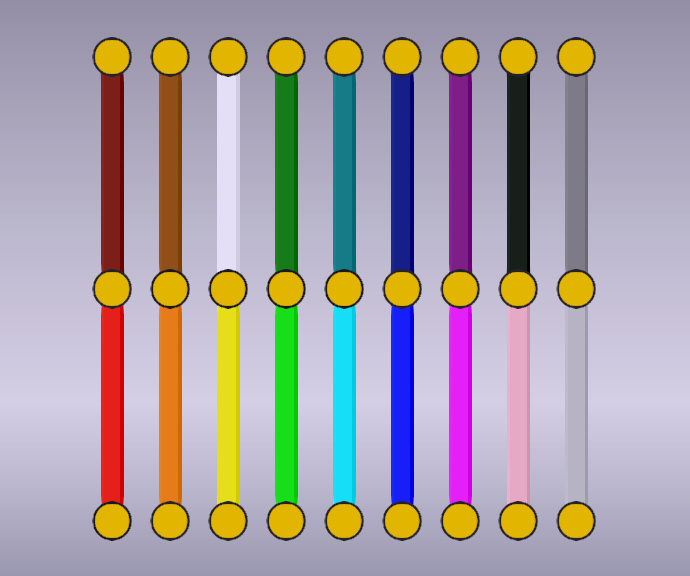
Add colors to bridge edges LeftAlt+LeftCtrl+any key to select color or color selected edge ( s ) Example: select edges and then press LeftAlt+LeftCtrl+I to make edges pink Default colors: Z: none, K: black W: white, R red, L: lime, B: blue, Y: yellow, C: cyan, F: fuchsia, E: grey, M: maroon, G: green, A: navy, V: olive, P: purple, T: teal, O: orange, S: silver, N: brown, I: pink Input to edit color (RGB, RRGGBB, #RGB, #RRGGBB (hex) and some names are accepted) Add color by selecting unset key and then input color Some console commands (open console with `): colormode : set color to be temporary or permanent (default: temporary) colorchange : change one color to another colordata : export color data colorclear : clear permanent colors You can change some settings in steamapps > workshop > content > 1850160 > 3471568521 > OnModLoad.lua (Default on Windows: %ProgramFiles(x86)%\Steam\steamapps\workshop\content\1850160\3471568521\OnModLoad.lua ) Discord: @than.h
📊 Mod Details
- Game
- Poly Bridge 3 Mods
- Author
- 76561199519962192
- Version
- N/A
- Downloads
- 90
- Endorsements
- 0
- Category
- Mod
- Created
- 4/27/2025
- Updated
- 4/27/2025
🔧 How to Install Poly Bridge 3 Mods
Subscribe on Steam Workshop. Mods auto-download and install. Launch the game to activate.
📖 Full step-by-step install guide for Poly Bridge 3 →
Visit the official mod page for specific installation instructions for this mod.
🎮 Need cheat codes or console commands? Check ur gaming wiki for Poly Bridge 3 commands, item IDs, and more.
Keep browsing — more Poly Bridge 3 mods await