CraftMaterialHelper / クラフト素材ヘルパー
🟡 Updated this year⚠️ Install Order · 1 step
Install in this order, then this mod last — most mods fail to load without their framework and dependencies in place.
Preview
🔍 Analysis
- ✅ Updated 268 days after the latest game patch — actively maintained
📋 About This Mod
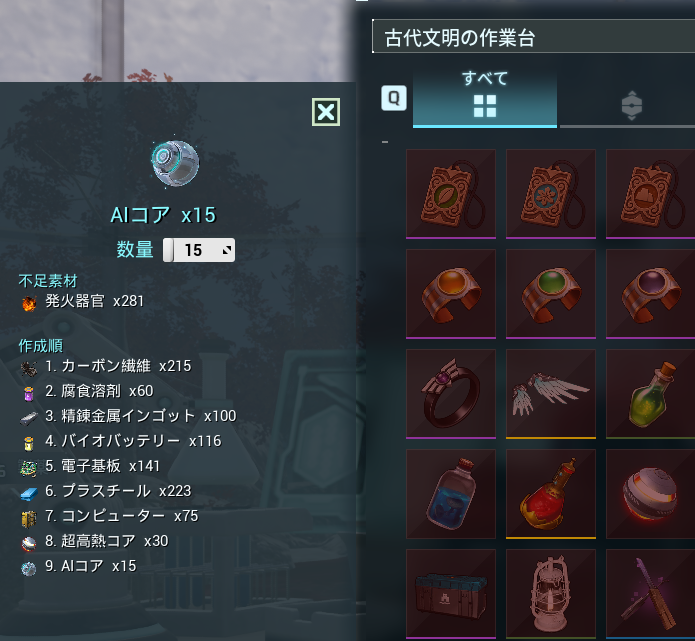
### Craft Material Helper Craft Material Helper displays the required materials and crafting order for the item currently selected in the Palworld crafting UI. This mod does not modify recipes, item counts, inventory, or crafting behavior. It is designed to keep the game balance intact while helping you avoid forgetting intermediate materials. ### Required Mods This mod requires the following mods/loaders: - UE4SS Experimental (Palworld) This mod also uses BPModLoaderMod and BPML_GenericFunctions, which are included with UE4SS. Please do not disable or delete them. ### Features - Shows a dedicated helper UI beside the crafting screen. - Detects the selected craft item and amount. - Aggregates materials from base storage, guild storage, food storage, and player inventory. - Recursively expands intermediate recipes. - Shows required materials as current stock / required count. - Shows a consolidated intermediate crafting order. - Displays item icons. - Supports Japanese and English. - Supports configurable hotkey. ### How To Use 1. Open a crafting screen. 2. Select the item you want to craft. 3. Press the hotkey. The default is `F5`. 4. The Craft Material Helper panel shows the required materials and crafting order. 5. To plan an amount that cannot currently be crafted, enter a value from 1 to 9999 in the helper panel's Quantity field and press the hotkey again. ### Configuration Edit `\steamapps\common\Palworld\Mods\NativeMods\UE4SS\Mods\CraftMaterialHelper\Scripts\craft_material_helper_config.lua`. ```lua language = "en" -- "ja" or "en" show_all_required_materials = false hotkey = "F5" hotkey_modifier = nil -- nil / "CTRL" / "SHIFT" / "ALT" debug_log = false ``` ### Notes - This mod does not change recipes, item counts, inventory, or craft results. - After a Palworld update, recipe data or UI references may need to be updated. - It may conflict with other UI mods or mods using the same hotkey. - Multiplayer/server environments should be tested carefully before publi
📊 Mod Details
- Game
- Palworld Mods
- Author
- 76561198812234365
- Version
- N/A
- Downloads
- 27
- Endorsements
- 0
- Category
- Utilities, User Interface
- Created
- 8/16/2026
- Updated
- 8/18/2026
🔧 How to Install Palworld Mods
Subscribe on Steam Workshop. Mods auto-download and install. Launch the game to activate.
📖 Full step-by-step install guide for Palworld →
Visit the official mod page for specific installation instructions for this mod.
🎮 Need cheat codes or console commands? Check ur gaming wiki for Palworld commands, item IDs, and more.
Keep browsing — more Palworld mods await