Hotkey Consumables
🟡 Updated this year⚠️ Install Order · 1 step
Install in this order, then this mod last — most mods fail to load without their framework and dependencies in place.
Preview
🔍 Analysis
- 👍 0.0% endorsement rate
- ✅ Updated 254 days after the latest game patch — actively maintained
- 🏆 #16 of 64 UE4SS, Utilities, User Interface mods in this game by downloads
📋 About This Mod
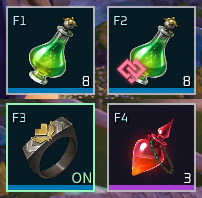
Features Heal yourself - Exactly what it says on the tin! Does nothing if you're already topped up or have a heal status. Uses your stonger potions first. Heal your weakest pal - Automatically detects the lowest percent HP pal on your team and applies a potion to them. Just like the self heal skips over pals already healed/healing. Revive your dead pals Chug tree water Equip/unequip Mercy accessories Each at the touch of a button! No pesky inventory menu needed. Additional features: Uses the in-game message system for item usage messages Support for mod menus DarnMenu and Mod Options Framework Fully client-side Requirements UE4SS Exprimental (Palworld) Usage F1 - Heal self F2 - Heal lowest pal F3 - Toggle Mercy accessory F4 - Revive pal F5 - Use World Tree Holy Water F6 - Toggle hotbar overlay on/off Shift + F6 - Toggle Edit Mode on/off. Use this to reposition and resize the hotbar to your liking. Shift + F6 again to save and close. Ctrl + F6 - Reload settings.ini. With the exception of the keybinds, you can reload every other option in settings.ini without having to restart the game. Configuration If you have DarnMenu or Mod Options Framework installed, all these settings can be updated in-game through their respective menus. Otherwise, all settings can be reloaded without having to restart the game by pressing Ctrl+F6 (or whatever key you bound the overlay to). Keybinds Set a key to "none" (or leave it blank) to disable that group. A key may carry ONE modifier: Shift+F1 / Ctrl+F1 / Alt+F1 (case-insensitive). The Overlay key takes NO modifier -- Shift/Ctrl+it are the editor/reload. Hotkey1 = F1 ; Consumable group 1 -- Potions Hotkey2 = F4 ; Consumable group 2 -- Pal Revive (revives a downed party Pal) Hotkey3 = F5 ; Consumable group 3 -- World Tree Holy Water Equip1 = F3 ; Accessory equip/swap group 1 -- Mercy HealPal = F2 ; Heal the most-hurt party Pal (skips the target-select popup) Overlay = F6 ; Show/hide (Shift+key = edit layout, Ctrl+key = reload c
📊 Mod Details
- Game
- Palworld Mods
- Author
- 76561198035870719
- Version
- N/A
- Downloads
- 2,502
- Endorsements
- 0
- Category
- UE4SS, Utilities, User Interface
- Created
- 7/29/2026
- Updated
- 8/3/2026
🔧 How to Install Palworld Mods
Subscribe on Steam Workshop. Mods auto-download and install. Launch the game to activate.
📖 Full step-by-step install guide for Palworld →
Visit the official mod page for specific installation instructions for this mod.
🎮 Need cheat codes or console commands? Check ur gaming wiki for Palworld commands, item IDs, and more.
Keep browsing — more Palworld mods await