Perfect Placement
🟡 Updated this year⚠️ Install Order · 1 step
Install in this order, then this mod last — most mods fail to load without their framework and dependencies in place.
Preview
🔍 Analysis
- 👍 0.0% endorsement rate
- ✅ Updated 268 days after the latest game patch — actively maintained
- 🏆 #1 of 5 UE4SS, Gameplay, Utilities, User Interface mods in this game by downloads
📋 About This Mod
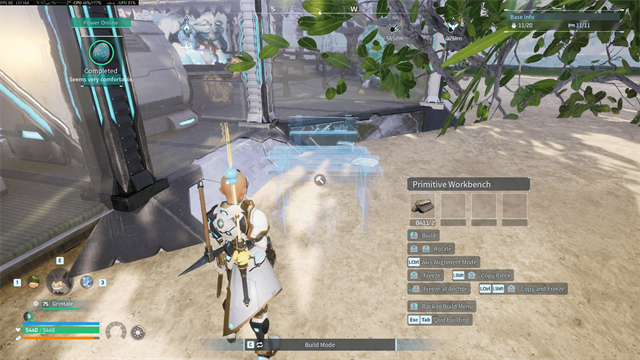
Perfect Placement Freeze the preview. Walk around it. Fine-tune its position. Experimental Steam Workshop beta for Palworld 1. 0 on Windows. HARD REQUIREMENT FOR THE STEAM WORKSHOP VERSION: Subscribe to and enable UE4SS Experimental (Palworld). An existing manually installed UE4SS does not satisfy Palworld's Workshop dependency or replace this requirement. Perfect Placement lets you freeze a live construction preview in world space, walk around it, and adjust its horizontal or vertical position and rotation in precise increments. It is intended for placements that are almost right but difficult to achieve with the normal camera trace or snapping controls. Current beta features Freeze and release a preview while keeping normal player and camera movement available. Move horizontally or vertically in configurable centimeter increments. Rotate precisely around the captured build-piece pivot. Camera-aware controls that remain aligned to the piece's own axes. Reset instantly to the transform captured when the preview was frozen. Eyedropper to copy the targeted build piece into the active preview. Copy and freeze to transfer the targeted piece's position and rotation into a replacement preview and freeze it there. Requirements Palworld 1. 0 for Windows through Steam UE4SS Experimental (Palworld) is a hard requirement for the Steam Workshop version. It must be subscribed to and enabled through Palworld's Mod Management screen. Optional: DarnMenu 1. 6. 2 or newer for in-game Mod Options. DarnUI is installed as DarnMenu's own dependency. Keyboard and mouse controls are included. Full gamepad support requires the optional native bridge from Nexus Mods. The Workshop item contains the UE4SS Lua component and one regular resource PAK. It intentionally does not include a native DLL. Enable the mod Subscribe to Perfect Placement and UE4SS Experimental (Palworld). Launch Palworld and open Options → Mod Management. Enable UE4SS Experimental and Perfect Placement. Both are required. Apply
📊 Mod Details
- Game
- Palworld Mods
- Author
- 76561198042546344
- Version
- N/A
- Downloads
- 2,123
- Endorsements
- 0
- Category
- UE4SS, Gameplay, Utilities, User Interface
- Created
- 7/21/2026
- Updated
- 8/17/2026
🔧 How to Install Palworld Mods
Subscribe on Steam Workshop. Mods auto-download and install. Launch the game to activate.
📖 Full step-by-step install guide for Palworld →
Visit the official mod page for specific installation instructions for this mod.
🎮 Need cheat codes or console commands? Check ur gaming wiki for Palworld commands, item IDs, and more.
Keep browsing — more Palworld mods await