PlayersOnMap
🟡 Updated this year⚠️ Install Order · 1 step
Install in this order, then this mod last — most mods fail to load without their framework and dependencies in place.
Preview
🔍 Analysis
- 👍 0.0% endorsement rate
- ✅ Updated 247 days after the latest game patch — actively maintained
- 🏆 #15 of 63 UE4SS, Utilities, Gameplay mods in this game by downloads
📋 About This Mod
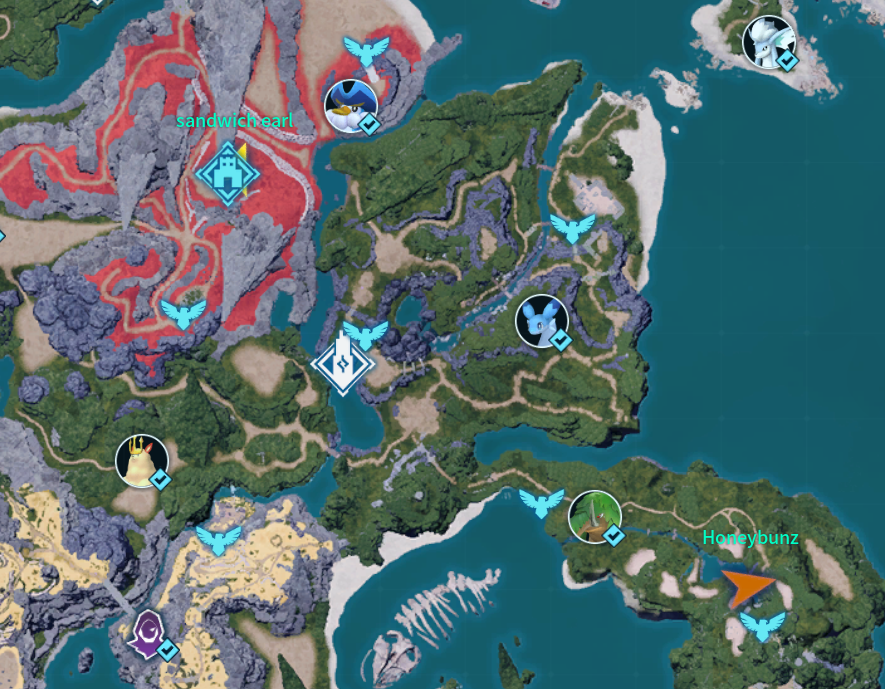
*Client side mod works for 1.0 I made this for my own server because I wanted to see where everyone was without being in the same guild, and figured other people probably want the same thing. What This Does Shows every connected player's marker on the world map, regardless of guild. No more losing track of friends who aren't in your guild, or having to guess where someone is based on chat messages. Features - Player markers show up on the map for everyone connected, not just your guild - Name labels above each marker, toggleable - Marker color cycling (Red, Green, Orange?) so you can tell players apart from guild members at a glance - Built to be lightweight: markers are styled as they're created rather than by constantly scanning the whole map, so it shouldn't add noticeable overhead Hotkeys ALT+8 - toggle name labels ALT+9 - cycle remote player marker color All of this is configurable in config.lua, including the hotkey bindings themselves if you want different keys. Requirements UE4SS-Palworld Manual installation or automatic from Workshop Manual install - Download UE4SS-Palworld from https://github.com/Okaetsu/RE-UE4SS/releases/download/experimental-palworld/UE4SS-Palworld.zip - Extract it to \steamapps\common\Palworld\Pal\Binaries\Win64 - Done Automatic install - Subscribe to the UE4SS Workshop item - Enable it in-game under Options -> Mod Management - Done Make sure UE4SS itself is enabled in Mod Management, or PlayersOnMap won't load. Notes This only affects what you see on your own map. It doesn't change guild permissions, party settings, or anything else about how guilds work. purely visual.
*Client side mod works for 1. 0 I made this for my own server because I wanted to see where everyone was without being in the same guild, and figured other people probably want the same thing. What This Does Shows every connected player's marker on the world map, regardless of guild. No more losing track of friends who aren't in your guild, or having to guess where someone is based on chat messages. Features - Player markers show up on the map for everyone connected, not just your guild - Name labels above each marker, toggleable - Marker color cycling (Red, Green, Orange?) so you can tell players apart from guild members at a glance - Built to be lightweight: markers are styled as they're created rather than by constantly scanning the whole map, so it shouldn't add noticeable overhead Hotkeys ALT+8 - toggle name labels ALT+9 - cycle remote player marker color All of this is configurable in config.lua, including the hotkey bindings themselves if you want different keys. Requirements UE4SS-Palworld Manual installation or automatic from Workshop Manual install - Download UE4SS-Palworld from https://github.com/Okaetsu/RE-UE4SS/releases/download/experimental-palworld/UE4SS-Palworld.zip - Extract it to \steamapps\common\Palworld\Pal\Binaries\Win64 - Done Automatic install - Subscribe to the UE4SS Workshop item - Enable it in-game under Options -> Mod Management - Done Make sure UE4SS itself is enabled in Mod Management, or PlayersOnMap won't load. Notes This only affects what you see on your own map. It doesn't change guild permissions, party settings, or anything else about how guilds work. purely visual.
📊 Mod Details
- Game
- Palworld Mods
- Author
- 76561198069889679
- Version
- N/A
- Downloads
- 5,194
- Endorsements
- 0
- Category
- UE4SS, Utilities, Gameplay
- Created
- 7/20/2026
- Updated
- 7/27/2026
🔧 How to Install Palworld Mods
Subscribe on Steam Workshop. Mods auto-download and install. Launch the game to activate.
📖 Full step-by-step install guide for Palworld →
Visit the official mod page for specific installation instructions for this mod.
🎮 Need cheat codes or console commands? Check ur gaming wiki for Palworld commands, item IDs, and more.
Keep browsing — more Palworld mods await