Background Crafting
🟡 Updated this year⚠️ Install Order · 1 step
Install in this order, then this mod last — most mods fail to load without their framework and dependencies in place.
Preview
🔍 Analysis
- 👍 0.0% endorsement rate
- ✅ Updated 236 days after the latest game patch — actively maintained
- 🏆 #22 of 64 UE4SS, Utilities, User Interface mods in this game by downloads
📋 About This Mod
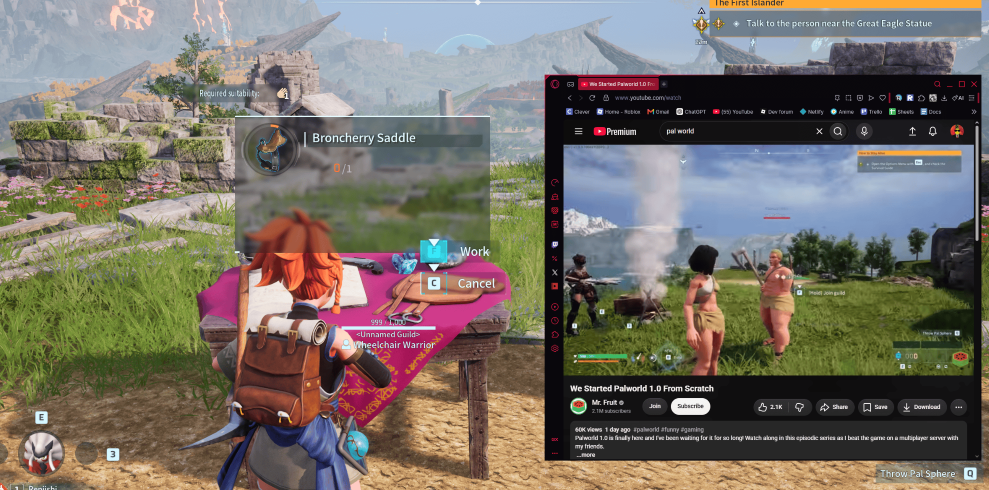
Background Crafting Keep crafting, building, repairing, and other supported toggle interactions running while you open menus or tab out of Palworld. Normally, Palworld cancels an active interaction when you open certain menus or switch away from the game. This mod detects that interruption and restores the interaction so your work can continue. This is an extention to the toggle hold setting to allow it to continue while not tabbed Game Settings -> Keyboard -> Single button press for hold interactions - > On Features • Keeps crafting active while the inventory is open • Keeps interactions active in the Technology menu • Keeps interactions active in the pause menu • Continues crafting and building while Tabbed Out • Works with crafting stations, building, repairing, and other supported toggle interactions • Restores the selected interaction state • You can still stop the interaction normally • No configuration required Current Version 1. 0. 0 Initial Workshop release. Setup 1. Subscribe to this mod. 2. Subscribe to UE4SS Experimental (Palworld) under Required Items. 3. Launch Palworld. 4. Open Options → Mod Management. 5. Enable both UE4SS Experimental and Background Crafting. 6. Restart the game. No manual file installation or configuration is required. How It Works When Palworld opens a menu or loses focus, it normally ends the active crafting or building interaction. Background Crafting detects interruptions caused by: • Opening the inventory • Opening the Technology menu • Opening the pause menu • Alt-Tabbing away from the game • A normal manual interaction cancel Automatic interruptions are restored. Manual cancellations are left alone. Because Palworld fully ends the interaction before the mod can restore it, the crafting animation may briefly replay when opening a menu or returning to the game. Your crafting or building progress should continue normally. Controls The mod automatically uses Palworld’s existing interaction behavior. • Start crafting or buildin
📊 Mod Details
- Game
- Palworld Mods
- Author
- 76561199179243433
- Version
- N/A
- Downloads
- 1,277
- Endorsements
- 0
- Category
- UE4SS, Utilities, User Interface
- Created
- 7/16/2026
- Updated
- 7/17/2026
🔧 How to Install Palworld Mods
Subscribe on Steam Workshop. Mods auto-download and install. Launch the game to activate.
📖 Full step-by-step install guide for Palworld →
Visit the official mod page for specific installation instructions for this mod.
🎮 Need cheat codes or console commands? Check ur gaming wiki for Palworld commands, item IDs, and more.
Keep browsing — more Palworld mods await