Nudge Until Totally Satisfied
🟡 Updated this year⚠️ Install Order · 1 step
Install in this order, then this mod last — most mods fail to load without their framework and dependencies in place.
Preview
🔍 Analysis
- 👍 0.0% endorsement rate
- ✅ Updated 245 days after the latest game patch — actively maintained
- 🏆 #8 of 128 UE4SS, Gameplay mods in this game by downloads
📋 About This Mod
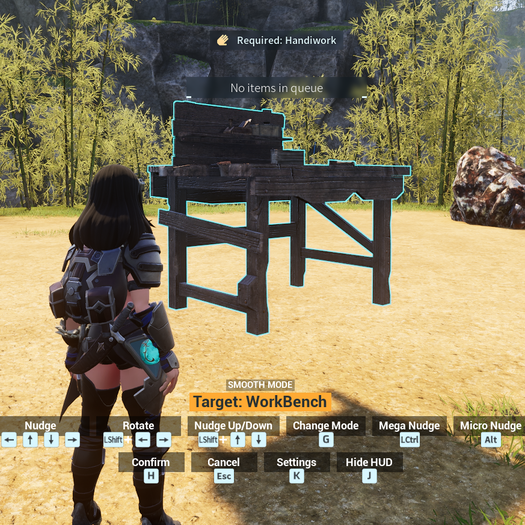
The mod adds a way for you to select an existing structure (such as Workbench, Walls, Roofs, etc) and Nudge it to any direction, facilitating in the alignment of them. To use you simply look at a structure and press H, it will select the build and open the menu with the instructions of how to move it, once finished you just confirm the change by pressing H again, if you changed your mind you can press ESC instead and it will cancel and reset the structure to the location it was before you moved. Important After you subscribe to the mod, do these steps to enable the mod: 1. Launch the game and wait until you get to the title screen. 2. Go to Options > Mod Management and make sure Enable Mod is set to ON. 3. Make sure the checkbox next to Nudge Until Totally Satisfied is CHECKED 4. Click the blue Save button and the game will now restart. 5. Once the game starts up again, Nudge Until Totally Satisfied should now be enabled. Controls ←↑↓→: Nudge in 4 directions. Shift + ↑↓: Nudge Up/Down. Shift + ← →: Rotate. Ctrl: Mega Nudge, same as Nudge but move faster/longer. Alt: Micro Nudge, same as Nudge but move slower/shorter. G: Change Mode, changes between Smooth Mode and Grid Mode. U: Direction Mode, changes the direction the building moves to be either based on the player's camera angle or the Cardinal Directions (N/S/E/W). Y: Snap to Grid, makes the selected structure rotates and snap aligned to the cardinal directions. J: Hide HUD. K: Open Settings for you to change the values of the speed/distance of each function. H: Confirm ESC: Cancel I don't support Multiplayer/Dedicated servers, if the mod works it works, if it doesn't you're on your own. Now, while it doesn't work in servers or non host players in coop, you can still use it to achieve what you want with a workaround. Let's say you want to move a foundation to a specific place in your base on a server, if you do that it will reset, but if you use the mod to move your foundation where you want, build a second found
📊 Mod Details
- Game
- Palworld Mods
- Author
- 76561198038830468
- Version
- N/A
- Downloads
- 23,356
- Endorsements
- 0
- Category
- UE4SS, Gameplay
- Created
- 1/20/2026
- Updated
- 7/25/2026
🔧 How to Install Palworld Mods
Subscribe on Steam Workshop. Mods auto-download and install. Launch the game to activate.
📖 Full step-by-step install guide for Palworld →
Visit the official mod page for specific installation instructions for this mod.
🎮 Need cheat codes or console commands? Check ur gaming wiki for Palworld commands, item IDs, and more.
Keep browsing — more Palworld mods await