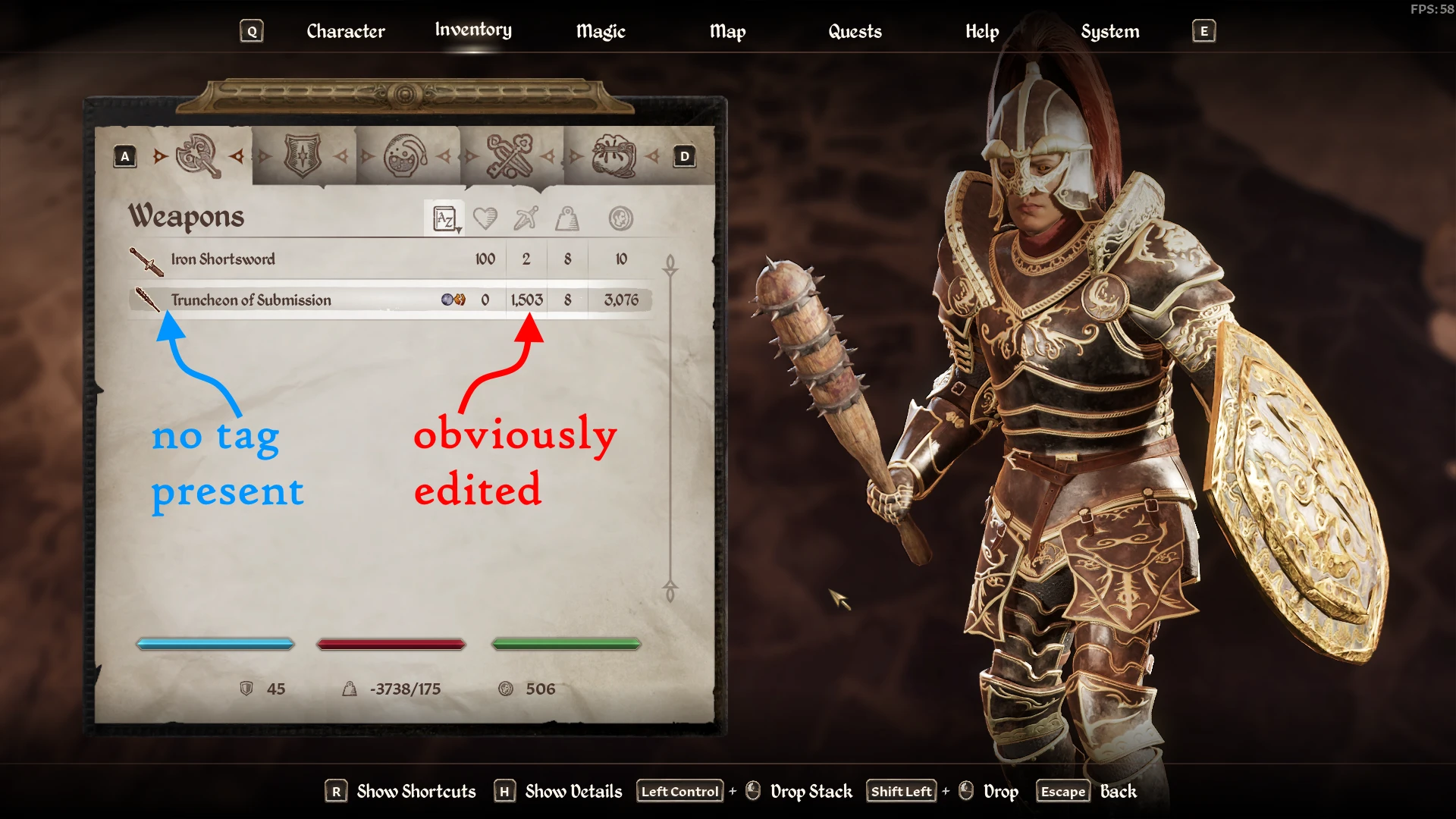
NL-Tag Remover
🟡 Updated this yearPreview
🔍 Analysis
- 👍 1.7% endorsement rate — high engagement, a strong quality signal
- 🏆 #4 of 183 User Interface mods in this game by downloads
📋 About This Mod
When you add or change texts using ESP plugins located in <GameRoot>\OblivionRemastered\Content\Dev\ObvData\Data you see the game adds tag to them, this probably means because no UE strings are loaded for your items.
How to install - Steam
- Download and install OBSE64 > Its EXE and DLL should be placed inside <GameRoot>\OblivionRemastered\Binaries\Win64 directory.
- Download and install the mod > its DLL and PDB should be placed inside <GameRoot>\OblivionRemastered\Binaries\Win64\OBSE\Plugins directory.
- Full folders structure starting from the game root is provided to clarify the path.
<GameRoot>
- OblivionRemastered.exe
- OblivionRemastered
- OblivionRemastered-Win64-Shipping.exe
- obse64_loader.exe / this is OBSE64 you always launch
- NLTagRemover.dll / mod's plugin
- NLTagRemover.pdb / mod's symbols (optional, you can remove it)
How to install - GamePass
- Download and install Ultimate ASI Loader > Its DLL should be placed inside <Content>\OblivionRemastered\Binaries\WinGDK directory.
- Download and install the mod > its ASI and PDB should be placed inside <Content>\OblivionRemastered\Binaries\WinGDK directory.
- Full folders structure starting from the <Content> is provided to clarify the path.
<Content>
- GameLaunchHelper.exe
- OblivionRemastered
- OblivionRemastered-WinGDK-Shipping.exe
- version.dll / this is Ultimate ASI Loader, filename can be different
- NLTagRemover.asi / mod's plugin
- NLTagRemover.pdb / mod's symbols (optional, you can remove it)
Support
- The latest Steam and GamePass versions are supported.
- The plugin will probably require update if the game updates. In that case, please, be patient.
- Big thanks to daytripping for the GamePass version tests.
NL-Tag Remover is a lightweight UI mod for Skyrim that strips the [plugin name] tag from items added or changed by ESP plugins, cleaning up inventory and crafting menus. With 3,875 endorsements and 223,849 downloads, it's a popular quality-of-life fix for modded playthroughs, last updated in February 2026.
✨ Key Features
📊 Pros & Cons
✅ Pros
- Huge download count (223k) and solid endorsements (3.8k) show it's a trusted fix.
- Does exactly one thing—cleans up your inventory UI—no bloat.
- Updated recently (Feb 2026), so it's likely compatible with current Skyrim versions.
⚠️ Cons
- If you use mods that add tags intentionally, this might strip them all—no config options mentioned.
For Skyrim modders who are tired of seeing [ModName] tags cluttering their inventory and crafting menus. If you run a heavily modded load order and want a cleaner UI, this is a no-brainer. Skip if you actually like seeing which mod an item comes from, or if you need granular control over what gets stripped.
💡 Beginner Tips
- Make sure to place this mod late in your load order so it can process all ESP-tagged items.
- If you use a mod manager like Vortex or MO2, just download and enable—no manual file placement needed.
- Test in a save with many modded items to see the effect immediately; if something looks off, check your load order.
📊 Mod Details
- Game
- Oblivionremastered Mods
- Author
- Meridiano
- Version
- 1.3.3
- Downloads
- 223,849
- Endorsements
- 3,875
- Category
- User Interface
- Created
- 4/24/2025
- Updated
- 2/24/2026
🧩 Commonly Used Together
Users add these mods to the same collections — a real compatibility signal, not an AI guess.
🔧 How to Install Oblivion Remastered Mods
Download from Nexus Mods.
📖 Full step-by-step install guide for Oblivion Remastered →
Visit the official mod page for specific installation instructions for this mod.
🎮 Need cheat codes or console commands? Check ur gaming wiki for Oblivion Remastered commands, item IDs, and more.
Keep browsing — more Oblivion Remastered mods await