Update My Statue
⚪ Last updated 2008⚠️ Install Order · 2 steps
Install in this order, then this mod last — most mods fail to load without their framework and dependencies in place.
Preview
🔍 Analysis
- 👍 4.6% endorsement rate — high engagement, a strong quality signal
- 🏆 #202 of 308 Gameplay Effects and Changes mods in this game by downloads
📋 About This Mod
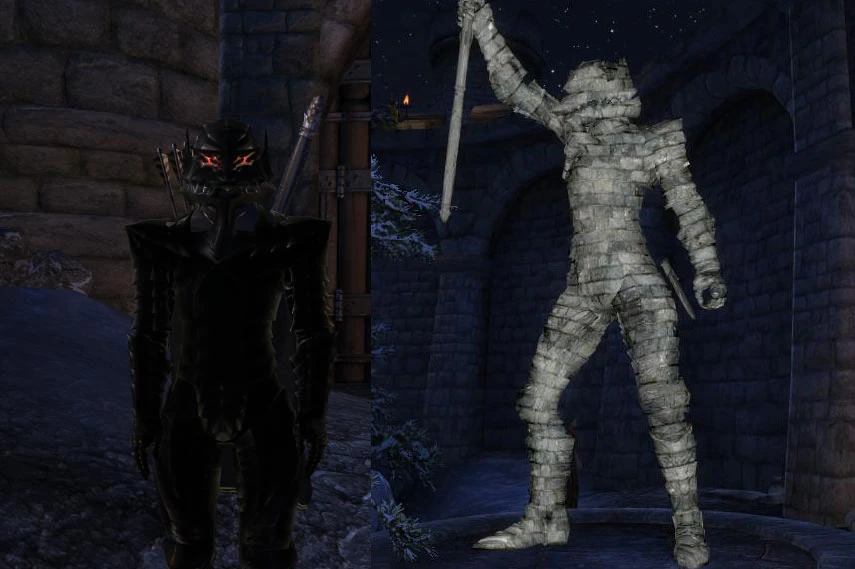
This mod will allow you to update the appearance of your statue at Bruma. I created this because a lot of people (myself included) had there statue turn out like garbage because you didn\'t even know that you a) had a statue. b) didn\'t know beforehand when your statue was created so you could dress it properly. To update your statue go to the east Bruma gate where you statue is and activate the statue\'s base, you\'ll see the following options: Update My Statue - Updates your statue\'s appearance or replace the statue if it disappeared or the game killed it. Use Storage - Opens a perfectly safe container to store your equipment. You\'ll only see the best equipment in your inventory equipped onto the statue so use this container so you don\'t have to toss your gear on the ground. Options - When you click on options you\'ll get another menu where you can turn the statue\'s stone texture on/off, turn the new stone texture on/off, increased/decrease the statue\'s size and change where the statue is facing. Done - Exits the menu. -Extract \"Update My Statue.zip\" into your \"Bethesda Softworks\\Oblivion\\Data\" folder. -Start the Oblivion Launcher. -Click \"Data Files\". -Find and tick \"Update My Statue.esp\" -Click \"OK\" and you\'re ready to play! Simply replace the existing version with the new version and make sure you have removed ALL items from the statue\'s storage or they might all disappear. -You can install and run this mod before or after you get your statue, it\'s perfectly compatible. -May take a few seconds for the statue\'s texture to turn off. 1. 30 -Improved statue update method. -The statue\'s texture, angle and scale are now remembered when you update the statue. -You can no longer use the statue while in combat to escape from guards/monsters ect. -Made the statue immune to more things (just incase!). -Vampirism will now get removed from the statue because of a game bug that causes a vampire\'s face to reset to the default (quite ugly if your female and the statue ends up with a male face). -Fixed where re-entering Bruma caused the statue to reset back to the default facing angle. 1. 21 -Removed debug messages (whoops!). 1. 20 -Added \"Options\" menu with some nice statue tweaking things to do. -Added new statue texture. -After you have finished with the statue\'s storage you\'ll be brought back to the main menu instead of being dumped out. -Changed statue updating method again. -Integrated Statue Fixer.esp into the main plugin to fix a freezing issue and because I solved a problem that made me create a separate plugin in the first place. -Removed Statue Fixer.esp. -Improved script. 1. 13 -Added a fix for some very rare cases where the statue will up and died for no apparent reason (games fault not mine!) and a big thanks to Razerz for sending me his game save allowing me to find this problem! 1. 12 -Made it a bit more pr
Update My Statue lets Oblivion players refresh the appearance of their statue in Bruma. Created because many players, including the author, ended up with an ugly statue without realizing they had one or how to improve it. A simple quality-of-life fix for a common oversight.
✨ Key Features
📊 Pros & Cons
✅ Pros
- Solid community support with over 1,000 endorsements.
- Fixes a real annoyance for players who ended up with a bad-looking statue.
- Simple concept that does exactly what it says.
⚠️ Cons
- Last updated in 2008 — may not work with newer Oblivion versions or mod setups.
- Very niche feature — only affects the Bruma statue, so if you don't care about that, it's useless.
For Oblivion players who want to fix an ugly statue in Bruma without starting over. If you're a completionist or care about your character's legacy, this is a handy tool. Skip if you're looking for broader gameplay changes — this is purely cosmetic.
💡 Beginner Tips
- Make sure to place the mod file in your Oblivion Data folder and activate it in the launcher.
- If you're using a mod manager like OBMM or Wrye Bash, you can install it through that for easier management.
- Test the mod after your statue is created — it should let you update its appearance without needing to reload an old save.
📊 Mod Details
- Game
- Oblivion Mods
- Author
- Unknown
- Version
- 1.30
- Downloads
- 21,819
- Endorsements
- 1,014
- Category
- Gameplay Effects and Changes
- Created
- 4/23/2006
- Updated
- 1/7/2008
🔗 Required By 1 Mod
These mods list this mod as a dependency.
🔧 How to Install Oblivion Mods
Download from Nexus.
📖 Full step-by-step install guide for Oblivion →
Visit the official mod page for specific installation instructions for this mod.
🎮 Need cheat codes or console commands? Check ur gaming wiki for Oblivion commands, item IDs, and more.
Keep browsing — more Oblivion mods await