Unique Signs
⚪ Last updated 2009⚠️ Install Order · 2 steps
Install in this order, then this mod last — most mods fail to load without their framework and dependencies in place.
Preview
🔍 Analysis
- 👍 1.3% endorsement rate — high engagement, a strong quality signal
- 🏆 #147 of 485 Models And Textures mods in this game by downloads
📋 About This Mod
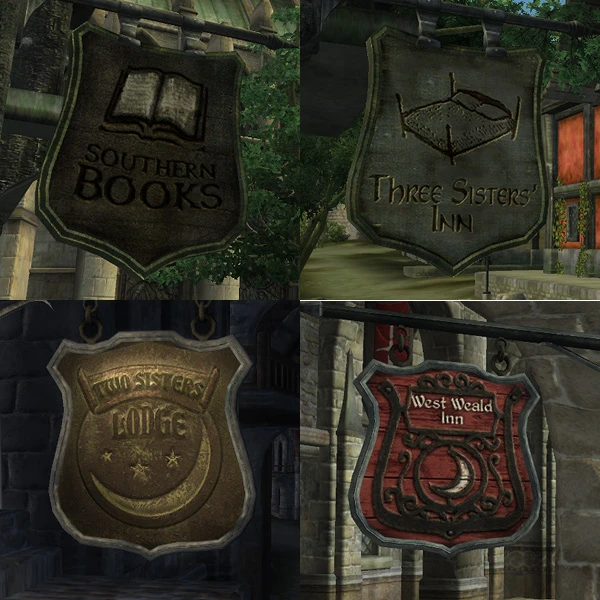
New textures for most signs of inns, shops, stables etc. Install by extracting the zip into your Oblivion\\Data\\ folder. Read up on the archive invalidation issue if you\'re new to modding: http://cs.elderscrolls.com/constwiki/index.php/Oblivion_Mods_FAQ#Archive_Invalidation Looking at vanilla Oblivion shop signs, it seems as if the emperor had set an official template that all shopkeepers must follow when having their signs made. In my opinion the similarity is acceptable in the Imperial City, but the others definitely needed some variation(except the ones in Chorrol, which look great). 3 July 2009 - Updated with the help of throttlekitty\'s excellent Keep Details profiles for Nvidia\'s . DDS Photoshop utility. Textures are now sharper when viewed at a distance or at an angle.
Unique Signs by Khavaz replaces the default sign textures for inns, shops, stables, and other establishments in Oblivion with new, unique designs. With 1,321 endorsements and over 103,000 downloads, this classic texture mod remains a popular choice for players seeking visual variety in the game's towns and cities.
✨ Key Features
📊 Pros & Cons
✅ Pros
- Community favorite with 1,321 endorsements and over 100k downloads—clearly a trusted mod.
- Simple texture replacer that adds visual variety without changing gameplay.
- Works for all sign types, so you get a cohesive overhaul of town signage.
⚠️ Cons
- Last updated in 2009—may not be compatible with newer Oblivion versions or mods that alter signs.
- No screenshots or detailed description provided, so you're going in blind on the art style.
For Oblivion players who want to freshen up the look of towns without overhauling the whole game. If you're tired of the same old signs and want something new, this is a quick cosmetic fix. Skip if you're looking for gameplay changes or need modern compatibility.
💡 Beginner Tips
- Since it's a texture replacer, you can install it manually by dropping the textures folder into your Oblivion Data directory, or use a mod manager like OBMM for easy uninstallation.
- Check if you have other mods that alter sign textures—this mod may conflict, so load order matters if you use multiple texture mods.
- Back up your original textures if you want to revert, though most mod managers handle this automatically.
📊 Mod Details
- Game
- Oblivion Mods
- Author
- Khavaz
- Version
- 1
- Downloads
- 103,567
- Endorsements
- 1,321
- Category
- Models And Textures
- Created
- 6/22/2009
- Updated
- 7/3/2009
🔧 How to Install Oblivion Mods
Download from Nexus.
📖 Full step-by-step install guide for Oblivion →
Visit the official mod page for specific installation instructions for this mod.
🎮 Need cheat codes or console commands? Check ur gaming wiki for Oblivion commands, item IDs, and more.
Keep browsing — more Oblivion mods await