To Move Objects ENG
⚪ Last updated 2010⚠️ Install Order · 2 steps
Install in this order, then this mod last — most mods fail to load without their framework and dependencies in place.
Preview
🔍 Analysis
- 👍 3.5% endorsement rate — high engagement, a strong quality signal
- 🏆 #104 of 302 Gameplay Effects and Changes mods in this game by downloads
📋 About This Mod
================================================================================
To Move Objects
Beta2
A Oblivion plugin
For Oblivion, OBSE 0014++
================================================================================
Excuse me for bad english.
================================================================================
Author: Visman
RUSSIAN version: http://alltes.ru/file/to-move-objects/
ENGLISH version: http://www.tesnexus.com/downloads/file.php?id=25949
================================================================================
Description:
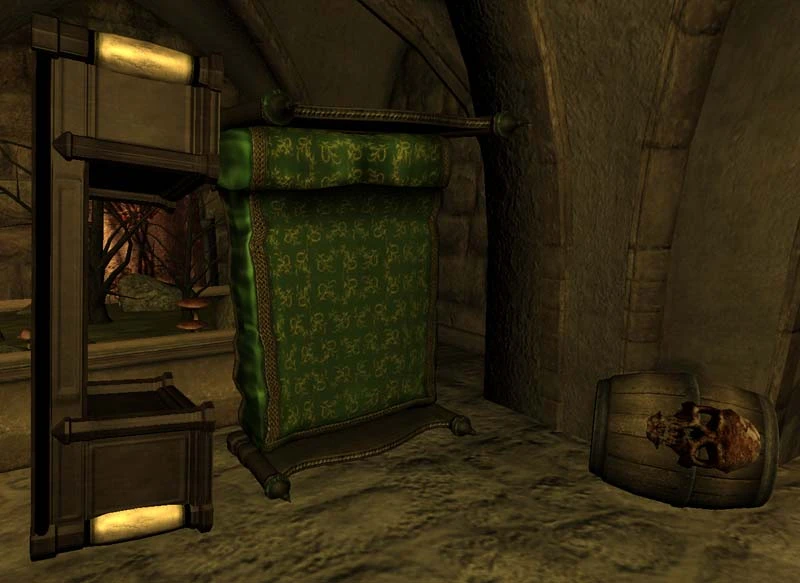
The plugin adds moving of furniture, containers and dead actors.
Including between game locations.
Beta:
Press a key Grab (by default \'Z\') and to go.
It is authorised to move some candles and \"static\" furniture.
Adds moving/installation of weapons, armors, clothes, etc. Press a key NUM+ after object grab.
While key Grab (by default \'Z\') is pressed, it is possible to press keys:
NUM2 and NUM8 - to approach/keep away object concerning the player;
NUM4 and NUM6 - to rotate object, axe Z;
NUM1 and NUM7 - to rotate object, axe X;
NUM3 and NUM8 - to rotate object, axe Y;
NUM* - to establish corners in zero.
Beta2:
The given version allows to appoint command keys through the menu.
Open inventory (MenuMode 1). Press consistently keys <0>, <0>, <2> on the basic keyboard. After that the menu for adjustment of command keys will open.
================================================================================
Remarks:
It\'s required OBSE v0014++ (http://obse.silverlock.org/download/)
It is impossible to move quest items and another\'s items.
YOU CARRY OUT ALL MOVINGS AT OWN RISK!!!
================================================================================
Installation:
1. Extract this archive in directory ...\\Oblivion\\Data (file Oblivion.esm is found in this directory).
2. Start Oblivion (OblivionLauncher.exe).
In menu \"Files\" choose file \"svaToMoveObjects_1C.esp\".
Press
This Fallout 3 mod by Visman adds the ability to move furniture, containers, and dead actors, including between game locations. With 73 endorsements and over 2,000 downloads, it's a niche utility for players who want more control over their environment. Last updated in 2010, it may be outdated for current setups.
✨ Key Features
📊 Pros & Cons
✅ Pros
- Handy for settlement builders and roleplayers who want to rearrange interiors.
- Moving dead bodies is a unique feature not commonly found in other mods.
- Decent download count (2,060) shows some community interest.
⚠️ Cons
- Last updated in 2010 — likely incompatible with modern Fallout 3 setups or mod managers.
- Only 73 endorsements, so it's a niche mod with limited testing.
- No documentation or install instructions provided, so you're on your own.
For Fallout 3 players who enjoy detailed interior decorating or want to reposition corpses for storytelling. Skip if you're looking for gameplay overhauls — this is a utility mod for tinkerers.
💡 Beginner Tips
- Since the mod is from 2010, check if you're using a mod manager that supports older plugins, or manually place the .esp in your Data folder.
- Test moving objects in a save you don't mind breaking, as old mods can cause unexpected issues.
- If you use FOSE or other script extenders, verify compatibility before relying on this mod.
📊 Mod Details
- Game
- Oblivion Mods
- Author
- Visman
- Version
- Beta2
- Downloads
- 2,060
- Endorsements
- 73
- Category
- Gameplay Effects and Changes
- Created
- 7/21/2009
- Updated
- 12/20/2010
🔧 How to Install Oblivion Mods
Download from Nexus.
📖 Full step-by-step install guide for Oblivion →
Visit the official mod page for specific installation instructions for this mod.
🎮 Need cheat codes or console commands? Check ur gaming wiki for Oblivion commands, item IDs, and more.
Keep browsing — more Oblivion mods await