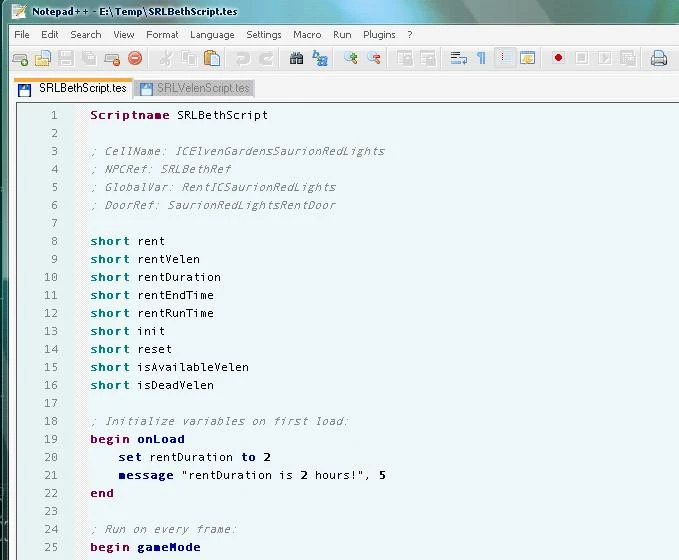
TES Script Definition File for NotePad++
⚪ Last updated 2008⚠️ Install Order · 2 steps
Install in this order, then this mod last — most mods fail to load without their framework and dependencies in place.
Preview
🔍 Analysis
- 👍 4.0% endorsement rate — high engagement, a strong quality signal
- 🏆 #24 of 52 Utilities mods in this game by downloads
📋 About This Mod
In case you prefer to use Notepad++ (http://notepad-plus.sourceforge.net/uk/site.htm) to edit your Oblivion Scripts, here is a user definition file that adds support for TES Scripts to the editor. Installation: Copy the userDefineLang.xml file to your C:\\Documents and Settings\\username\\Application Data\\Notepad++\\ folder. In case an userDefineLang.xml is already existing you might want to prefer to extends the existing file with the data in the new file. Files that have a .tes suffix are recognized as TES Script files.
📊 Mod Details
- Game
- Oblivion Mods
- Author
- Unknown
- Version
- 1.0.0
- Downloads
- 846
- Endorsements
- 34
- Category
- Utilities
- Created
- 4/17/2006
- Updated
- 1/7/2008
🔧 How to Install Oblivion Mods
Download from Nexus.
📖 Full step-by-step install guide for Oblivion →
Visit the official mod page for specific installation instructions for this mod.
🎮 Need cheat codes or console commands? Check ur gaming wiki for Oblivion commands, item IDs, and more.
Keep browsing — more Oblivion mods await