QTP3 Custom Road Texture -- and more
⚪ Last updated 2009⚠️ Install Order · 3 steps
Install in this order, then this mod last — most mods fail to load without their framework and dependencies in place.
Preview
🔍 Analysis
- 👍 4.1% endorsement rate — high engagement, a strong quality signal
- 🏆 #387 of 485 Models And Textures mods in this game by downloads
📋 About This Mod
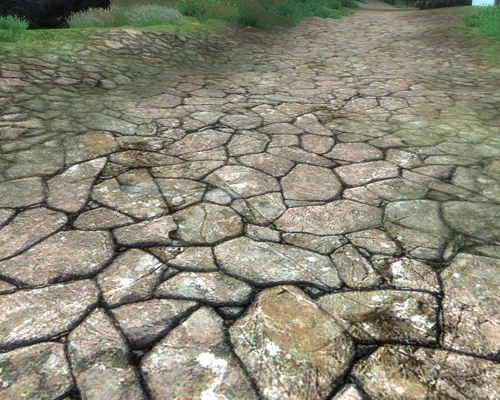
QTP3 Custom Road Texture (and more) v1. 0 by -pk- I like Qarl\'s highres texture packs, but sometimes they just don\'t look right ingame or have overdone bump maps making it hard to see the underlying textures. This pack contains remade textures for a few that really stuck out to me. I tried to keep the original Oblivion feel to some of the common textures. Check out the comparison gif\'s for examples. Currently there are no plans to expand this project, but I may add a few more if they stand out when I play through the game again. ============ INSTALLATION ============ 1. Add the QTP3 Custom Textures. 7z to Wrye Bain and select which textures you would like to replace. Or extract the 7z to your desktop, then move the files in to the corresponding Oblivion data folder. This package includes Oblivion, QTP3 Redimized, and Custom variations for each texture in case you want to mix them around or undo your changes.
A texture pack for Oblivion that remakes select textures from Qarl's highres packs, focusing on roads and other surfaces that had overdone bump maps. With 837 endorsements and 20,441 downloads, it's a community favorite for visual polish without the harshness of the original.
✨ Key Features
📊 Pros & Cons
✅ Pros
- Community-approved with 837 endorsements and over 20k downloads
- Fixes the overdone bump maps that plague Qarl's packs, making textures look cleaner
- Lightweight and focused—just the textures that needed fixing, no bloat
⚠️ Cons
- Last updated in 2009—may not be compatible with newer Oblivion versions or mods
- Only covers a few textures, so you'll still need Qarl's pack for full coverage
For Oblivion players who use Qarl's highres packs but find the bump maps too harsh. If you want cleaner road textures without the visual noise, this is a must-have. Skip if you don't use Qarl's packs or prefer vanilla textures.
💡 Beginner Tips
- Make sure you have Qarl's Texture Pack III installed first, as this mod is designed to overwrite its textures.
- Use a mod manager like Oblivion Mod Manager to easily install and uninstall, or manually drop the files into your Data folder.
- Check the load order—this mod should load after Qarl's pack to ensure its textures take priority.
📊 Mod Details
- Game
- Oblivion Mods
- Author
- -pk-
- Version
- 1.0
- Downloads
- 20,441
- Endorsements
- 837
- Category
- Models And Textures
- Created
- 7/26/2009
- Updated
- 9/6/2009
🔧 How to Install Oblivion Mods
Download from Nexus.
📖 Full step-by-step install guide for Oblivion →
Visit the official mod page for specific installation instructions for this mod.
🎮 Need cheat codes or console commands? Check ur gaming wiki for Oblivion commands, item IDs, and more.
Keep browsing — more Oblivion mods await