Qarls Texture Pack III OMOD - QTP3
⚪ Last updated 2008⚠️ Install Order · 3 steps
Install in this order, then this mod last — most mods fail to load without their framework and dependencies in place.
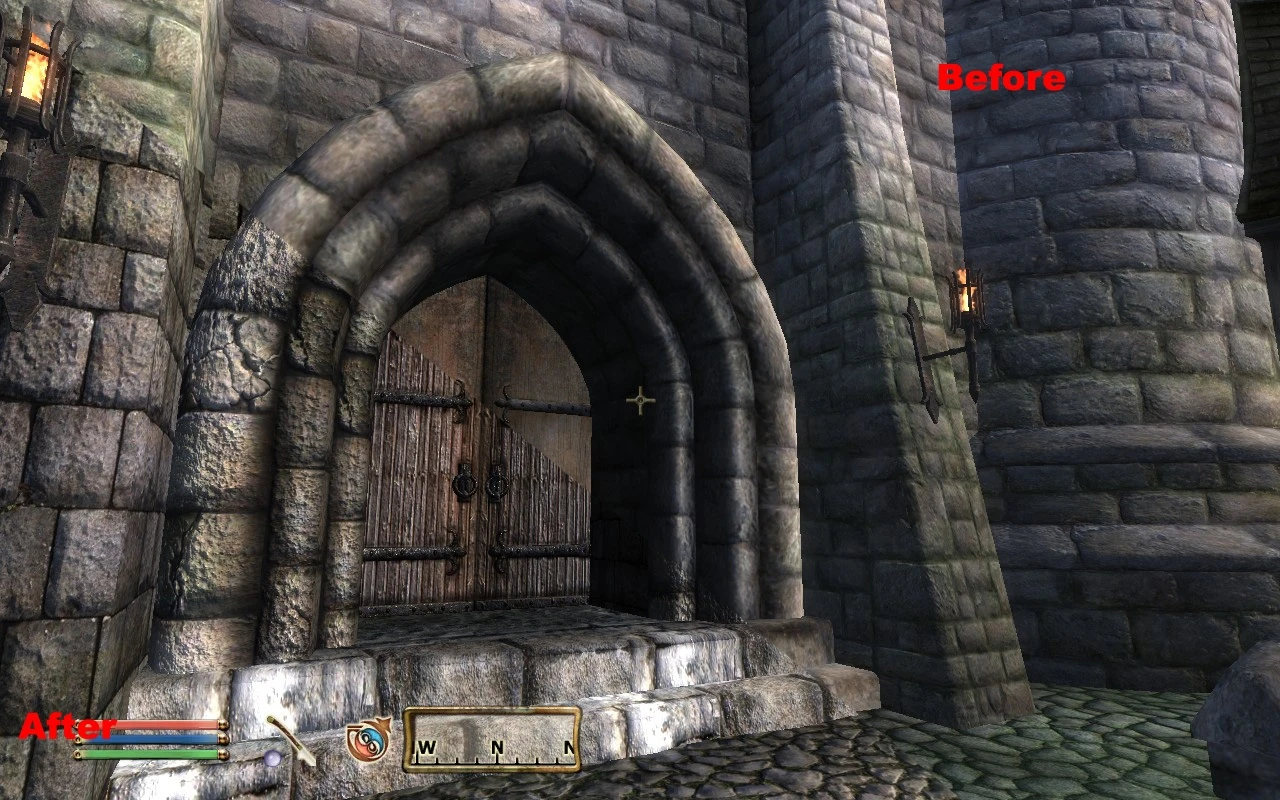
Preview
🔍 Analysis
- 👍 0.5% endorsement rate
- 🏆 #1 of 485 Models And Textures mods in this game by downloads
📋 About This Mod
NOTE
GO TO THE MIRRORS SECTION TO DOWNLOAD THE FULL OMOD WITH NO MULTIPLE PARTS!!! THANKS PLANET ELDER SCROLLS!
PLANET ELDER SCROLLS IS DEFUNCT, MIRROR LINK HAS BEEN REMOVED.
NOTE
Description-
This is a full version of Qarl's Texture Pack III, with patch v1. 3 already installed, and then created into an OMOD. I did no work with the actual textures, all I did was combine Qarl's TP3 with the newest 1. 3 patch, and then made it into an OMOD. I found this very helpful, because it is much easier than manually uninstalling and installing all those different textures and meshes, with the OMOD, all you have to do is activate or deactivate the mod, and Oblivion Mod Manager takes care of the rest.
What Does It Do?-
This mod makes most of the textures in the game sharper and clearer.
Most textures are 4 times the size of the originals. Some, even more. This makes things seem much clearer and sharper in-game.
A large number of meshes have been altered to take advantage of the game engine's parallax shader.
Only parts of the mesh which NEED parallaxing have the parallax flag enabled. This removes unwanted artifacts parallaxing can cause around corners.
Textures which use the parallax shader have been altered at the mipmap level so that things look very 3D from a distance but do not get the soupy artifacts associated with the parallax effect when viewed close-up.
Advanced normal map techniques used to make landscape textures seem very 3D.
Landscape color maps and normal maps edited at the mipmap level to reduce the tiling effect in the distance.
Mesh fixes from the Unofficial Oblivion Patch are included.
Things retextured:
Architecture
Landscape
Rocks
Dungeons
Blood splatters, falling snowflakes, butterflies
Furniture, and other medium-sized clutter
Things NOT retextured:
Clothes, armor, weapons, creatures, NPCs
Foliage, the sky
Kvatch, the Arena, and the Oblivion realm
Requirements-
This mod greatly enhances the graphic detail of Oblivion. Therefore, you should probably only install this if you have a farily high-end system. I am currently running an 8800GT with 1280x1024 resolution, 4x anti-aliasing, and max graphics, and with this mod installed I average around 45fps.
Installation-
Extract the OMOD to your C:...\Oblivion\obmm\mods folder. Then, start up OBMM, and double click on the mod to activate it. After you have activated it, click on Utilities then Archive Invalidation. Click the bubble for BSA alteration, check mark the box for Textures, and check mark the box for Generate archiveinvalidation entries on hash collision. If you want to know why you did all that, scroll down to number 4 in Qarl's Installatio
Qarls Texture Pack III OMOD (QTP3) is a comprehensive texture overhaul for Oblivion that makes the game world appear much clearer and sharper. It comes as an OMOD with the 1.3 patch pre-installed, simplifying installation. With over 20,000 endorsements and 4.5 million downloads, it's a legendary mod for enhancing visual fidelity.
✨ Key Features
📊 Pros & Cons
✅ Pros
- Massive community approval – 20,774 endorsements and 4.5 million downloads speak for themselves.
- OMOD format with the 1.3 patch pre-installed means less hassle for mod manager users.
- A classic texture overhaul that dramatically improves visual clarity – a must-try for Oblivion veterans.
⚠️ Cons
- Last updated in 2008 – may have compatibility issues with newer systems or mods.
- Requires Oblivion Mod Manager (OBMM) to install – not for manual installers.
- Texture packs can be performance-heavy on older hardware – expect a hit on FPS.
For Oblivion players who want a significant visual upgrade without fiddling with multiple patches. If you're using a mod manager and have a decent GPU, this is a no-brainer. Skip if you prefer lightweight texture mods or play on a low-end rig.
💡 Beginner Tips
- Make sure you have Oblivion Mod Manager (OBMM) installed – this mod is OMOD-only and won't work with manual extraction.
- After installing, activate the OMOD in OBMM and check your load order – QTP3 should be loaded after other texture mods to avoid conflicts.
- If you experience performance issues, consider using the performance version of QTP3 instead of the full pack.
📊 Mod Details
- Game
- Oblivion Mods
- Author
- Qarl -OMOD by BangsBoomstik-
- Version
- 1.3
- Downloads
- 4,469,123
- Endorsements
- 20,774
- Category
- Models And Textures
- Created
- 7/16/2008
- Updated
- 7/18/2008
🔧 How to Install Oblivion Mods
Download from Nexus.
📖 Full step-by-step install guide for Oblivion →
Visit the official mod page for specific installation instructions for this mod.
🎮 Need cheat codes or console commands? Check ur gaming wiki for Oblivion commands, item IDs, and more.
Keep browsing — more Oblivion mods await