oblivion reloaded obse enb mod organizer config guide
⚪ Last updated 2018⚠️ Install Order · 2 steps
Install in this order, then this mod last — most mods fail to load without their framework and dependencies in place.
Preview
🔍 Analysis
- 👍 4.4% endorsement rate — high engagement, a strong quality signal
- 🏆 #6 of 40 Patches mods in this game by downloads
📋 About This Mod
- oblivion stable setup settings including ctd prevention up to ugridstoload=7. describes the way to get the the stable basis using mod organizer, obse, oblivion reloaded, enb memory hack, sweet fx in a perfect bundle for smooth, glich free
+++ please refer to my user profile about me page and follow my recommendations how to use my mods as an addition to nexusmods terms +++
this mod can be useful for people with older hardware and settings and old setup as i use it. all other users can probably omit this mod.
information updated in aug 2020 due to changes related with more oblivion reloaded features available
providing useful setup information playing oblivion on win 7 x64 and comparable os combining the best mods and tools for a satisfying, non frustrating playing and modding experience. it works also with win 10 at least on my rig.
your system should provide at least mid range hardware with 8GB Ram and 2GB Vram graphics card. better is 16GB ram and 4 GB vram.
fiddeling with optimized ram settings for a modded dx9 game makes no sense if hardware is limited to 4gb ram and a ram dependend integrated graphics card.
most of the description also works for skyrim while oblivion/obse related settings and tools have to be replaced by skyrim/skse counterparts.
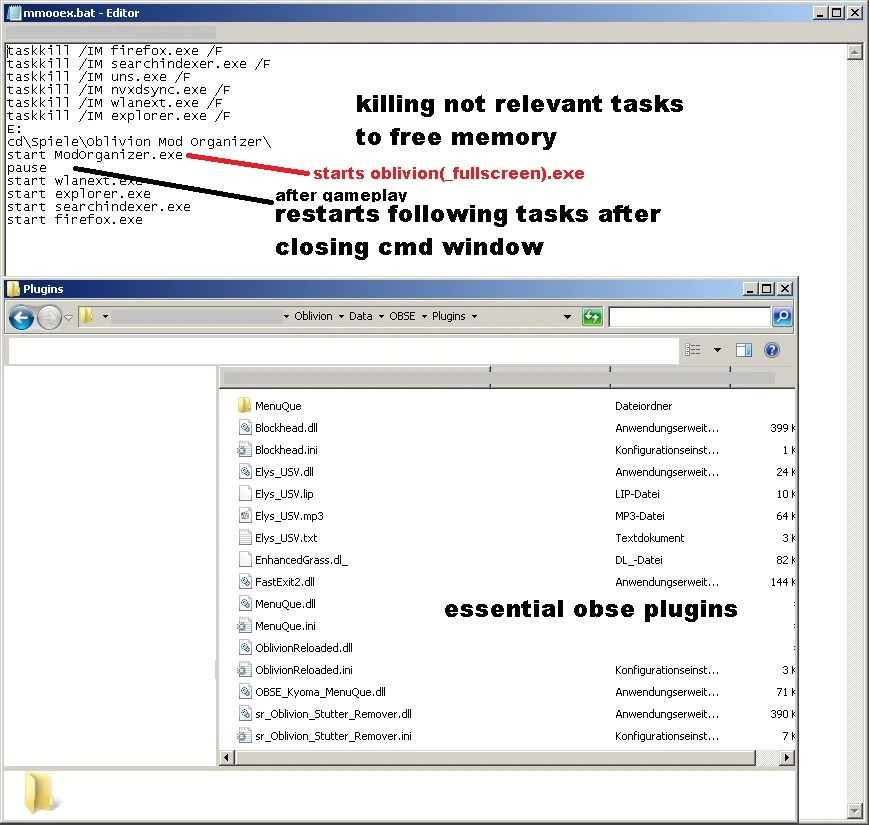
first important advice for all gaming sessions: keep your system clean! avoid unnecessary 3rd party processes running
in windows while reducing mem space and producing instabilities due to
popups or other unpredictable activities while gaming!
deactivate or reduce lan and wlan use if you do not need it for gameplay! disable
anti virus and clean up software while gaming! All this stuff may
contribute to a potential risk of ctd or other unpredictable and
unwanted gaming experience!
update feb2018 tested on win 7 64bit with mod organizer 1. 311, oblivion reloaded v6. 2. 0., enb 0. 259 and optional sweet fx 1. 5. 1 or even better: reshade v3. 4 or higher. but be aware: reshade may cause problems with some shader and ini settings, post processing enb effects and msaa
I had a severe stutter problem before writing this guide even on capable hardware. this guide and the introduced tools may solve
your problem with severe stuttering ingame and handling as it did for me.
tannin's mod organizer 1. 311(or newer) should be your solid basis for a new oblivion installation with mods. forget about the alternatives if
you plan to install complex mods und you dislike to do more than one new game installation. mo is currently the only glich free option (maybe vortex will follow) capable to reach this goal. if you already own a stable system stick to your settings and be happy. you may exit here or you already use mo.
if not this guide will show you one possible and already tested way providing you with a stable oblivion playing and modding experience.
since i use mo i never had to reinstall oblivion again. don't ask me how often i did it before using obmm.
📊 Mod Details
- Game
- Oblivion Mods
- Author
- xrayy
- Version
- 1.3
- Downloads
- 1,412
- Endorsements
- 62
- Category
- Patches
- Created
- 12/25/2015
- Updated
- 2/10/2018
🔧 How to Install Oblivion Mods
Download from Nexus.
📖 Full step-by-step install guide for Oblivion →
Visit the official mod page for specific installation instructions for this mod.
🎮 Need cheat codes or console commands? Check ur gaming wiki for Oblivion commands, item IDs, and more.
Keep browsing — more Oblivion mods await