Oblivion Face Exchange Lite

⭐ ⭐⭐ (2,827 endorsements) 📥 130,196 downloads 📌 v1.4.1 📅 11/5/2006
⚪ Last updated 2008

By Mikko Puonti - Resetgun · Utilities

⬇ Download Mod Source: Nexus Mods 📅 Updated: 1/7/2008 📅 Created: 11/5/2006
⚠️ Install Order · 2 steps
1🛠️ OBSE — Oblivion Script Extender Download ↗
2🔧 UOP — Unofficial Oblivion Patch Download ↗

Install in this order, then this mod last — most mods fail to load without their framework and dependencies in place.

🔍 Analysis

  • 👍 2.2% endorsement rate — high engagement, a strong quality signal
  • 🏆 #20 of 86 Utilities mods in this game by downloads

📋 About This Mod

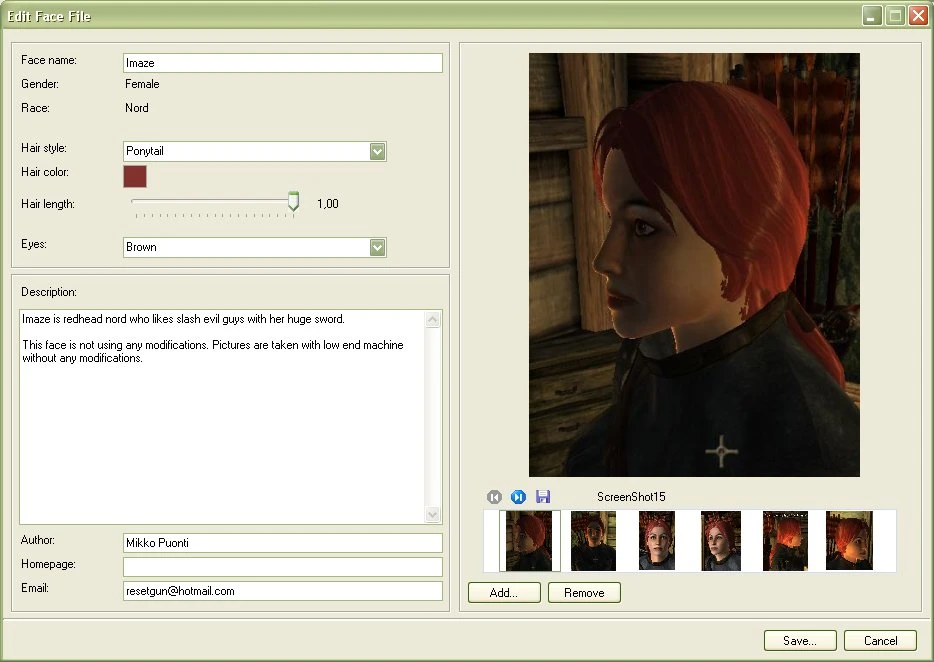
NOTE: The latest version (1. 4. 1) is not Windows Vista compatible. With this tool, you can change your character\'s name, hairstyle, hair length, hair color, eyes and copy face from a another save file, from a face file, from text that is copied to the clipboard or from a non-player character. This allows you to change your character\'s look and continue to playing your character without starting a new game. You may also share your character looks more easily with your friends by exporting your character\'s face to a \"face file\". This file may also include preview pictures from your character\'s look, short description from the look, your homepage and email address. You can also copy-paste your character\'s look to/from clipboard. It is also possible to use hair styles and eyes that are not normally available for your character\'s race or gender. You can also try to move faces from other gender and races to your character, but this normally will crash Oblivion when you try to open your save file (don\'t overwrite your save files). Since version 1. 2. 0, program scans automatically all new or changed plugins from the Oblivion\'s data folder and import their objects to the program. This program is freeware. You can download, use or distribute it absolutely free. Author Mikko \"Resetgun\" Puonti, 2006. Send your feedback and bug reports to \"resetgun@hotmail.com\". Requirements: Windows XP/2000, Microsoft . NET Framework 1. 0, 1. 1 or 2. 0 (you can download this from Windows Update) Installation: ------------- 1. Unzip file to temporal folder. 2. Start \"Setup.exe\" 3. Select installation folder. 4. Start program from the program folder. Bit more information in \"Readme.txt\". HISTORY: ----------- 1. 4. 1 Minor fixes. 1. 4. 0 Improved face file creation, faster startup and other small improvements. 1. 3. 10 Fixed copy button related bug and face files preview image is updated. 1. 3. 9 Plugin dialog temporally disable in save file\'s edit dialog. 1. 3. 8 Support for SI and v1. 2 patch. 1. 3. 7 Minor fixes. 1. 3. 6 Screenshots folder added to new settings dialog. 1. 3. 5 Fixed Windows 2000 related bug. 1. 3. 4 Shows required plugins and image scaling. 1. 3. 3 Installer should now support all NET frameworks. 1. 3. 2 Fixed some file handling and settings problems. 1. 3. 1 Copy to clipboard fix and changing save file plugins. 1. 3. 0 Importing faces from non player characters. 1. 2. 0 Automatical import from the plugins. 1. 1. 0 Some minor fixes and some new features. See readme.txt for details. 1. 0. 1 Fixed bug that prevented hair and eyes copy. 1. 0. 0 Initial version.
🤖 AI-enhanced — based on mod data

Oblivion Face Exchange Lite is a utility tool for The Elder Scrolls IV: Oblivion that lets you modify your character's appearance and copy faces from other saves, face files, clipboard text, or NPCs. With 2,827 endorsements and 130,196 downloads, it's a well-established mod from 2008, ideal for players who want to tweak their character's look without starting over.

✨ Key Features

Change your character's name, hairstyle, hair length, hair color, and eyes.
Copy a face from another save file, a face file, or text copied to the clipboard.
Copy a face from a non-player character (NPC).

📊 Pros & Cons

✅ Pros

  • Community favorite with 2,827 endorsements and over 130k downloads—clearly a trusted tool.
  • Lets you tweak your character's look without restarting, which is a huge time-saver.
  • Flexible face copying: from saves, files, clipboard, or NPCs—tons of options.

⚠️ Cons

  • Last updated in 2008—might have issues with newer Oblivion versions or mod setups.
  • It's a utility, not a flashy mod—if you're after visual overhauls, this won't add content.
🎯 Is This For You?
For Oblivion players who want to fine-tune their character's appearance or replicate a face from another save or NPC. Perfect for roleplayers who care about their character's look. Skip if you're looking for new hairstyles or eye meshes—this only edits existing ones.
📦 Install:Easy· Under 1 minute

💡 Beginner Tips

  • Since it's an older tool, make sure to run it as an administrator if you're on Windows 10/11.
  • When copying a face from an NPC, you might need to have the game running or use the console to get the NPC's ref ID—check forums for specifics.
  • Back up your save files before using the tool, just in case something goes wrong.

📊 Mod Details

Game
Oblivion Mods
Author
Mikko Puonti - Resetgun
Version
1.4.1
Downloads
130,196
Endorsements
2,827
Category
Utilities
Created
11/5/2006
Updated
1/7/2008

🔗 Required By 2 Mods

These mods list this mod as a dependency.

🔧 How to Install Oblivion Mods

Download from Nexus.

📖 Full step-by-step install guide for Oblivion →

Visit the official mod page for specific installation instructions for this mod.

🎮 Need cheat codes or console commands? Check ur gaming wiki for Oblivion commands, item IDs, and more.

Keep browsing — more Oblivion mods await

📋 All Oblivion Mods 🏆 Top 25 📂 More Utilities 👤 More by Mikko Puonti - Resetgun 🔎 Similar Mods 🌐 Best Utilities (All Games) ⚠️ Fix Crashes & Errors 💾 Save Files 🔀 Check Compatibility ⚖️ Compare Mods 🆕 New Mods