Non-plastic clouded crystal balls
⚪ Last updated 2008⚠️ Install Order · 2 steps
Install in this order, then this mod last — most mods fail to load without their framework and dependencies in place.
Preview
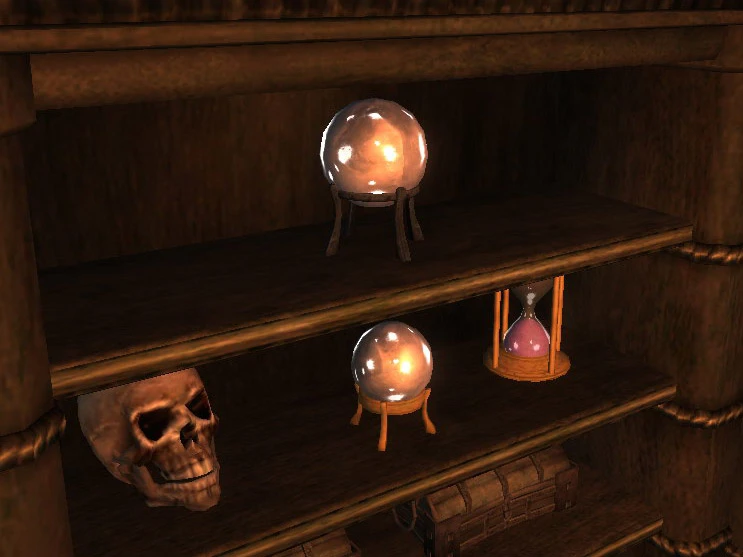
🔍 Analysis
- 👍 7.7% endorsement rate — high engagement, a strong quality signal
- 🏆 #83 of 247 Models And Textures mods in this game by downloads
📋 About This Mod
Name: Non-plastic clouded crystal balls Version: 1. 0 Date: 9/27/2008 Category: Models and Textures Recommended: Oblivion Mod Manager Author: Tchos Details ======= A quick and basic texture replacement to make the crystal balls look less like plastic toys and more like something a mage would actually keep around on the desk. This mod will replace all instances of both varieties of the standard crystal ball objects in the game with my version. Since the true appearance of glass or crystal requires refraction and reflection, which models in Oblivion largely lack, I went with a clouded crystal look, which fits with some kinds of real-life cut crystal I\'ve seen. In any case, I think it\'s a big improvement over the originals. Install ======= This archive is distributed in what LHammonds calls OMOD-Ready format. It allows you to manually extract and install like most other mods but it also allows you to use Oblivion Mod Manager and import this archive with all the settings pre-configured for an OMOD file. Pick which method you are going to use for installation: Manual Installation - = or = - OBMM Installation Manual Install -------------- Extract this archive to any folder and then copy the contents to Oblivion\'s Data folder. You can ignore or delete the \"omod conversion data\" folder. OBMM Install ------------ Create the OMOD (Do this section only once) 1. Copy archive to (install folder)\\Oblivion\\obmm\\omod\\ 2. Start Oblivion Mod Manager. 3. Click the Create button. 4. Click the Add Archive button, find and select the archive, then click Yes. 5. Click the Create omod button, then click OK when it finishes. Install the mod using OBMM 1. Start Oblivion Mod Manager. 2. Double-click the name of the mod in the right-hand side of the OBMM screen. (icon should turn blue) Uninstall ========= Pick which method you are going to use for uninstall based on how you installed it: Manual Uninstall - = or = - OBMM Uninstall Manual Uninstall ---------------- Delete the files associated with the mod. Oblivion\\Data\\Meshes\\clutter\\MagesGuild\\crystalball01.nif Oblivion\\Data\\Meshes\\clutter\\MagesGuild\\crystalball02.nif Oblivion\\Data\\Non-plastic clouded crystal balls readme.txt OBMM Uninstall -------------- 1. Start Oblivion Mod Manager. 2. Double-click the name of the mod in the right-hand side of the OBMM screen, click Yes. (icon should turn green) History ======= 1. 0, 2008/10/27 - Initial release. Contact ======= You can find me on TESNexus as \'Tchos\' Tools Used ========== BSA Commander - http://letalka.sourceforge.net/morr/index.htm NIFSkope - http://www.niftools.org/ Oblivion Mod Manager - http://www.tesnexus.com/downloads/file.php?id=2097 Readme Generator - http://lhammonds.game-host.org/obmm/tools_readme_generator1.asp Licensing/Legal =============== You can do whatever you want with this mod but all I ask in return is that you give me
A simple texture replacement for crystal balls in Oblivion, removing the plastic look for a more mage-appropriate appearance. With 162 endorsements and over 2,000 downloads, it's a small but appreciated tweak for players who want a more immersive magical aesthetic.
✨ Key Features
📊 Pros & Cons
✅ Pros
- Community-approved with 162 endorsements and over 2,000 downloads
- Lightweight and simple—just drop-in texture files
- Adds a touch of realism for mage-themed playthroughs
⚠️ Cons
- Last updated in 2008—may not be compatible with newer Oblivion versions or mods
- Only affects crystal balls, so impact is minimal
- No screenshots or detailed previews provided by the author
For Oblivion players who want to polish their mage's desk without overhauling the game. If you're a roleplayer who notices small details, this is a nice touch. Skip if you're looking for major visual overhauls or gameplay changes.
💡 Beginner Tips
- Place the texture files in your Oblivion Data folder, overwriting if prompted.
- Use a mod manager like OBMM or Wrye Bash to easily enable/disable this mod.
- Check for conflicts with other texture mods that also alter crystal balls.
📊 Mod Details
- Game
- Oblivion Mods
- Author
- Tchos
- Version
- 1.0
- Downloads
- 2,091
- Endorsements
- 162
- Category
- Models And Textures
- Created
- 9/27/2008
- Updated
- 9/27/2008
🔧 How to Install Oblivion Mods
Download from Nexus.
📖 Full step-by-step install guide for Oblivion →
Visit the official mod page for specific installation instructions for this mod.
🎮 Need cheat codes or console commands? Check ur gaming wiki for Oblivion commands, item IDs, and more.
Keep browsing — more Oblivion mods await