MD G15 LCD Mix
⚪ Last updated 2009⚠️ Install Order · 2 steps
Install in this order, then this mod last — most mods fail to load without their framework and dependencies in place.
Preview
🔍 Analysis
- 👍 1.7% endorsement rate — high engagement, a strong quality signal
- 🏆 #168 of 172 Miscellaneous mods in this game by downloads
📋 About This Mod
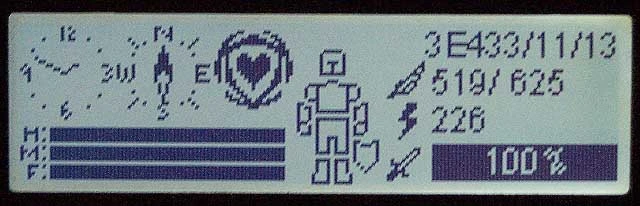
Description =========== This is a customized display for Faw\'s OBSE PLUGIN FOR THE LOGITECH G15 LCD. It shows various Oblivion game details on the LCD display of a Logitech G15 Keyboard. This is a work in progress as well as a modder\'s
Description =========== This is a customized display for Faw\'s OBSE PLUGIN FOR THE LOGITECH G15 LCD. It shows various Oblivion game details on the LCD display of a Logitech G15 Keyboard. This is a work in progress as well as a modder\'s resource. Version 1. 45 ============ Built against the 1. 61 version of Faw\'s OBSE plugin. Requires OBSE v17 or greater. 1. 45 fixes a severe bug in the armor health display. Switched spell icons to new system: -Instead of 1 texture for all spells, each icon has it\'s own file that sits in a directory structure that mimics the directories Oblivion\'s spell icons sit in. -Icon display is determined by icon name instead of spell name. Should work with any custom or plugin spell. Bugfixes curtesy of Kaurn: -Full helms now properly display an armor icon. -Full armor that includes arm and leg slots now displays proper armor icons. New default display: - Uses horizontal compass bar, spell icon and text based time. - Other older displays are still available by pressing button 1 repeatedly. Requirements ============ OBSE v17 or later. Tested on v17 of OBSE. http://obse.silverlock.org/ Faw\'s OBSE Plugin for the Logitech G15 LCD. Tested on v1. 61 of Faw\'s plugin. http://www.tesnexus.com/downloads/file.php?id=11685 Both must be installed prior to running this mod. The plugin requires a Logitech G-15 v1 or v2 keyboard, a Logitech speaker with a display or a Logitech G-19 keyboard. The G-19 keyboard will run in backwards compatibility mode (2-color 160x43) on the G-19\'s 320x240 color LCD. Install ======= Extract the contents of the zip file into your Oblvion\\Data directory using the included subdirectory structure. The .esp file will reside in your Oblivion\\Data directory and the .dds files in your Oblivion\\Data\\Textures\\LCD\\ directory. Disable any other LCD .esp files you may have installed (eg. the one that comes with Faw\'s OBSE plugin). Enable the LCD_MDMix.esp using Oblvion\'s Data Files (or Wrye Bash or OBMM or any other mod managing utility). When you start your game, you will need to push the big round button on your keyboard to cycle the active LCD programs until you reach the Oblivion one. On the G19, this is the orange display button with the gear on it and you\'ll likely have to cycle through your LCD programs more than once. Uninstall ========= Deactivate LCD_MDMix.esp Delete Oblivion\\Data\\LCD_MDMix.esp Delete the Oblivion\\Data\\Textures\\LCD\\MD folder Delete the Oblivion\\Data\\Textures\\LCD\\Magic folder Usage ===== There are four oval buttons under the G15 keyboard. I will refer to the left oval button as 1 and count up from there. Button 1 - Main Oblivion display contains the following info: Date, Digital Clock, Horizontal Compass, Current Spell Icon Health, Magika, Fatigue (small bars, no numeric display) Armor status Encumbrance, Weapon status (including magic charges and/or arrows when appropriate)
📊 Mod Details
- Game
- Oblivion Mods
- Author
- Maboroshi Daikon
- Version
- 1.45
- Downloads
- 1,514
- Endorsements
- 25
- Category
- Miscellaneous
- Created
- 7/19/2007
- Updated
- 6/15/2009
🔧 How to Install Oblivion Mods
Download from Nexus.
📖 Full step-by-step install guide for Oblivion →
Visit the official mod page for specific installation instructions for this mod.
🎮 Need cheat codes or console commands? Check ur gaming wiki for Oblivion commands, item IDs, and more.
Keep browsing — more Oblivion mods await