Landscape LOD Texture Replacement
⚪ Last updated 2008⚠️ Install Order · 2 steps
Install in this order, then this mod last — most mods fail to load without their framework and dependencies in place.
Preview
🔍 Analysis
- 👍 1.7% endorsement rate — high engagement, a strong quality signal
- 🏆 #41 of 485 Models And Textures mods in this game by downloads
📋 About This Mod
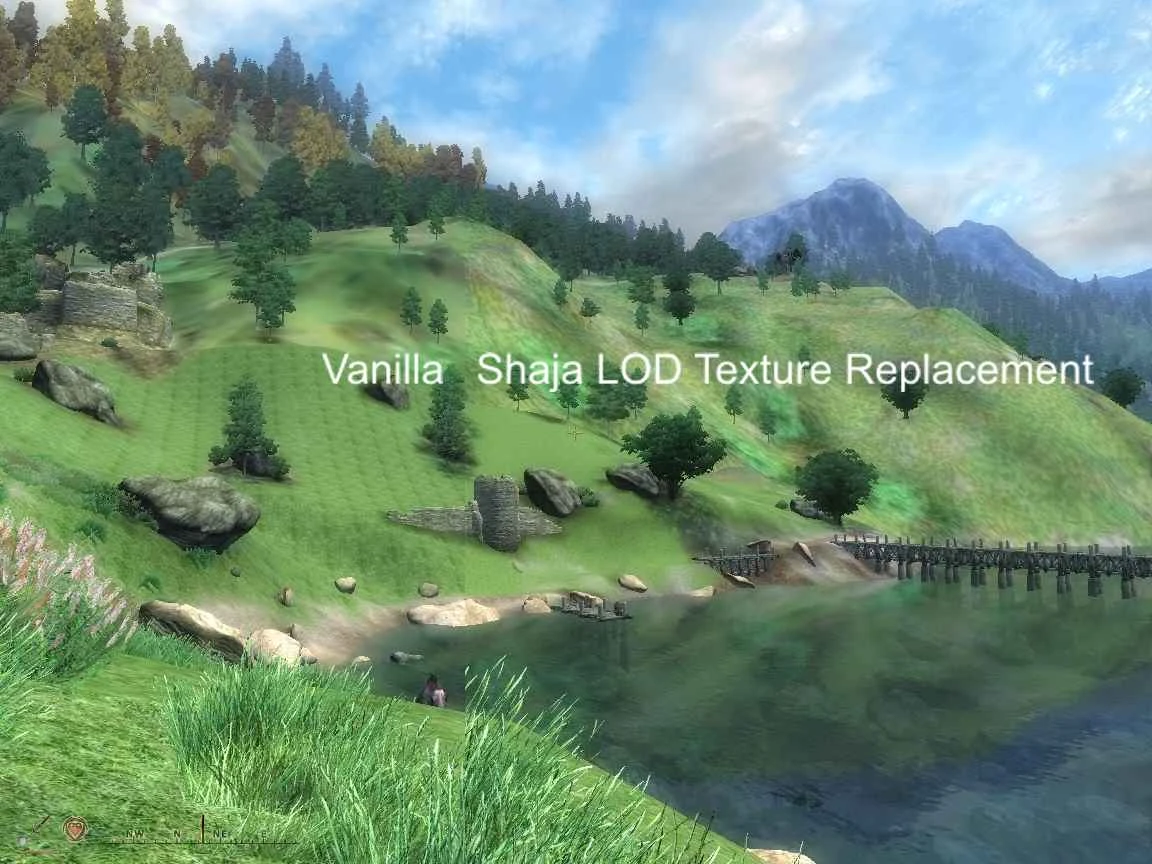
================================ Landscape LOD replacement textures for Oblivion Version 1. 1b ================================ by shaja Redistribution and/or repackaging of this texture package is expressly permitted, provided that this readme is not removed. These textures are based on the original Bethesda Softworks files, and copyright remains with them. History ======== Version 1. 1b: June 15, 2006 - Textures generated without mipmaps again. Including the mipmaps in version 1. 1 made the package useless for people running with medium or small texture size settings. ----------------------- Version 1. 1: June 11, 2006 = Update for Oblivion 1. 1 Changes: + Textures now have mipmaps included, avoiding a potential stutter problem. Change based on info from jikad @ nvnews.net, via CapNKill. + Brightness is increased slightly over version 1. 0 level. + File timestamps have been postdated to ensure that the replacement textures are loaded instead of textures in the .bsa archive. The texture generation process remains the same, there is no major visual difference over the 1. 0 textures. ---------------------- Version 1. 0: April 1, 2006 = Initial Release What does it do? =============== Replaces the original 1024x1024 landscape LOD textures with improved 2048x2048 textures. Makes the far-off terrain look much less blurry. This version includes only the 12 textures for the \'inner Tamriel\' - the part of Cyrodiil you can normally travel across. Installation =========== Unzip the .zip file to your \"Oblivion\\Data\" directory, using folder names. The following files should end up in your \"Oblivion\\Data\\textures\\landscapelod\\generated\" folder: 60. 00. 00. 32.dds 60. 00. 32. 32.dds 60. 00.-32. 32.dds 60. 00.-64. 32.dds 60. 32. 00. 32.dds 60. 32. 32. 32.dds 60. 32.-32. 32.dds 60.-32. 00. 32.dds 60.-32. 32. 32.dds 60.-32.-32. 32.dds 60.-64. 00. 32.dds 60.-64.-32. 32.dds Note: This folder does not need to exist prior to installation. Uninstallation ============= Delete the 12 dds files from your \"Oblivion\\Data\\textures\\landscapelod\\generated\" folder. How it was done =============== Each original 1024x1024 texture was opened in Photoshop. The texture was resized to 2048x2048 using the Bicubic sharper filter. Film grain filter was applied, with Grain: 3, Highlight Area: 0, Intensity: 0. Brightness was reduced with the Brightness/Contrast tool by -4 to compensate for the brightness added by the film grain. Texture was saved using the Nvidia DDS plugin with DXT1 compression, and generated mipmaps. Bugs & Limitations ================= Lighting does not affect the normal high-detail close landscape and the LOD terrain in exactly the same way, so the dividing line between them can be very visible at certain times. Initial game load times are slightly longer. No detail was added by hand, so it is certainly possible for someone with actual artistic talent to i
This mod replaces the landscape LOD textures in Oblivion with higher quality versions, improving distant terrain visuals. It has 4,965 endorsements and 285,665 downloads, indicating strong community adoption. Last updated in 2008, it remains a popular choice for enhancing the game's view distance.
✨ Key Features
📊 Pros & Cons
✅ Pros
- Huge community trust (4,965 endorsements)
- Massive download count (285,665) shows it's a go-to for LOD improvements
- Author allows redistribution, so it's easy to share or bundle
⚠️ Cons
- Last updated in 2008 — may not be compatible with newer mods or patches
- Only covers landscape LOD, not buildings or objects
For Oblivion players who want better distant terrain without overhauling the whole game. If you're tired of blurry mountains and ugly ground textures when looking far away, this is a simple fix. Skip if you're using a comprehensive graphics overhaul that already includes LOD improvements.
💡 Beginner Tips
- Back up your original LOD textures before replacing, so you can revert if needed.
- Use a mod manager like Oblivion Mod Manager to easily toggle this mod on and off.
- This mod only affects distant LOD, so you won't see changes up close — check from a high vantage point.
📊 Mod Details
- Game
- Oblivion Mods
- Author
- Unknown
- Version
- 1.1b
- Downloads
- 285,665
- Endorsements
- 4,965
- Category
- Models And Textures
- Created
- 4/1/2006
- Updated
- 1/7/2008
🧩 Commonly Used Together
Users add these mods to the same collections — a real compatibility signal, not an AI guess.
🔧 How to Install Oblivion Mods
Download from Nexus.
📖 Full step-by-step install guide for Oblivion →
Visit the official mod page for specific installation instructions for this mod.
🎮 Need cheat codes or console commands? Check ur gaming wiki for Oblivion commands, item IDs, and more.
Keep browsing — more Oblivion mods await