Improved Bruma
⚪ Last updated 2008⚠️ Install Order · 2 steps
Install in this order, then this mod last — most mods fail to load without their framework and dependencies in place.
Preview
🔍 Analysis
- 👍 0.8% endorsement rate
- 🏆 #149 of 485 Models And Textures mods in this game by downloads
📋 About This Mod
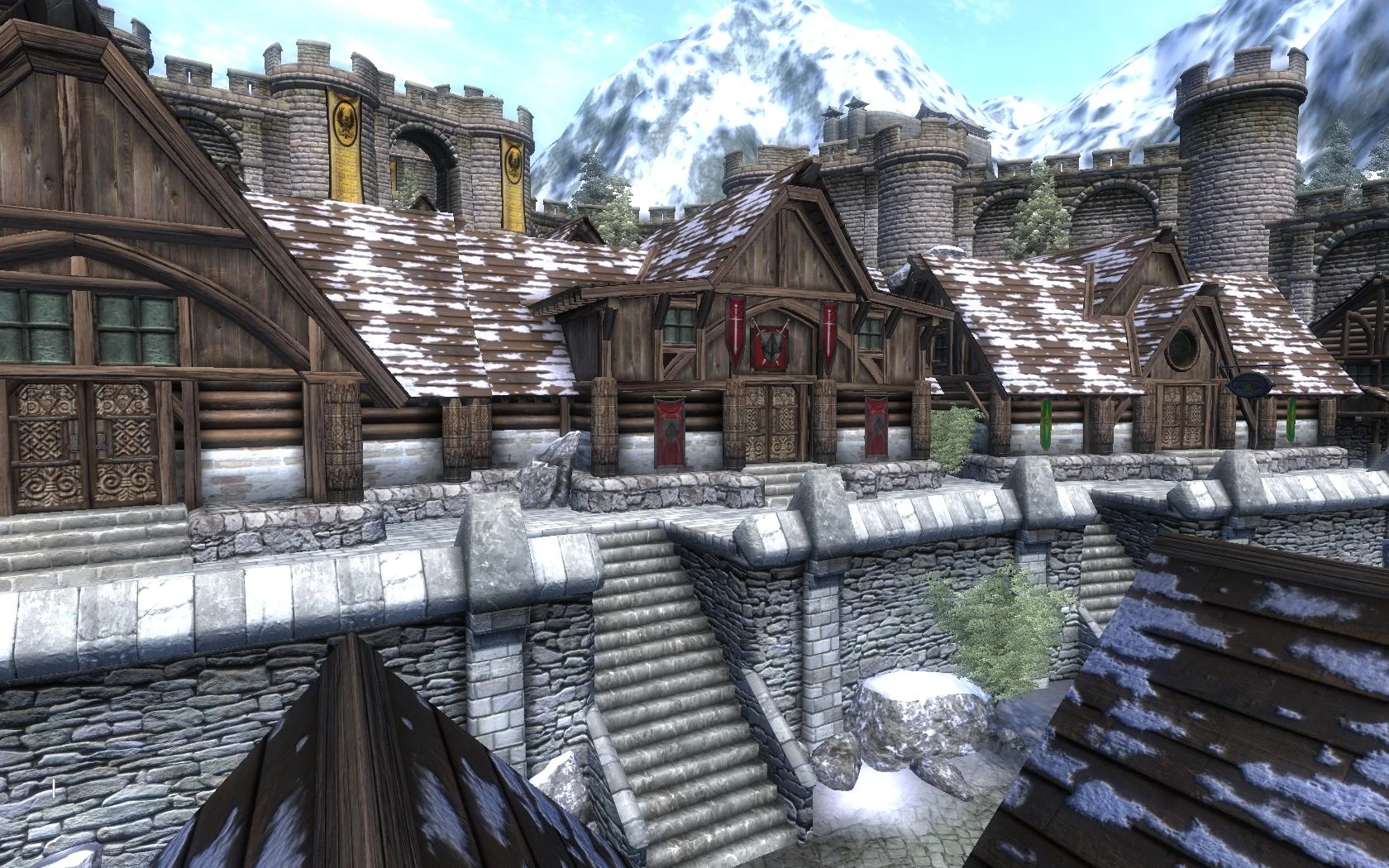
This is a retexture of Bruma with 1024x1024 & 1024x512 new textures. This set also includes several other architectural textures from other sections of the game to complete the retexture. The roof textures have a tile pattern because Bethesda chose to use the same normal map for all three roof textures. I have no performance hit in fps, but my memory usage goes from 340 to 395mb with this set. A uninstall list is included in the read me. Version History --------------- 1. 0 - Initial release 1. 1 - Added BrumaUpdate file which finishes the remaining textures I did not do in the original release. This set also includes reworked textures from the original pack.
Improved Bruma is a texture overhaul for the city of Bruma in Oblivion, replacing its textures with higher-resolution 1024x1024 and 1024x512 versions. It also includes additional architectural textures from other areas to complete the retexture, featuring a tile pattern on roofs. With 824 endorsements and over 100k downloads, it's a popular choice for visual upgrades.
✨ Key Features
📊 Pros & Cons
✅ Pros
- Community favorite with 824 endorsements and over 100k downloads.
- Higher-res textures give Bruma a sharper, more detailed look.
- Covers more than just the city—includes textures from other areas for consistency.
⚠️ Cons
- Last updated in 2008—may not be compatible with newer Oblivion versions or mods.
- Texture resolution is modest by today's standards (1024x1024 max).
For Oblivion players who want to give Bruma a visual facelift without overhauling the entire game. If you're into lore-friendly texture upgrades and don't mind older mods, this is a solid pick. Skip if you're looking for modern 4K textures or gameplay changes.
💡 Beginner Tips
- Since it's a texture replacer, just drop the files into your Oblivion Data folder, but make sure to overwrite when prompted.
- If you use a mod manager like OBMM or Wrye Bash, you can install it as a package for easier management.
- Check if you have other texture mods that affect Bruma—load order might matter to avoid conflicts.
📊 Mod Details
- Game
- Oblivion Mods
- Author
- Mikal33
- Version
- 1.1
- Downloads
- 102,138
- Endorsements
- 824
- Category
- Models And Textures
- Created
- 1/27/2007
- Updated
- 1/8/2008
🔧 How to Install Oblivion Mods
Download from Nexus.
📖 Full step-by-step install guide for Oblivion →
Visit the official mod page for specific installation instructions for this mod.
🎮 Need cheat codes or console commands? Check ur gaming wiki for Oblivion commands, item IDs, and more.
Keep browsing — more Oblivion mods await