Imperial City Waterfront Shack Made Cozy
⚪ Last updated 2022⚠️ Install Order · 2 steps
Install in this order, then this mod last — most mods fail to load without their framework and dependencies in place.
Preview
🔍 Analysis
- 👍 6.1% endorsement rate — high engagement, a strong quality signal
- 🏆 #63 of 143 Player homes mods in this game by downloads
📋 About This Mod
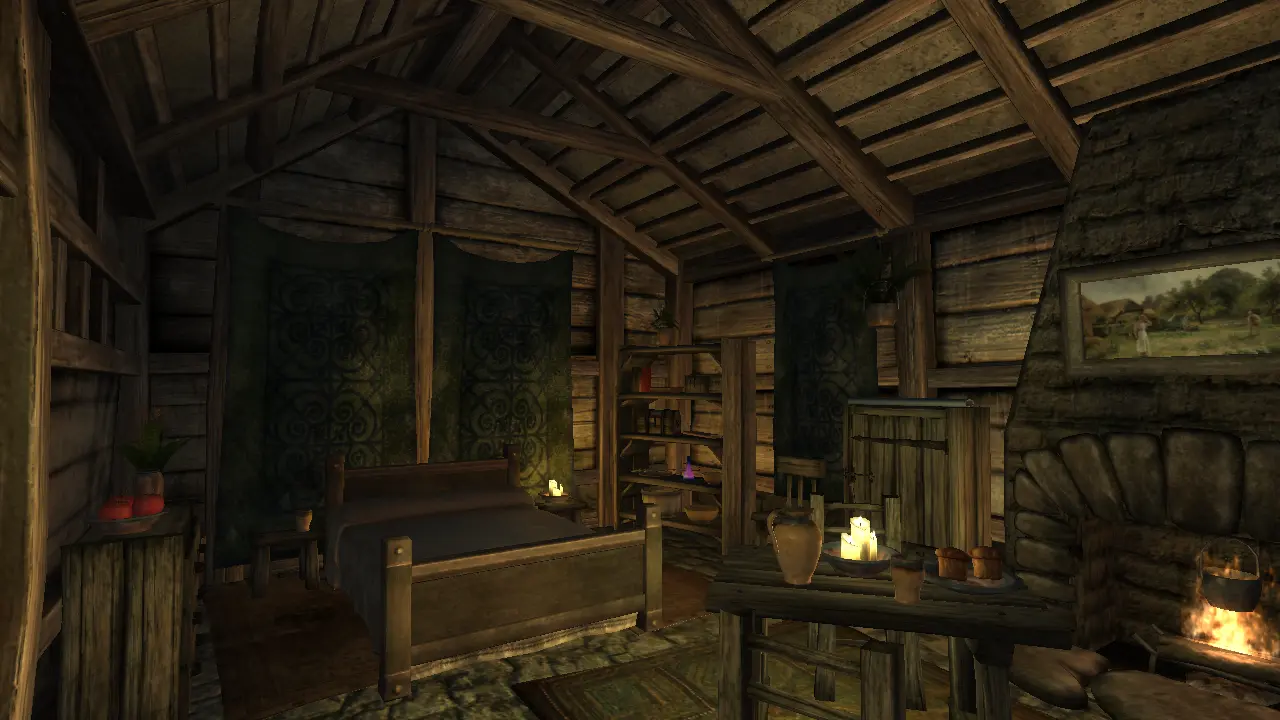
Housemod. The shack at the Imperial City Waterfront finally looks cozy. Includes automatic ingredient storage (vanilla ingredients, and optionally also Shivering Isles ingredients).
Upgrades
The names and descriptions of the upgrades have changed compared to vanilla, but the prices remain the same.
-
[]Dining: does not include any containers for storage
[
]Sleeping (previously Wall Hangings): has only a sack for a container[]Kitchen: includes some containers, as well as the automatic ingredient storage. Simply activate the drawer on the right and pick "store ingredients"
[]Shelves (previously Sitting Area): includes a few containers
- Storage: includes containers, and the ability to move and climb the ladder to reach more storage containers. To move the ladder, activate the small crate (see screenshot). To climb the ladder, activate the ladder itself. If you fall off the ladder, activate the ladder again. To put the ladder back in its place, activate the crate again.
Installation
There are 2 files, pick one. The file with SI has Shivering Isles ingredients included in the script. The other file only includes vanilla ingredients. If you don't have SI installed and activated, but you do use the SI version of this mod, then the automatic ingredient storage script won't work.
It's a simple esp. So drop it in Data folder, and activate it in Wrye Bash (recommended) or Oblivion Mod Manager. Some comments mention problems with activating it in the vanilla Oblivion Launcher, so don't use that.
Activating the mod before buying the house or its upgrades is the best situation.
Activating after buying the house but before buying the upgrades is probably fine as well. If not, see below.
Activating the mod after buying one or several upgrades, requires the solution posted by Omeletter in the comments. You could probably use it to get the upgrades for free as well, but I don't think it would complete the quest. First, in the game, open the console with the ~ key (tilde key). Then:
type in "prid xxxxx" (from vanilla master so no need to prefix by number of mod in load order) --
32f62 = storage area
32f99 = kitchen area
330ee = dining area
32f96 = fireplace area
3c69f = tapestries
Load Order: Somewhere after the Unofficial Oblivion Patches if you have them, but I don't think this mod has anything that is changed by the patches. Otherwise it shouldn't matter where you put it in the load order.
Conflicts: Anything that changes the interior of the IC Waterfront House. The scripts for buying the house and its upgrades are not changed in this mod, but if another mod changes those scripts, maybe it will cause conflicts?
Permissions
Don't use it to make money or som
📊 Mod Details
- Game
- Oblivion Mods
- Author
- woolswarm
- Version
- 1.0
- Downloads
- 1,201
- Endorsements
- 73
- Category
- Player homes
- Created
- 2/17/2021
- Updated
- 1/16/2022
🔧 How to Install Oblivion Mods
Download from Nexus.
📖 Full step-by-step install guide for Oblivion →
Visit the official mod page for specific installation instructions for this mod.
🎮 Need cheat codes or console commands? Check ur gaming wiki for Oblivion commands, item IDs, and more.
Keep browsing — more Oblivion mods await