IFT Improved Facial Textures
⚪ Last updated 2008⚠️ Install Order · 2 steps
1🛠️ OBSE — Oblivion Script Extender Download ↗
2🔧 UOP — Unofficial Oblivion Patch Download ↗
Install in this order, then this mod last — most mods fail to load without their framework and dependencies in place.
Preview
🔍 Analysis
- 👍 2.3% endorsement rate — high engagement, a strong quality signal
- 🏆 #74 of 485 Models And Textures mods in this game by downloads
📋 About This Mod
✅ ---------------------------
✅ IFT VERSION 2. 1
✅ BY SHADY TRADESMAN
✅ ---------------------------
✅ ---------------------------
✅ How to install
- ---------------------------
- IFT VERSION 2. 1
- BY SHADY TRADESMAN
- ---------------------------
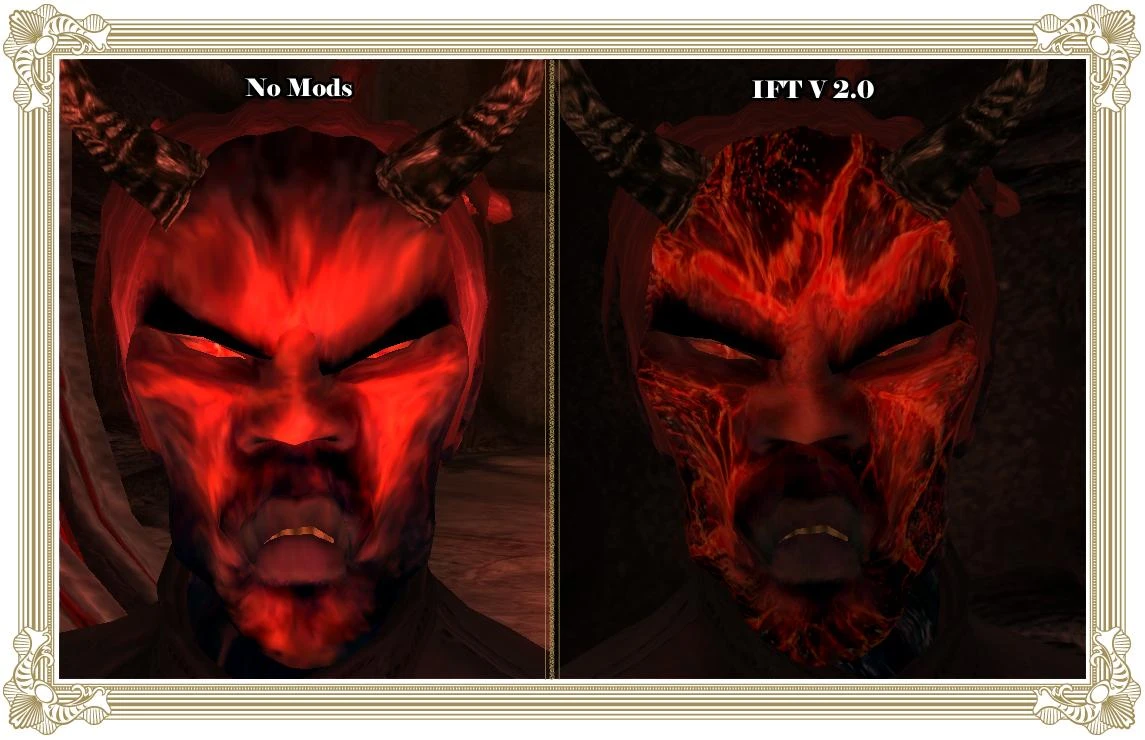
- Welcome to the readme for Improved Facial Textures version 2. 1, a mod by Shady Tradesman. This increases the resolution of all facial textures through a complete facial texture overhaul. No longer will you notice discolored squares on people’s faces or jaggedy wrinkles. While this may change the way the faces look, rather than just making them look sharper, I believe it will look much more natural.
- The screenshots do a moderate job of showing how much the facial textures are improved. I could not picture all of my textures, though. When you install this mod you can expect improved facial textures most of the time. It is recommended that you have are running DirectX 9. 0 or greater. If you have a low version of DirectX, your video card will automatically reduce textures size, no matter what.
- ---------------------------
- How to install
- ---------------------------
- You can view the screenshots all you want to get a small idea about what IFT does, but to really appreciate it, you need to install it. And this part of the readme will help you with that.
- First of all you need to locate your oblivion data directory. To do this, find your “program files†folder. Enter it and open “Bethesda softworks.†Then go to “oblivion.†After that open up the “data†folder. The path to this directory is something like this usually. \"C:\\Program Files\\Bethesda Softworks\\Oblivion\\Data\"
- When you look in the ZIP, you will notice a folder named, “textures.†Drag it into your Oblivion Data directory. IFT is now installed. If you already have a textures directory in your Oblivion data folder, then you need to drag the folder named “characters†from inside the textures folder included in the zip into the textures folder included on your hard drive in the oblivion\\data folder.
- ---------------------------
- Mod conflicts and troubleshooting
- ---------------------------
- This mod is compatible with any mods except those that replace facial textures, such as retextured orcs or dremora mods. I suggest you install IFT first, then extract those mods into your data folder replaceing files when neccisary.
- ---------------------------
- Version History
- ---------------------------
- IFT didn’t start on 2. 0, believe it or not. This section will help you track the changes that have been made in each new version of IFT. The newest version is at the top, and the oldest is a the bottom.
- V2. 1 Released on September 4, 2006 - THis version adds much improved eyebrows. There are updated age textures, and new normal maps. There is a new compression meathod which will allow you to use the mod with increased preformance and no quality loss. Much research into beast races has been done. In the future you may expect better beast race textures.
- V2. 0 released on July 18, 2006 – Many improvements have been made to IFT since 1. 9. I
🤖 AI-enhanced — based on mod data
IFT Improved Facial Textures by Shady Tradesman increases the resolution of all facial textures in the game. It's a simple, high-impact visual upgrade for players who want sharper character faces. With 4,641 endorsements and 199,594 downloads, it's a popular choice despite its age.
✨ Key Features
Increases the resolution of all facial textures
Version 2.1 of the mod
High endorsement count (4,641) and downloads (199,594) indicate widespread use
📊 Pros & Cons
✅ Pros
- Community favorite with 4,641 endorsements and nearly 200k downloads
- Simple install—just drop in and go
- Makes faces noticeably sharper without changing gameplay
⚠️ Cons
- Last updated in 2008—may not be compatible with current game versions
- Author unknown, so no support or future updates
🎯 Is This For You?
For players who want a quick visual upgrade to character faces without messing with complex mods. If you're playing an older version of the game or don't mind potential compatibility issues, this is a solid pick. Skip if you need modern features or support.
For players who want a quick visual upgrade to character faces without messing with complex mods. If you're playing an older version of the game or don't mind potential compatibility issues, this is a solid pick. Skip if you need modern features or support.
📦 Install:Easy· Under 1 minute
💡 Beginner Tips
- Since this mod is from 2008, check if your game version is compatible before installing.
- Back up your original texture files if you want to revert easily.
- If you're using a mod manager, you can still install manually—just drop the files into the correct folder.
📊 Mod Details
- Game
- Oblivion Mods
- Author
- Unknown
- Version
- 2.1
- Downloads
- 199,594
- Endorsements
- 4,641
- Category
- Models And Textures
- Created
- 7/20/2006
- Updated
- 1/7/2008
🔧 How to Install Oblivion Mods
Download from Nexus.
📖 Full step-by-step install guide for Oblivion →
Visit the official mod page for specific installation instructions for this mod.
🎮 Need cheat codes or console commands? Check ur gaming wiki for Oblivion commands, item IDs, and more.
Keep browsing — more Oblivion mods await