Icons for Alchemy Apparatus
⚪ Last updated 2013⚠️ Install Order · 2 steps
Install in this order, then this mod last — most mods fail to load without their framework and dependencies in place.
Preview
🔍 Analysis
- 👍 0.4% endorsement rate
- 🏆 #164 of 485 Models And Textures mods in this game by downloads
📋 About This Mod
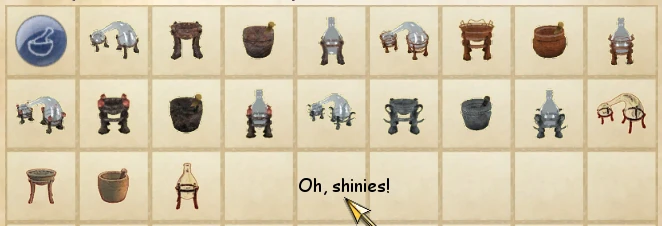
Icons for Alchemy Apparatus Basically what the short description says: I went on and created icons for the different alchemy items, using screenshots of them in the render window, and following this excellent tutorial. I tried to make them as close in view to the standard novice equipment icons as I could, but frankly I didn\'t have a very good method. I ended using CS render window screenshots instead of NifSkope ones, since the glass parts kept getting selected for erasing with the color selector. And due to that, the glass parts of the Retort and Alembic are too blue compared to the vanilla icons, due to the gray background color in the renderer. Included Menus50 and 80 versions, to ensure consistency across all graphics settings! I hope... To install, drop contents into your Oblivion\\Data folder and activate ApparatusIcons.esp, or better yet import it into a bashed patch with Wrye Bash, it is adequately tagged for it. Included as an optional file is a replacer for the vanilla alembic and retort icons, to match them to the glass\' looks from my other icons. Credits go to Dwip for the excellent tutorial. Now I can make icons out of anything! ANYTHING... Made with GIMP and the CS Extender.
This mod replaces the generic icons for alchemy apparatus in Skyrim with distinctive icons for apprentice, journeyman, expert, and master tiers, so each level of equipment looks unique in inventory and alchemy menus. It's a simple visual improvement for players who want better item recognition.
✨ Key Features
📊 Pros & Cons
✅ Pros
- Community favorite with 354 endorsements and over 94k downloads
- Solves a real annoyance for alchemy enthusiasts who craft and use high-tier gear
- Lightweight texture mod that doesn't affect gameplay or performance
⚠️ Cons
- Last updated in 2013, so may not be compatible with the latest Skyrim versions or mods that overhaul alchemy items
- Only changes icons, not the 3D models or item names, so visual variety is limited to menus
- No screenshots or detailed install instructions provided by the author
For Skyrim players who spend a lot of time in the alchemy menu and want to quickly distinguish between apprentice and master gear. Also for modders who appreciate clean UI improvements. Skip if you want more than icon changes or play with mods that already overhaul alchemy visuals.
💡 Beginner Tips
- Place the mod's files directly into your Skyrim Data folder, or use a mod manager like Vortex or Mod Organizer 2 for easier uninstallation.
- If you use other mods that change alchemy icons, load this one after them to ensure its icons take priority.
- Check the mod's file structure to ensure you're not overwriting other essential mods' textures.
📊 Mod Details
- Game
- Oblivion Mods
- Author
- migck
- Version
- 1.0
- Downloads
- 94,048
- Endorsements
- 354
- Category
- Models And Textures
- Created
- 7/18/2013
- Updated
- 7/19/2013
🔧 How to Install Oblivion Mods
Download from Nexus.
📖 Full step-by-step install guide for Oblivion →
Visit the official mod page for specific installation instructions for this mod.
🎮 Need cheat codes or console commands? Check ur gaming wiki for Oblivion commands, item IDs, and more.
Keep browsing — more Oblivion mods await