FOV Modifier
⚪ Last updated 2010⚠️ Install Order · 2 steps
Install in this order, then this mod last — most mods fail to load without their framework and dependencies in place.
Preview
🔍 Analysis
- 👍 2.6% endorsement rate — high engagement, a strong quality signal
- 🏆 #40 of 308 Gameplay Effects and Changes mods in this game by downloads
📋 About This Mod
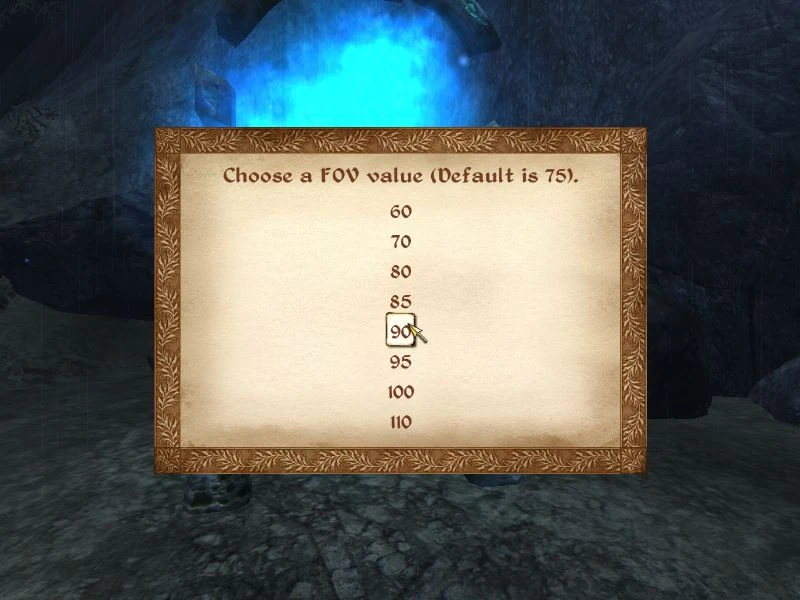
The Elder Scrolls IV Oblivion My other mods here: http://www.tesnexus.com/modules/members/index.php?id=419659 FOV Modifier Requirements ============ Oblivion with latest patch Oblivion Script Extender (OBSE) latest version (--> http://obse.silverlock.org <--) Description =========== This mod allows you to change the default 75 degrees field of view. After you talk or zoom the FOV will automatically return to the value you specified. How It Works ============ v1. 1 - When you activate this mod for the first time (new game or old savegame) a menu will appear and you will have to chose between the possible FOV values (60-110). If you want to change the value, type \"startquest fov\" in the console and the menu will appear again (or you can deactivate the plugin, save the game and activate it again). v2. 0 - No starting menu. Default FOV is 90. Change FOV by typing in the console \"Set CustomFOV to #\" (without quotes). FOV range is now 60-120. WARNING This mod modifies the fDefaultFOV value in the Oblivion.ini file during game mode, and return it to 75 in the menus, so when you exit the game the correct value is saved. If for some reason (usually a crash) a value different from 75 is saved, the main menu will be messed up. To restore it, do the following: 1. quit the game 2. open with Notepad the oblivion.ini file (the one in the folder My Documents\\My Games\\Oblivion) 3. modify the value fDefaultFOV to 75 4. play This never happens but if it does, you know what to do. Install ======= Extract in your Oblivion\\Data directory. From the Oblivion Launcher or OBMM, check the \"FOV Modifier.esp\" file before starting the game. Uninstall ========= Delete the \"FOV Modifier.esp\" file in your Oblivion\\Data directory. (In)Compatibility ================= None. Known Issues ============ None. Credits ======= Thanks to Bethesda for creating Oblivion. Thanks to TESNexus.com for the a one-stop-shop resource for authors and players. Thanks to LHammonds for the Readme Generator this file was based on.
FOV Modifier is a lightweight utility for changing the Field of View from the default 75, with the key feature that your chosen FOV persists and won't reset when talking or zooming. Ideal for players who want a wider or narrower view without constant re-adjustment.
✨ Key Features
📊 Pros & Cons
✅ Pros
- Community favorite with 3,420 endorsements and over 131k downloads.
- Solves a real annoyance: FOV resets are gone.
- Simple, focused mod that does exactly what it says.
⚠️ Cons
- Last updated in 2010 — likely outdated for current game versions.
- Only adjusts FOV; no other gameplay tweaks included.
For players who find the default 75 FOV too narrow or too wide and want a persistent change. Skip if you're on a recent game version, as this mod may not work.
💡 Beginner Tips
- Check if the game version you're running is compatible with this 2010 mod.
- If the mod doesn't work, look for a more recent FOV mod for your game version.
- Test different FOV values to find what feels comfortable for your playstyle.
📊 Mod Details
- Game
- Oblivion Mods
- Author
- troybayliss
- Version
- 2.0
- Downloads
- 131,806
- Endorsements
- 3,420
- Category
- Gameplay Effects and Changes
- Created
- 3/11/2009
- Updated
- 6/10/2010
🔧 How to Install Oblivion Mods
Download from Nexus.
📖 Full step-by-step install guide for Oblivion →
Visit the official mod page for specific installation instructions for this mod.
🎮 Need cheat codes or console commands? Check ur gaming wiki for Oblivion commands, item IDs, and more.
Keep browsing — more Oblivion mods await