Custom Class Description
⚪ Last updated 2016⚠️ Install Order · 2 steps
Install in this order, then this mod last — most mods fail to load without their framework and dependencies in place.
Preview
🔍 Analysis
- 👍 2.2% endorsement rate — high engagement, a strong quality signal
- 🏆 #148 of 308 Gameplay Effects and Changes mods in this game by downloads
📋 About This Mod
DESCRIPTION:
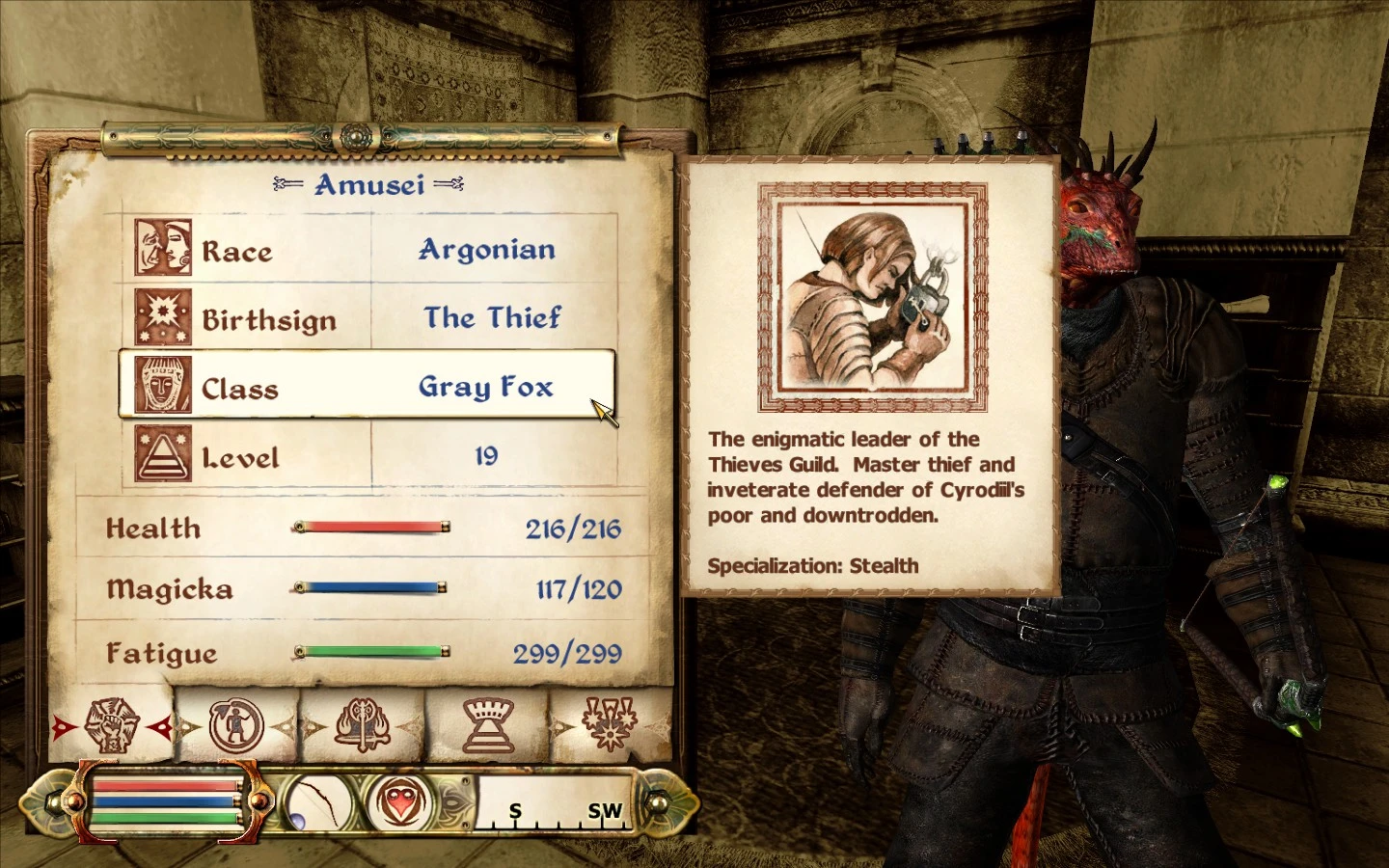
When you create a custom class, you are now able to enter a description; this description will appear when you mouse over your class in the character section of the stats menu. This description will be limited to 165 characters. Your custom class will use the portrait of whichever class you had selected when you created it.
REQUIREMENTS:
A working copy of The Elder Scrolls IV: Oblivion, and the Oblivion Script Extender.
INSTALLATION:
Place the contents of the . 7z file in your "Data" folder, which is usually located under Bethesda Softworks/Oblivion.
The ReadMe document is not required for the mod to run -- you may keep it or discard it.
UNINSTALLATION:
Delete the included .esp file.
Replace all older files with newer versions. If in doubt, replace all mod files with the contents of the latest uploaded archive.
No in-game configuration is necessary.
As of yet, none.
COMPATIBILITY:
This should be compatible with practically any mod.
Custom Class Description by PrinceShroob lets you add a custom description to your custom class in Darkest Dungeon. With 728 endorsements and 33,343 downloads, this small QoL mod is a community favorite. Last updated in 2016, it remains a simple, effective tool for players who want to personalize their class.
✨ Key Features
📊 Pros & Cons
✅ Pros
- Community-approved with 728 endorsements and over 33k downloads.
- Fills a real gap for custom class creators who want to add flavor text.
- Lightweight and straightforward—no bloat, just the feature you need.
⚠️ Cons
- Last updated in 2016—may not work with the latest game patches or mod loaders.
- Only does one thing: adds a description field. If you wanted more customization, this isn't it.
For Darkest Dungeon modders who create custom classes and want to add a personal touch with a description. Also great for players who enjoy lore-friendly mods and want to see flavor text on their custom classes. Skip if you're looking for gameplay changes—this is purely a quality-of-life tool.
💡 Beginner Tips
- If you're using a mod manager like Steam Workshop, just subscribe and enable it—no manual file placement needed.
- After installing, check your custom class in-game to see where the description appears; it might be in the class selection screen or the character sheet.
- Since the mod is old, test it with your current game version before relying on it for a serious playthrough.
📊 Mod Details
- Game
- Oblivion Mods
- Author
- PrinceShroob
- Version
- 1.0
- Downloads
- 33,343
- Endorsements
- 728
- Category
- Gameplay Effects and Changes
- Created
- 8/21/2016
- Updated
- 8/21/2016
🧩 Commonly Used Together
Users add these mods to the same collections — a real compatibility signal, not an AI guess.
🔧 How to Install Oblivion Mods
Download from Nexus.
📖 Full step-by-step install guide for Oblivion →
Visit the official mod page for specific installation instructions for this mod.
🎮 Need cheat codes or console commands? Check ur gaming wiki for Oblivion commands, item IDs, and more.
Keep browsing — more Oblivion mods await