ConsoleCommands
⚪ Last updated 2017⚠️ Install Order · 3 steps
Install in this order, then this mod last — most mods fail to load without their framework and dependencies in place.
Preview
🔍 Analysis
- 👍 1.8% endorsement rate — high engagement, a strong quality signal
- 🏆 #62 of 86 Utilities mods in this game by downloads
📋 About This Mod
Console Commands
Description: ==========
ConsoleCommands - as the name suggests - is an OBSE plugin which adds some console/script commands to the game. These are mostly commands I made for myself but which may be useful to others. More commands may be added in the future. The majority of these commands was made to be used from the console, but many can be used from scripts as well. Before using any of the commands make sure you read the explanation for each command which may contain notes about possible limitations and/or quirks if the command is not used correctly.
Current command list: ===================
This is just a quick overview. For detailed explanation about each command please check the readme file.
1) GetCCVersion --------------- Just a helper function to query the current version of this plugin.
2) AddDebugNote [AddDN] (message:string) ---------------------------------------- A command mainly for landscape designers and patch writers. It is basically the same as the existing 'BetaComment' command but with more helpful (hopefully) log output. Check the long description in the readme file for more info.
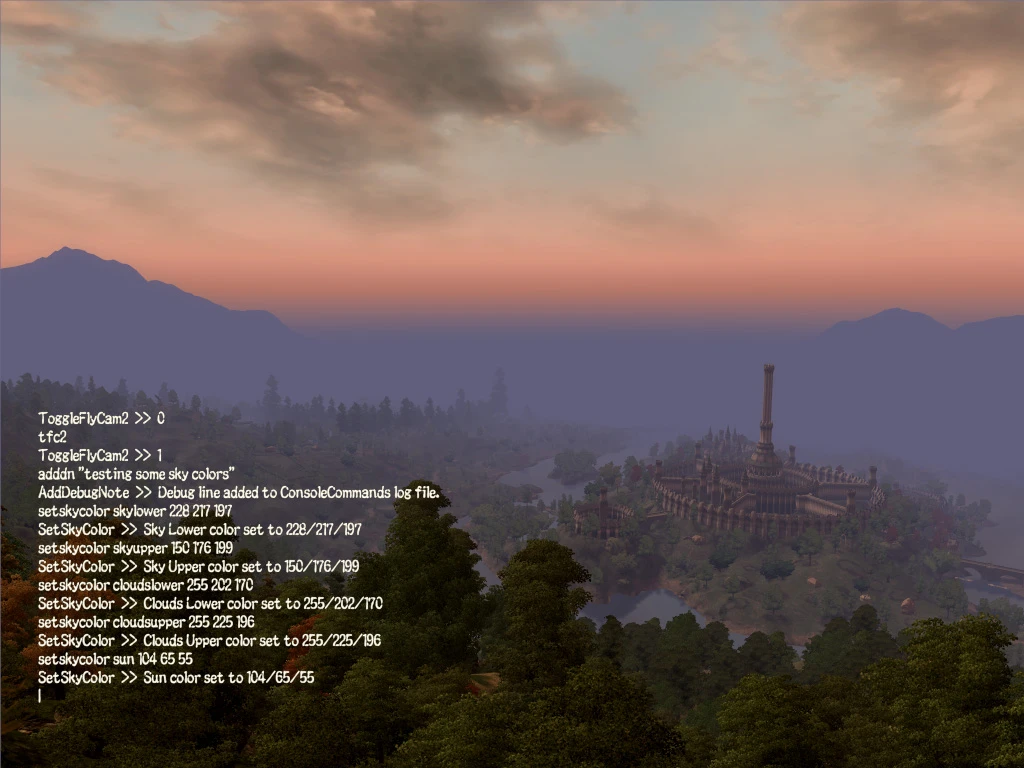
3) ToggleFlyCam2 [TFC2] (keepTFC:bool) -------------------------------------- This command is just like the original TFC command but additionally 'freezes' the game while TFC2 mode is active. It is primarily meant for taking screenshots. There are some limitations associated with the time freeze so make sure you read the full description in the readme file before using this command!
4) GetSkyColor (layer:string) ----------------------------- Returns the current RGB color value for the specified sky layer (e.g. Ambient, Sky Upper, Sun, etc...). Unlike the GetWeatherColor command this returns the actual color you see on the screen which is a composition of one or more daytime colors from the current weather and possibly a transition weather.
5) SetSkyColor (layer:string) (red:int) (green:int) (blue:int) -------------------------------------------------------------- Sets the RGB color value for the specified sky layer in the current frame. This command only affects the sky colors in the current frame (i.e. while the console is open). When you close the console the game will overwrite all your changes in the next frame. This command is therefore primarily meant to test we
ConsoleCommands is an OBSE plugin for Oblivion that adds extra console and script commands, giving modders and players more control. With 486 endorsements and over 26,000 downloads, it's a proven utility, though it hasn't been updated since 2017.
✨ Key Features
📊 Pros & Cons
✅ Pros
- Solid track record with 486 endorsements and over 26k downloads.
- Essential for modders who want more scripting flexibility.
- Lightweight utility that doesn't overhaul the game—just adds tools.
⚠️ Cons
- Last updated in 2017—might have issues with newer Oblivion patches or OBSE versions.
- No detailed documentation in the description, so you'll have to figure out commands on your own.
- Only useful if you actually need extra console/script commands—casual players can skip.
For Oblivion modders and power users who want to extend scripting capabilities. If you're a player just looking for gameplay tweaks, this isn't for you. Skip if you don't use OBSE or console commands regularly.
💡 Beginner Tips
- Make sure you have OBSE installed and launch the game through OBSE's loader, or the plugin won't activate.
- Check the mod's comments section on Nexus for community-shared command lists and usage examples.
- If you're using a mod manager like Wrye Bash, install the plugin as a regular mod and ensure it's active in your load order.
📊 Mod Details
- Game
- Oblivion Mods
- Author
- Tiawar
- Version
- 1.1
- Downloads
- 26,455
- Endorsements
- 486
- Category
- Utilities
- Created
- 3/7/2017
- Updated
- 4/5/2017
🔧 How to Install Oblivion Mods
Download from Nexus.
📖 Full step-by-step install guide for Oblivion →
Visit the official mod page for specific installation instructions for this mod.
🎮 Need cheat codes or console commands? Check ur gaming wiki for Oblivion commands, item IDs, and more.
Keep browsing — more Oblivion mods await