Cazy Hair Pack
⚪ Last updated 2011⚠️ Install Order · 2 steps
Install in this order, then this mod last — most mods fail to load without their framework and dependencies in place.
Preview
🔍 Analysis
- 👍 3.2% endorsement rate — high engagement, a strong quality signal
- 🏆 #9 of 88 Body, Face, and Hair mods in this game by downloads
📋 About This Mod
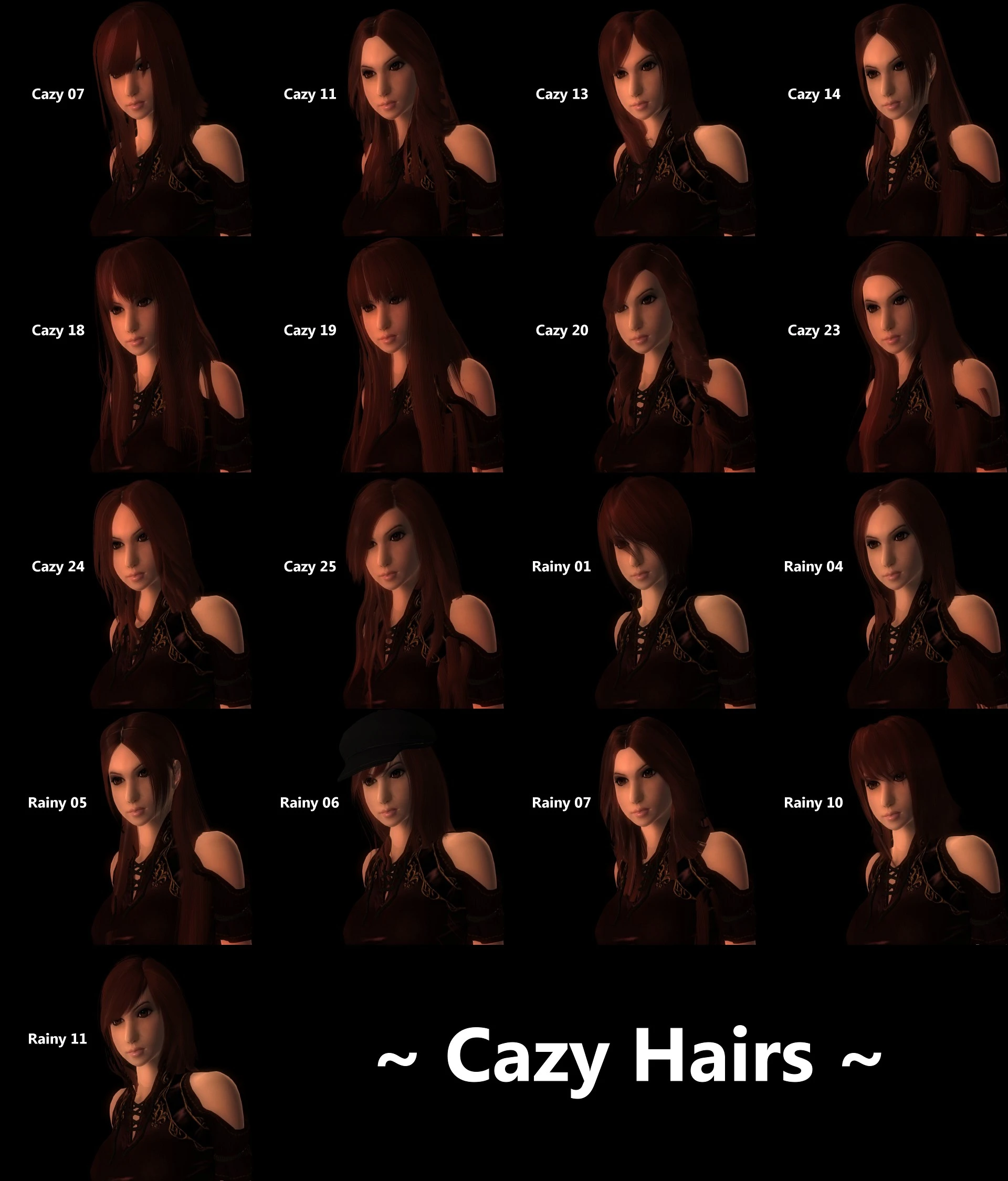
~ Cazy Hair Pack ~
- - Description -
- Adds 17 new hairs to Oblivion, ranging from high couture to casual everyday to modern style. All meshes and textures have been made by Cazy or by Anto and then tweaked by Cazy.
- Cazy has given me permission to convert all of her free hairs and the use of the hairs as a resource.
There is also an ESP packaged with the hairs. This covers most of the vanilla races; you will need to add the hairs manually to use them with a custom race. TES4Edit can help with the job.
- - Installation -
- 1. Extract the files into the Data folder. Overwrite or merge folders if prompted.
- (Optional) 2. Activate CazyHairs.esp - This is a test plugin. To use them, either start a new game or type "showracemenu" in the console (type ` or the tilde key to activate) to bring up the character customization menu and choose the hairs. Kahjiits, Orcs, SI races, Dremora and Argonians do not have the hairstyles. When finished, keep the console active and save the game.
- FAQ -
Q: How do I add the hairs to my custom race ESP? A: Well, there are three ways. One way is easy, but makes the custom race ESP dependent on the included ESP, but the other two adds the hair directly into the file. One takes a long time, while the other uses another program to add the hairs. Method 1: Load Cazy Hairs.esp and your custom race ESP into the CS. Open Characters->Hair, find the Cazy hairs, but don't do anything when you do. Now, open Characters->Races..., select the custom race from the list, open the Body Data tab, and drag the hairs from the Hairs dialog into the Hairs list on the Races dialog box. Click Apply/OK and save the plugin. NOTE: This method will overwrite or be overwritten by other ESPs that also add to custom or existing races. The one that is last in the load order will be the only one that changes the affected races. Because of this, I suggest trying Method 2 or 3 instead of 1, or merging these ESPs together.
Method 2: Load your custom race ESP only. Go to Characters->Hairs... and a new dialog will pop up. Right-click the list and select "New"; give the editor id for the custom hair, name it, load the mesh and texture, and check the appropriate boxes. Keep it open when you're done adding all the hairs. Now, open Characters->Races..., select the custom race from the list, open the Body Data tab, and drag the hairs from the Hairs dialog into the Hairs list on the Races dialog box. Click Apply/OK and save the plugin.
Method 3 (requires TES4Edit): Open Tes4Edit, and load only Cazy Hairs.esp and your custom race ESP. (If Oblivion.esm loads up, don'
Cazy Hair Pack adds 17 hairstyles to Oblivion, ported from The Sims by creator Cazy. With 4,494 endorsements and 139,327 downloads, it's a popular cosmetic mod for players seeking more hair variety. Last updated in 2011, it remains a classic for retro Oblivion modding.
✨ Key Features
📊 Pros & Cons
✅ Pros
- Community favorite with 4,494 endorsements and over 139k downloads—clearly a go-to for hair mods.
- 17 hairstyles is a solid variety for a single pack, giving you plenty of options without bloating your load order.
- Ported from The Sims means these styles have a polished, distinct look that stands out from vanilla Oblivion.
⚠️ Cons
- Last updated in 2011—over a decade old, so it may have compatibility issues with newer mod setups or the Steam version.
- Since it's from The Sims, the art style might clash with Oblivion's aesthetic for some players.
For Oblivion players who want more hair variety and don't mind a retro mod from 2011. If you're a fan of The Sims' hair styles and want to bring that look into Cyrodiil, this is a solid pick. Skip if you're looking for modern, high-res hair or need active mod support.
💡 Beginner Tips
- Since this mod is from 2011, make sure your Oblivion is patched to the latest version and consider using a mod manager like OBMM or Wrye Bash for easy installation.
- If you're using the Steam version, you may need to apply the official patch or use the Script Extender (OBSE) for full compatibility—check the mod's comments for user reports.
- Load order shouldn't be a big issue for a hair pack, but place it after any body or face mods to avoid conflicts.
📊 Mod Details
- Game
- Oblivion Mods
- Author
- Cazy
- Version
- 1.01
- Downloads
- 139,327
- Endorsements
- 4,494
- Category
- Body, Face, and Hair
- Created
- 9/19/2011
- Updated
- 9/19/2011
🔧 How to Install Oblivion Mods
Download from Nexus.
📖 Full step-by-step install guide for Oblivion →
Visit the official mod page for specific installation instructions for this mod.
🎮 Need cheat codes or console commands? Check ur gaming wiki for Oblivion commands, item IDs, and more.
Keep browsing — more Oblivion mods await